

Safari 5 for Mac OS X comes with a great, but relatively unheralded feature – Safari Reader. WIth Safari Reader, you can make nearly any article on the internet beautiful and easy to read, having it basically formatted with the click of a button to read just like an E-book, right in your browser. To do this, you’ll need Mac OS X 10.6 or higher, as well as Safari 5 (This will also work in Safari 5 on Windows, but for Mac users, you’ll need Snow Leopard). To find out where to get Safari 5, as well as how to use Safari Reader and some tips to get the most out of it, read on!
Installation
On most Macs, you either got Safari 5 with your computer, or your Mac updated it automatically for you. If it hasn’t though, or you’re on a Windows machine, just head over to www.apple.com/safari and use Apple’s standard download form to download the installer for Safari 5. Once you have downloaded and installed the browser, open up Safari.
Using Safari Reader
Once Safari opens up, open up your favorite news site, MakeTechEasier.com for example. Initially on most news sites, on the right side of Safari’s address bar at the top, you’ll see an RSS Button. Click this button and you’ll be shown the RSS feed for that news site. RSS allows you to do things like subscribe to your favorite blogs. Safari 5 takes the concept of RSS step further though, by appealing its own formatting to make blog posts and news articles far more appealing to the eye.
Since you’re on Make Tech Easier, click an article you’re interested in. Once the page loads, in the address bar on the right side, that same RSS button should be gone, and in its place should be a Reader button, which should look like this:
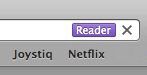
Click the reader button, and up from the bottom of your Safari window will slide a simple, elegant reading layout of the article your currently have open, and everything else on the page will be shaded black, allowing you to more easily focus on what you’re reading.
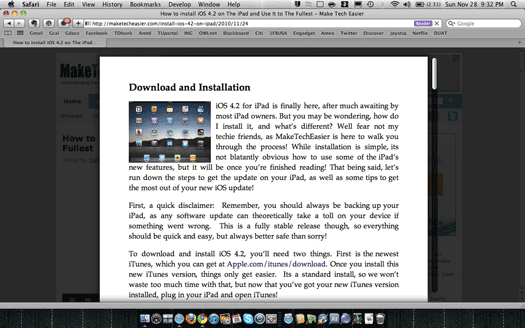
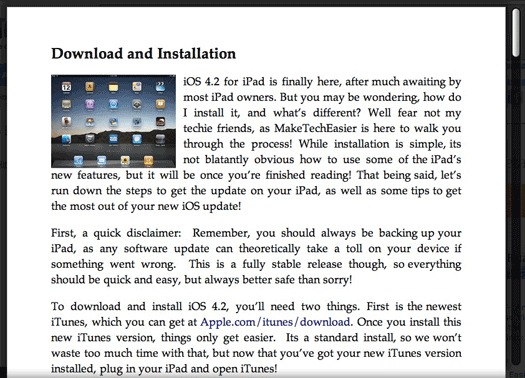
I chose to look over my MakeTechEasier article from last week on installing and using iOS 4.2 on your iPad. With a great looking font, easily viewed pictures, and no distracting background, Safari Reader made looking over my post easier and more pleasant than usual.
Tips!
Now that you’ve got the Reader up, here a few tips to help you in using it:
- To change the font size of your Reader article, you can either use the magnifying glass at the bottom of the reader window, or on your Mac hit “Command and +/-” sign. You can also click “View” in the Menu bar, then Zoom In or Zoom Out.
- The control bar at the bottom of the Reader window does not house only magnification controls, but also sharing and printing controls. With one click you can email the article to someone, or print it out for later reference.
Wrap-Up
Safari’s Reader feature may not be something that you would use everyday, but its certainly something that can come in handy under certain circumstances, like prolonged reading on the computer, or a particularly long article. Is this something you use? Will you now? Or do you use an entirely different RSS reader? Let us know in the comments, especially if you know of something better!