


You probably get so much information on your Facebook’s news feed that sometimes you don’t even want to look at it. Just the thought of the amount of time you might have to waste to find the info that matters most to you is mind-numbing.
That can easily be fixed by making a few modifications in Facebook’s settings. By making a few changes here and there, you can prioritize Facebook’s news feed so that you see what you want first. That way you’ll finally be able to save some valuable time you can use elsewhere.
How to Prioritize the News Feed on Facebook (Desktop)
If you usually access your Facebook account on your desktop computer, the first thing you’ll need to do to prioritize your news feed is to go to the page of interest. As you can see in the image below, I have gone to Samsung’s Facebook page.
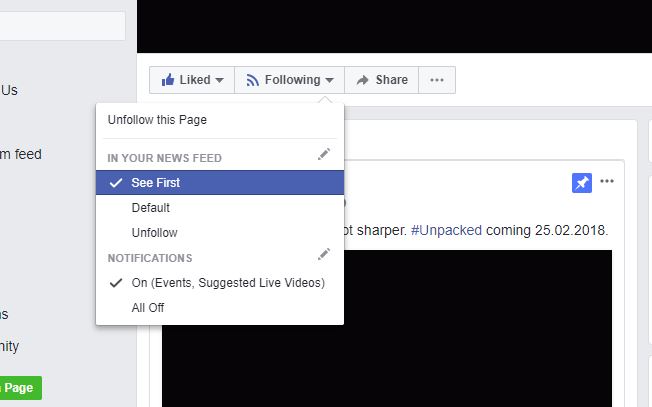
Just place the cursor over the “Following” button, and the options will appear automatically. Select the “See First” option by clicking on it. The changes will be applied immediately. To check if it works, simply go to your Facebook’s homepage and view your feed.
Prioritize Your Facebook News Feed on Android
To decide what you see first on your Facebook news feed on your Android device, you’ll need to follow similar steps as what was previously mentioned. Launch your Facebook app and go to the page whose news you want to see first.
To the right of the Like button, you’ll see the button that tells you that you’re already following that account. Tap on the Following button, and you’ll be taken to another page called “Your Subscriptions.”
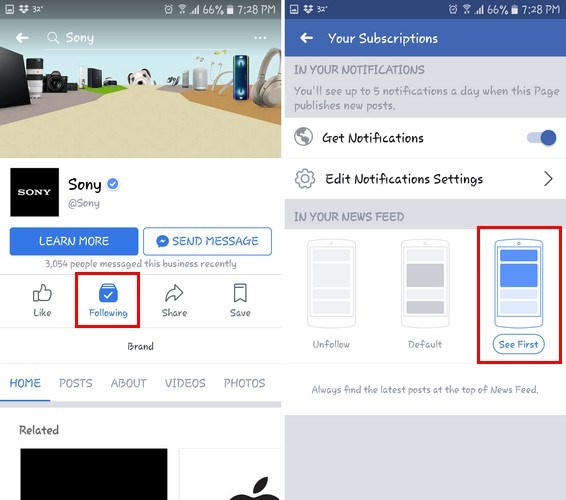
Besides being able to change how you get your notifications and unfollowing someone, you can also make it the first thing you see on your news feed. It will be the third option to the right. Just tap, and the changes will take effect immediately.
The previous tip is useful if you only have a few accounts in mind, but if there are several accounts you want to give priority to, you can do the following. To be able to see those accounts in the news feed, you need to tap on the hamburger icon and keep swiping down until you reach the “Help and Settings” section.
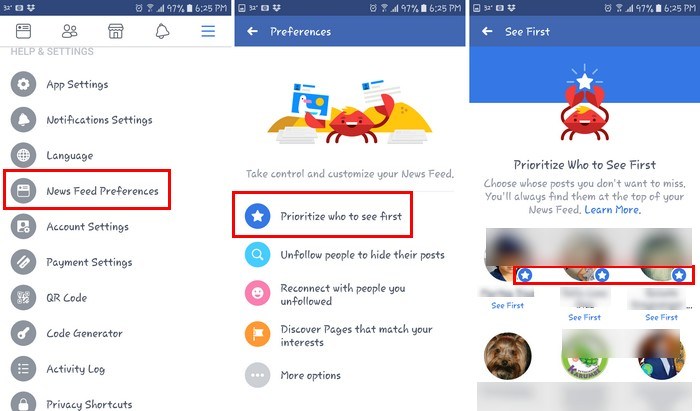
Look for and tap on the “News Feed Preferences” option. Besides finding a happy-looking crab, you’ll also see the “Prioritize who to see first” option. After you choose this option, you’ll see the profile picture of all the accounts you follow.
Tap on the ones you want at the top of your feed and a star will mark those essential accounts. The changes should take effect immediately.
Conclusion
By prioritizing what you see first, you don’t waste time with what you couldn’t care less about. Now, you’ll always be up to date with what the accounts you care about the most are publishing. This will definitely help you stay informed at a much faster rate. What accounts do you prioritize in your Facebook news feed? Share your thoughts in the comments.