


There’s a great old saying about marketing, “If you’re not paying for something, you’re not the customer; you’re the product being sold.” This quote fits quite well with how online services like Gmail, Outlook, Facebook, Twitter and several hundreds of thousands other products perceive us, the consumers. We use their service for free, but as a price, we need to see the ads.
Over time, this advertising technique has become more personalized. For instance, try to buy two things from any Online retailer, and the next time you visit the website, you will see ads that are very similar to your last purchase. That of course isn’t just limited to online shopping portals. In fact, your emails and attachments are being scanned to get a sense of the products you might be interested in investing in. This has its own set of advantages, as seeing relevant ads is undoubtedly better than seeing ads that make no sense and use to us at all.
Popular email service, Gmail does this too. It’s not hidden; everyone knows about it – in fact, the company has mentioned this in its terms and policies. Although this is perfectly legal, there are many people who would prefer to not be watched or tracked at all. If you’ve been using the Web version of Gmail, here is a simple trick to opt out of the targeted ads and prevent Google from scanning your emails.
How to Opt-out of targeted ads
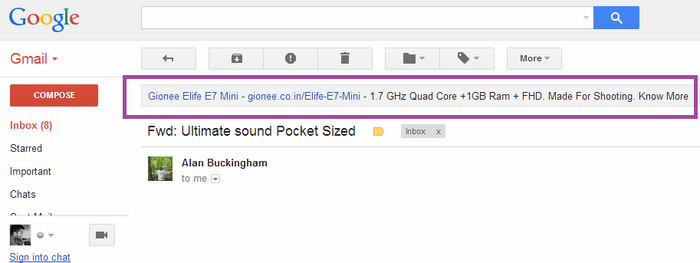
1: Open the Web version of Gmail. Open the “Ad Settings” page. There are two ways to reach there. First, find any text ad banner, and you will find a notation “Why this Ad” on the right side. Second, you can simply click on the Ad Preference page.
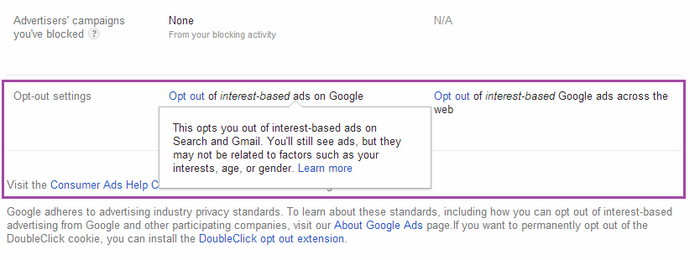
2: Once you’re in the Ad Settings page, click on the “control your ad settings” link. Now scroll down to the bottom of the page where it says “Opt out of interest-based ads on Google.”
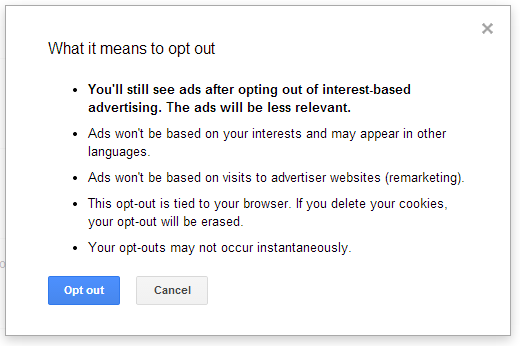
3: Once you click on that link, Gmail will ask you for confirmation. Click on “Opt out,” and that’s it. You will no longer see any targeted ad banners on your emails anymore.
We hope this helps you. If you’ve any queries, let us know via comments.