

I have a large amount of links saved in my Pocket account (previously Read It Later) and use the service on a daily basis, so this WordPress plugin really caught my eye. It’s called WP Stacker, and it lets you post Pocket links to WordPress automatically.
What’s really cool about WP Stacker is that it can automatically generate titles, descriptions, and tags for your posts. You can also customize the layout for your posts. WP Stacker is a great tool for showcasing your favorite links, and sharing interesting links of the day with your readers.
Here’s how it works.
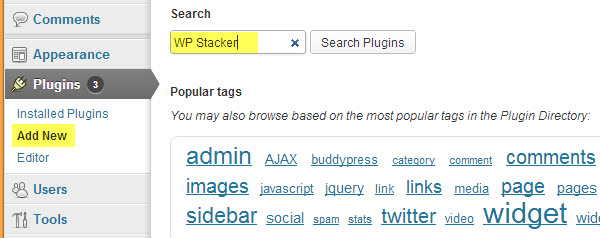
1. Install the WP Stacker plugin on your WordPress blog. From your dashboard, go to “add new” under the Plugins menu and then search for “WP Stacker.” Don’t forget to activate the plugin after installing.
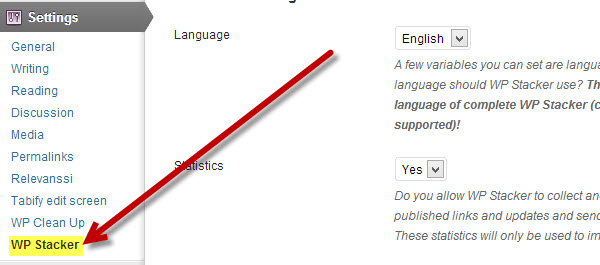
2. You will find the WP Stacker options page under the “Settings” menu. Click on the WP Stacker options page under the “Settings” menu to bring up the single page of options.
3. Now all that’s left is to go down the page and choose your desired settings.
- Pocket Login – Connect and authenticate your Pocket account. You can also use a private consumer-key, but this isn’t required.
- WP Stacker Settings – Choose the language that should be used (English, German, or French). You can also enable or disable anonymous statistics here.
- Data Processing – There are quite a few useful options here like the ability to choose the type of links to use (unread, read, etc). You can also choose how to order your links in new posts, use meta tags as tags, mark used links as read/archived, and more.
- Post Settings – After generating a post you can choose the default status it should have (draft, pending, published). You can also choose a default category and set comment status and ping status as open or closed.
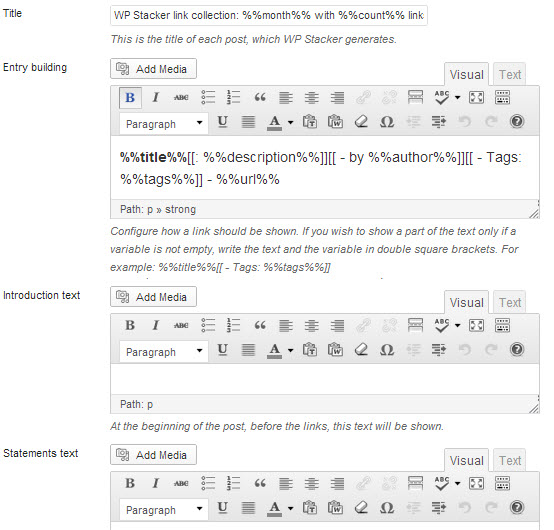
- Post Content Matching – Here you can customize the post title, entry building (how a link should be shown), introduction text (at the beginning of the post), and statements text (at the end of the post).
Once everything is customized to send Pocket LInks to WordPress, all that’s left to do is sit back and wait for the magic to happen. There’s really a lot of possibilities for this plugin and I’m really anxious to see it in action.