

If you are a webmaster running an online business, you know that one of the factors of ranking well in Google and other search engines is to have a fast-loading site. And yes, an advice you hear often is to optimize the images to the lowest possible size so they don’t slow down the site loading. If you are using WordPress, then Optimus is an image-optimization plugin that you should try.
What Is Optimus
Optimus is a WordPress plugin (developed by KeyCDN) that optimizes the images that you upload to your site and potentially reduces up to 70%of the image size.
When you upload a new image in WordPress, the image will be sent to the Optimus.io server where it will be optimized. The optimized image will then be returned back to your server where it will replace the uploaded file. All these steps are done quietly in the background and happen in real time.
Optimus uses lossless compression so your image quality will not be affected. It also strips all superfluous metadata off the images in exchange for a smaller file size.
The plugin is free of charge, though it comes with a 100kb image limitation. If you upgrade to Optimus HQ ($19/year), you can get it to convert all images to .webp format which can further reduce the file size. One thing of note is that the .webp format is only supported in Chrome and Opera.
Image Compression Comparison
To check out how Optimus compares with the other image optimization plugins, we tooh WP Smush, Kraken and Optimus and pitted them together.
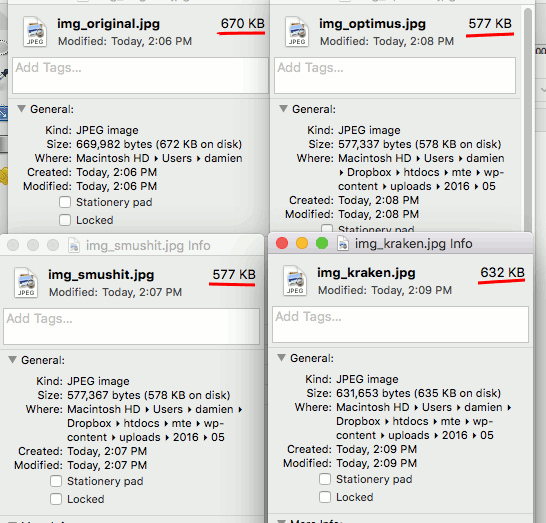
The image used was a photo of Mount Fuji, found here. The original file size is 669,982 bytes (672 KB).

Here is the result after using all three plugins to optimize different instances of the same image.
| Image Optimization Service | Original Image Size (bytes) | Compressed Image Size (bytes) | Saving (%) |
|---|---|---|---|
| Optimus | 669,982 | 577,337 | 13.83 |
| WP Smush | 669,982 | 577,367 | 13.82 |
| Kraken (Lossless) | 669,982 | 631,653 | 5.72 |
| Kraken (Lossy) | 669,982 | 111,563 | 83.35 |
| Optimus (webp) | 669,982 | 109,922 | 83.59 |
For lossless compression, you can see that Optimus has the best optimization, in-par with WP Smush. Kraken is far behind with a reduction of only 5%.
However, if you take Kraken’s lossy compression into account (Optimus doesn’t provide lossy compression service), then the difference in file size reduction is rather big (83% vs. 13%). On the other hand, the .webp format that Optimus provides is on par with the lossy compression at an 83.59% reduction.
Note: WP Smush does provide lossy compression as well, but it requires a pro subscription; that’s why we didn’t test it.
Serving .webp image
As mentioned earlier, .webp format is only supported in Chrome and Opera. So the question now is “how can you serve .webp images only for supported browsers?” This is where the WordPress Cache Enabler plugin comes in. Developed by the same developer as Optimus, WordPress Cache Enabler create two static versions of your website, one with the normal images and another with .webp images. It will then detect if the browser supports .webp format and serve the appropriate version to the user. Think of it like a page-caching plugin, like W3 Total Cache or WP Super Cache, but with .webp support.
Conclusion
If all you want is maximum file reduction, and you don’t mind a slight loss of image quality, then Kraken Image Optimizer is one that you should use (we use it here in MakeTechEasier). But if you are looking for lossless compression with .webp support, then you should try Optimus. Coupled with its KeyCDN network and WP cache enabler, you can improve your site loading speed by a great deal.
Image credit: Japan