

Navigating between your keyboard and your mouse can be a bit of a juggle sometimes. The good news is that there are some mouse gestures you can add to Chrome and Firefox to keep your hand on your mouse a bit more (that is, if you prefer the mouse more than the keyboard).
Take advantage of the following extensions and use your mouse for just about everything.
SmartUp Gestures
SmartUp Gestures offers you a better design and some useful mouse gestures as well. For example, draw a “G” to go to Gmail or a vertical line to reload a tab.
If you’re not happy with the preloaded gestures, you have the option of changing them or deleting them by clicking on the “X.”
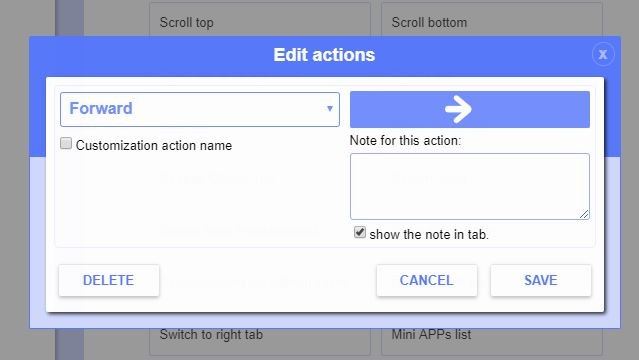
You can also alter the appearance of SmartUp Gestures by displaying real-time direction tips, the action note, the drawing line, and more.
It also features simple drag, super drag, wheel gestures, and rocker gestures as well.
crxMouse Chrome Gestures
crxMouse Chrome Gestures is the most feature-rich Chrome extension on the list. Unlike the other extensions, this one shows you the most popular mouse gestures for a particular site. If a site doesn’t have one, you have the option of adding one.
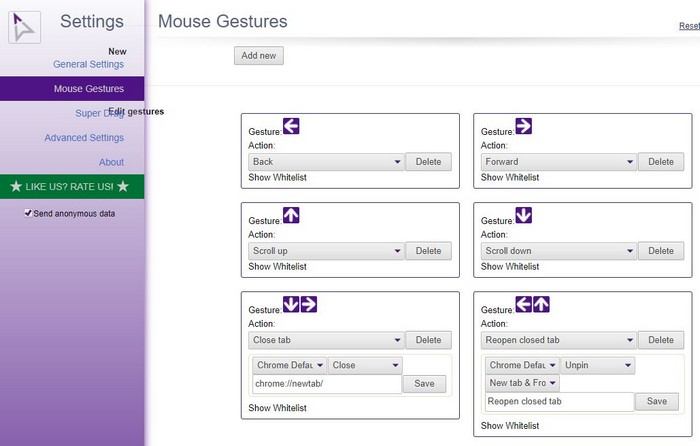
As soon as you install the extension, its Setting opens up so you can customize it or leave it as is. Click on “Mouse Gestures” and browse the list of gestures that are ready to be used. In General Settings you can even blacklist certain sites where the extension won’t be able to function.
The extension has support for Windows, Linux, and Mac. You can even import or export configurations.
Mouse Gesture Events for Firefox
If you’re looking for a Firefox add-on that only covers the basic mouse gestures, then give Mouse Gesture Events a try. At the Addons Manager page you can see what the default gestures are and change them if you want.
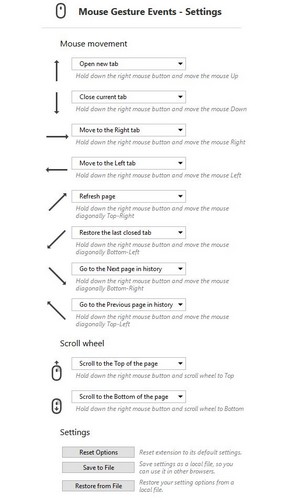
Just click on the drop-down menu to the side of the gesture and choose the option you want. If at any time you’re not happy with the gestures you set up, you can always set them back to the default in Settings.
Each gesture’s drop-down menu will show you the exact same options. If you want, you can add the same option to more than one gesture. You can even restore your settings options from a local file and save them to one as well for safekeeping.
Conclusion
Any tool that can make our online experience easier is always welcome (these extensions included). You won’t have to accidentally close a tab when all you wanted to do was open one in the first place. Which extension do you think you’re going to try first? Leave a comment and let us know.