

When you connected to a website back in the 90s, you were routed to one server, and that same server replied to you. Traffic was scarce in those days, since not many people were connected to the internet. As time passed, billions more began to connect to the internet and make their own requests to various servers. This was easily solved by coming up with a nifty little concept known as load balancing. This particular concept has helped solve a stalemate that has plagued larger websites for years. How it does this is something we intend to answer.
What Is Load Balancing?
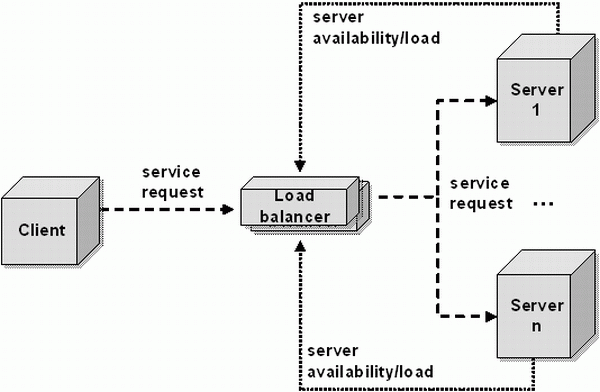
In a typical web browsing scenario, your browser sends a request to a server and the server replies with the data that composes the webpage you requested. What if thousands of browsers are connected to this server? It will become overwhelmed, unless another server takes over the work of handling some of those active connections. The solution to this problem is load balancing in its most basic form.
With load balancing, a network of connected servers and a little bit of software magic come together to distribute active connections between them in such a way that no server becomes too overloaded. This way, a site like Google or Facebook can handle millions of active users at the same time without having to keep them all in the same place.
The brain of the entire operation is known as the “load balancer”, a network routing system that acts as a coordinator, determining where each connection will reside.
If you want to have an idea of what load balancing looks like, this is how Google applies DNS load balancing to its domain:
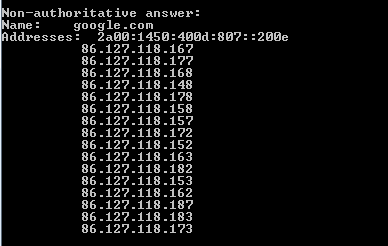
Notice how multiple IPs are returned for the domain. Those are some of the servers that Google uses within my proximity.
Layer 4 vs. Layer 7
There are two types of load balancing: Layer 4 and Layer 7. These numbers represent the type of traffic which is being handled and are related to the different levels of the Open Systems Interconnection (OSI) model. For the sake of simplicity, we will not be diving too far into what OSI is. If you’re curious, you can read about all of its different levels in this neat little fact sheet.
All you have to know about these layers is that Layer 4 – the “transport layer” – deals with the grittier aspects of internet communication. Layer 7 – known as the “application layer” – deals with what you see as soon as you enter a website or a web app.
With regards to load balancing, Layer 7 allows for more visibility and, as a result, a much more intelligent load distribution. Basically, by knowing more about the way your visitors interact with the website you can better assess the amount of resources (i.e. computing power) they require. Consequently, you’ll be also be able to provide a better overall user experience (UX) through better utilization of your server resources.
How Else Does It Help Websites?
Load balancing, aside from balancing loads, can perform other essential functions. Because you now have multiple servers at your disposition to handle all incoming traffic, you’re also able to dampen the effect of a DDoS attack, and prioritize load distribution as you see fit. For example, webmasters can create different tiers of service by allowing some subscribers to gain faster access to the site even during “rush hour”.
Conclusion
While often overlooked as an “invisible” technology, load balancing is the backbone of many of the major services you use every day. Switches and networks are pumping your data tirelessly to ensure that you get the smoothest experience possible when visiting the web. Understanding what load balancing is, and how it applies to your own user-experience, is a good way of broadening your understanding of the inner workings of the internet.
If you have any questions or anything to add, leave your thoughts in a comment!