

When you browse the Web, you’re constantly being followed. Different companies, such as ad networks and social networks, track users so that they can deliver personalized content based on: browsing history, Internet searches, likes and dislikes, and much more.
As an internet user, you may or may not be comfortable with this. If you’re not comfortable with it, luckily there’s something that you can do about it. Today we’ll show you just how to find out which companies are tracking you, and what type of data they’re tracking.
For this task, we’ll use an internet tool called Ghostery. This tool will show you a list of trackers for each Web page including: ad networks, behavioral data providers, web publishers, and more. Then you’ll be able to learn more about each one.
Here’s how:
1. Go to the download page for Ghostery and download the appropriate browser extensions; Ghostery is available for Firefox, Safari, Chrome, Opera, Internet Explorer and even iOS devices.
2. After Ghostery is installed, you’ll be taken through a quick wizard. The wizard introduces you to Ghostery and helps you choose the best options.
3. You’ll be asked whether or not to enable an alert bubble. If you want to be alerted automatically (without having to click on the browser icon) each time a company is tracking you on a Webb page, you should enable this.
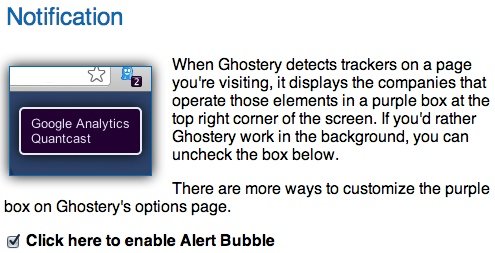
4. Additionally, Ghostery can automatically block specific trackers and you can specify which ones (if any) to automatically block. You can choose to block: advertising, analytics, beacons, privacy and widgets.
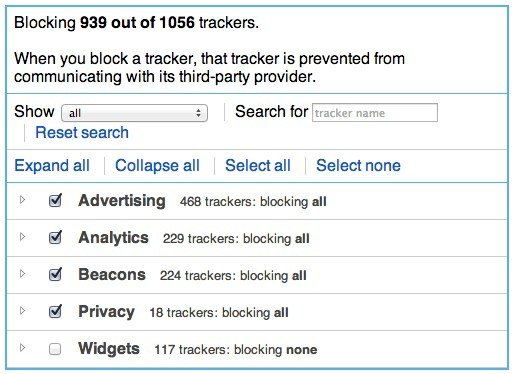
For each category, you can go a step further and choose to block individual items. Personally, I like to keep widgets unblocked because many social sharing buttons on blogs and websites are in the widgets category.
5. Now browse to any Web page of your choice. If you’ve enabled the alert bubble, you’ll see it popup along with the items being tracked (crossed out in the bubble) and those not being tracked.
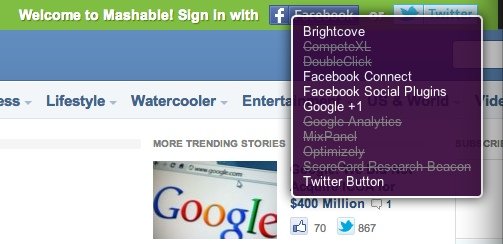
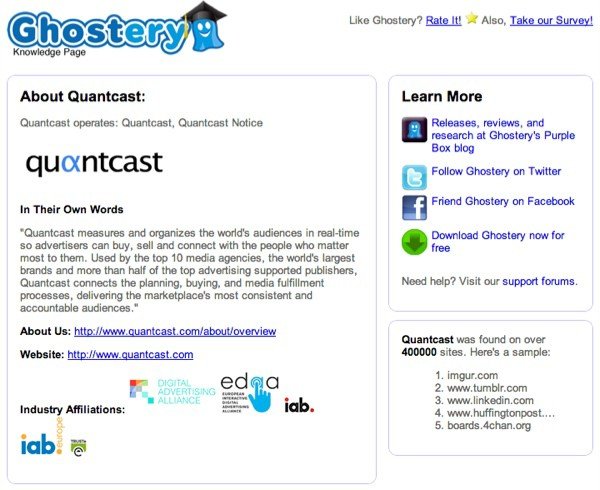
6. You can also click on the browser icon to view each tracker. To learn more about a specific tracker, click on the item in the list and you’ll be taken to an info page.
That’s it. Now you’ll know which companies are tracking you and why.