


Beginning this week, you will be able to install a PWA (Progressive Web App) to your desktop through Chrome 70 with the click of a button. What is a PWA? And why is that a good thing?
Progressive Web Apps
A Progressive Web App (PWA) is a web application that offers its users an experience like the one they use on their phones. Some basics about PWAs are:
- These apps will work for every internet user no matter which browser they choose as their primary one.
- They are responsive, meaning no matter what device you are on, the PWA will fit correctly on the screen.
- Because they resemble their native app, you interact with them the same way you would on your phone. This means no URLs to type in and one-touch navigation throughout the app.
- Progressive Web Apps can be used online, offline, and in areas with limited connectivity.

Why should you use PWAs?
Progressive Web Apps are fast! Even without a network they load right away because they load from the cache first and ask for a connection second. When using a browser, your device asks for the connection first before it loads anything. This lag time results in a blank screen, which about half of us will give up on within about three seconds!
These apps feel and act like the apps we install on our devices without a large amount of storage taken up. In fact, the Starbucks PWA is 0.4% the size of its native app counterpart. You find them on your home screen and do all the same things as the native app, such as notifications.
PWAs are reliable. They use service workers, Javascript files that run separately from the main browser. Service workers allow applications to control network requests, cache those requests to improve performance and provide offline access to cached content. So, you are always able to load and use them, with or without a network. Of course, you may not be able to access new content until you regain network access.
Lastly, PWAs are more natural to engage with than a browser. You don’t need to type in web addresses over and over. Just tap or click an icon on your home screen and away you go.
How to install PWAs
You can install these apps on your home screen without bothering with an app store to find and download them.
Choose a site with a progressive web app option. There is still a limited number out there, but some that users have had success with are Twitter, Pinterest, Trivago, Uber, and Starbucks. Some of the apps are accessible through the full webpage, whereas some, like Twitter, need to be accessed through their mobile site.
When you’re on a website that offers a PWA, click the menu icon in the top-right corner.
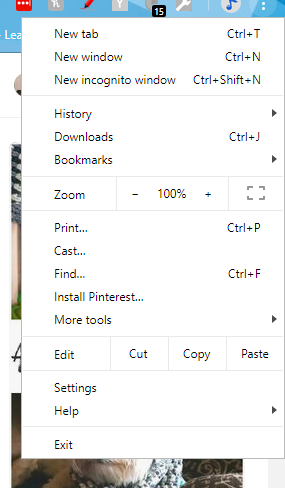
Select “Install [App Name]” to install it.
For example, if you access the Twitter Mobile site, click “menu > Install Twitter.”
If you do not see the option to install, then there is likely not a PWA available for that site. I would suggest checking the mobile site first before giving up on it.
Click Install when the permission to install dialog appears.
Open it by selecting it on your desktop, or in Windows 10, in the applications list. The application will open with its own window, taskbar icon, and Start menu entry.
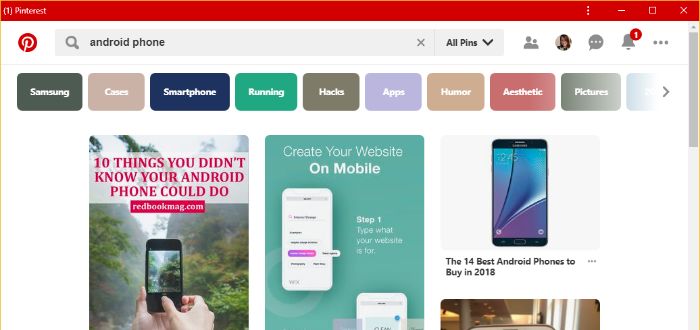
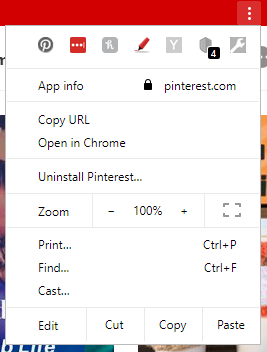
Should you decide to uninstall the Progressive Web App, just click on the three vertical dots at the top and click “Uninstall [app name]”.
Because of their many advantages, you may want to check out some of these apps for yourself. It’s hard to find a definitive list of PWAs that are currently available, so let us know which ones work for you by commenting below.
Image credit: Website address / URL bar