

Do you know that Google actually penalizes websites that are slow to load? If you want to get a good search engine ranking, one of the most important thing is to make sure your site load fast, blazingly fast!
If you are running WordPress, we have already mentioned several ways to polish up your site loading speed, including adding Google Analytics site speed tracking feature, lazy loading your images, using W3 Total Cache and minify the code.
One other way is to use CloudFlare as a proxy server.
CloudFlare acts as a proxy server that link between you and your readers. When your readers enter your site’s URL, the browser will first connect to CloudFlare, which will then detect their locations and load your site content from the server closest to the readers. This will ensure your reader get the fastest loading time and performance. Furthermore, CloudFlare caches your script, css and image files, so there is no wastage of bandwidth and server resources.
In addition, as a proxy server, CloudFlare can detect who is accessing your site and block threats and limit abusive bots and crawlers before they reach you. In other words, CloudFlare is able to increase your site security as well.
Configuring CloudFlare
Getting your site to run with CloudFlare is easy.
1. Go to CloudFlare.com and sign up for an account.
2. Next, enter your site’s domain name. Click “Add this domain”.
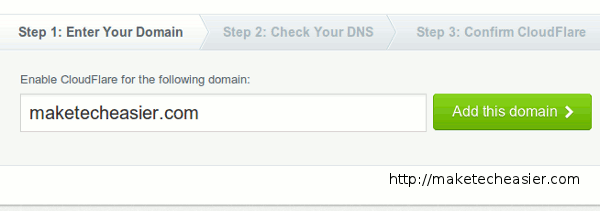
3. CloudFlare will then scan your DNS. It might take up to 2 minutes. Once the scanning is completed, click “Continue to Step 2”.
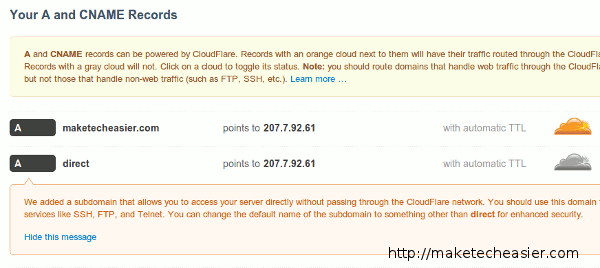
4. The next page displays a list of your site existing DNS record. Check to see if they are correct. If necessary, you can add in extra DNS record here. If everything is correct, scroll down to the end and click “I’m done checking my DNS records, continue“
5. CloudFlare will then register your DNS setting and configure itself to power your site. CloudFlare will also add a sub-domain (of the name “direct”) for you to access your server without passing through the CloudFlare network.
6. The last step is to update your domain with the new DNS setting. If you register your domain name via a domain registrar, you can login to your domain registrar account and change the DNS setting. If you got everything set up via your web-host, submit a ticket and get them to change the DNS setting for you.
That’s it. You are good to go.
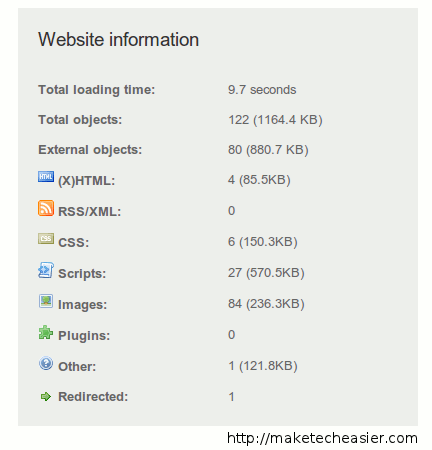
This is loading speed of Make Tech Easier before and after implementing CloudFlare.
Before:
After:
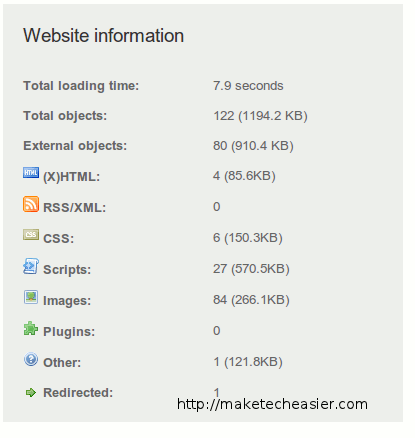
There is a saving of 1.8 second, which translate to a 18.5% improvement.
The above results were taken from Pingdom. You should also test out your site loading speed before and after implementing CloudFlare too.
What’s next after configuring CloudFlare?
After you have set up CloudFlare, login to your CloudFlare account and go to the “Settings -> CloudFlare Settings” (the link is beside your website). Here is where you can configure the settings for CloudFlare. Some of the important settings include Security level, Caching level, customize the Challenge page, E-mail Address Obfuscation, IP Geolocation (useful if you are showing geolocation ads) and Hotlink Protection.
In addition, if you are using WordPress, install the CloudFlare plugin which can help you optimize your database and better protect your site from spammers.