

If there is any plugin that can improve the performance of any WordPress blog by a great deal, it has to be W3 Total Cache. This is a well-designed cache plugin used by many popular sites, as well as this Make Tech Easier blog.
Why the need for a cache plugin?
Whenever you load a page on a WP site, the server has to first query the database for the relevant content, then format the content into html format before sending to the browser for you to see. This is fine if your site only have 10 or 20 visitors per day. However, if you are receiving ten of thousands of readers every day, your CPU workload will also increase exponentially, and eventually crashed. This is also why plenty of sites went down when their post reaches the front page of Digg (aka the Digg effect).
What a cache plugin does is to store the dynamically generated page in a static html format. Whenever a visitor visits your site, the static page is served to the visitors instead of fetching it from the database. In this case, it will relief the workload of your CPU.
W3 Total Cache: An all in one caching solution
W3TC is more than just a cache plugin. It is in fact a combination of various features to optimize your site.
There are 4 main aspect of W3 Total cache
- Page caching
- Database caching
- Minify scripts
- Content Delivery Network
Page Caching
This is the part where a static html version of your site is generated and shown to your visitors whenever they visit your site.
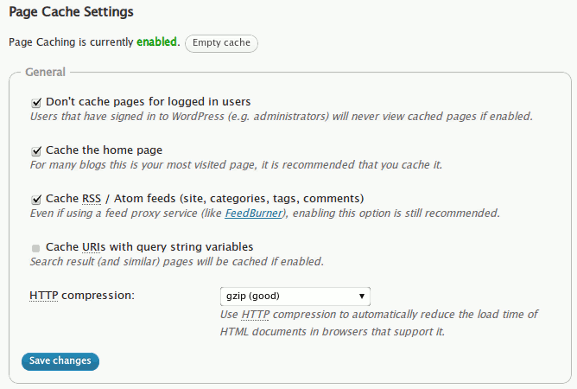
In the Settings, you can determine whether to cache pages for logged in users and the homepage. You can also configure the lifetime of the cache and the user agents of the browser. If you are using a mobile theme, you may want to add the mobile device’s user agent to the list so that the mobile theme (instead of the cached page) will be shown on the mobile devices.
Minify Your Script
Minifying your CSS and javascript is a great way to reduce the file size of your web page, which in turn reduces the loading time of your site. In the Settings page, you can configure W3TC to minify your HTML code, Javascript and CSS.

Database caching
To reduce the number of database query, W3TC caches the database query and keep it active for a period of time. During this period of time, all database queries will be loaded from the database cache, thus reducing the number of time the server has to go to the database to fetch the items. When the expiry time is reached, the plugin will re-cache the database queries.

Content Delivery Network
Unless you are seeing a lot of traffic, chances are, you won’t need to use a CDN. What a CDN does is to load your content (such as images, css, javascript files) from an external server closest to the visitor’s geographical location so as to achieve a faster loading of your content as well as reducing your server’s bandwidth.
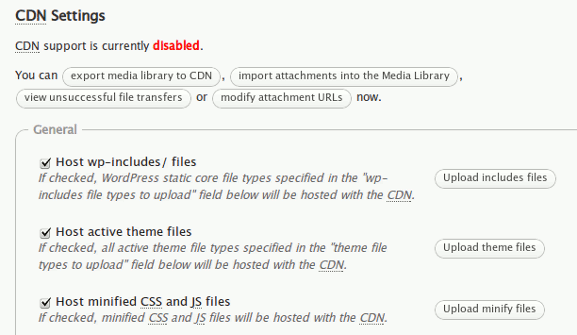
W3TC works with several CDN company, including Amazon CloudFront, S3 and even your own FTP account. You can choose to load your wp-includes/files, active theme files and even minified CSS and JS files from your CDN. There are also options for you to configure which file types get uploaded to your CDN.
Checking out the performance of W3TC
Once you have installed and configured the plugin, you can log out of your dashboard and go to your site. Right click on the browser and select “View Source“. Scroll down to the bottom and you will see the W3TC message. This will give you a good idea of how fast your site is loading.
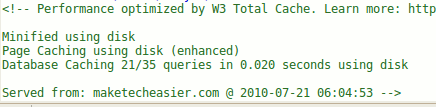
Alternatively, you can also carry out website speed test before and after you have implemented the plugin to see the differences.
Let us know in the comments if the W3TC plugin works well for you.
Image credit: gibb626