


It’s no secret that to protect your accounts you need to have a unique password for every one of them. Unfortunately, remembering a password with special characters, letters, and numbers is a tough task. That’s why you may prefer to use the same one for various accounts.
Thanks to password managers, you don’t have to do that. You can create strong and unique passwords for each of your accounts and have less worry about forgetting them. But what if you want to switch password managers – for example, from LastPass to Dashlane? Here’s how you can import your passwords from LastPass to Dashlane.
How to Import Your Passwords from LastPass to Dashlane
To start exporting your passwords from LastPass to Dashlane, make sure you have installed Dashlane and have LastPass open. You can either export your passwords using Chrome’s LastPass extension or the software.
Click on the “Open my vault” option, and LastPass will show all your passwords. At the bottom-left, click on “More Options,” followed by the Advanced option.
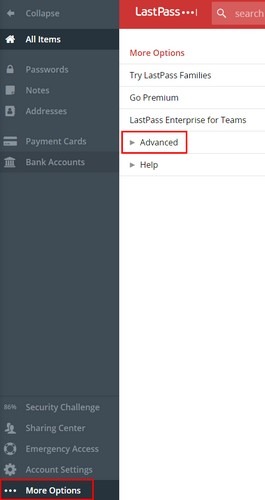
After clicking on the Advanced option, various new options will show up. Click on “Export,” and LastPass will ask you to enter your master password. You will then see all of your passwords and usernames/emails in a new tab. Highlight what you want to transfer, and copy it without pasting it anywhere, at least for the time-being.
Once you’ve copied your passwords, remember to close the tab so no one sees it. Go to the search bar, and open a new note on your computer’s Notepad. Paste what you copied, and click on the Save button. Save your file as “LastPass.csv.”
Open Dashlane and click on File to import your passwords.
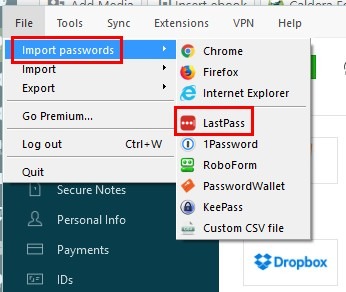
Choose LastPass and a new window will appear showing you the steps of how your passwords will be transferred. Click on the green “Next” button, and a documents window will appear. Click on the file you previously saved with all your usernames and passwords.
Dashlane will now show you how many passwords you’re about to transfer. If you change your mind and want to take some passwords off the list, this is your chance to do that. Make sure the passwords you wish to transfer are checked. Click the green “Import” button to start the process.
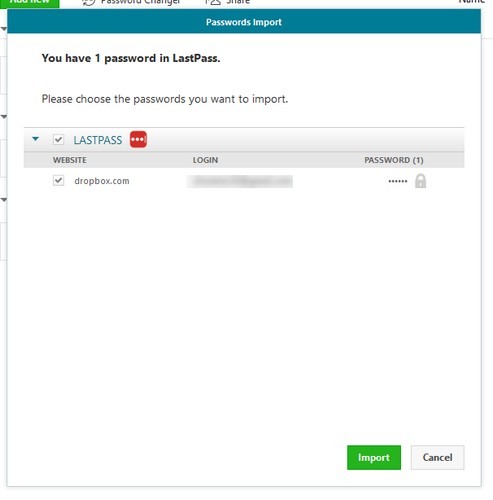
Once it is completed, Dashlane will let you know how many passwords were added, how many passwords were already there, and how many passwords were ignored. Click on the OK button to close the window.
Also read: 10 of the Best Password Managers for Web, Desktop, and Mobile
How to Delete Your LastPass Account
It’s up to you if you want to keep your passwords in two places. If not, you’ll need to erase your LastPass account. You can do that by going to a site just for this purpose.
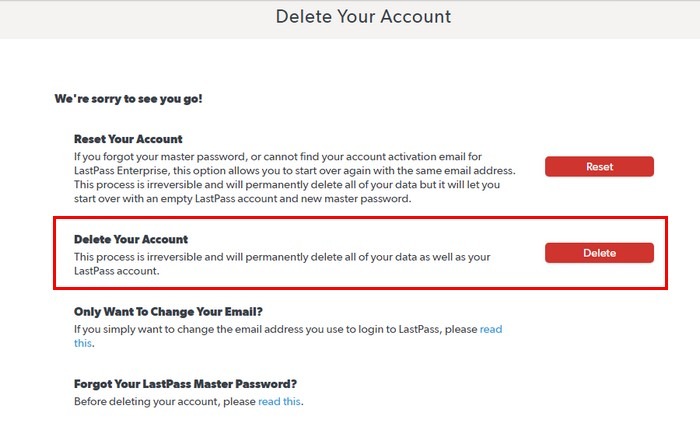
Follow the steps that LastPass will show you, and you’re on your way to deleting your account. Remember to remove the file you created that contained all of your usernames and passwords, since you don’t want that file falling into the wrong hands. But if you need to have it on your computer, make sure you add a password to the file or use other methods to keep it safe.
Conclusion
Now that you know how easy it is to move your passwords from LastPass to Dashlane, you can spread the word. If you have any issued, let us know in the comments below.