

Most of you have probably heard the phrase “If you’re not paying for it, you are the product.” It’s generally used to illustrate the fact that supposedly “free” services and consumer goods are anything but. With the advent of television, free-to-air television shows were supported by advertisements directed at viewers. Fast forward to the modern day and the Internet has made it possible for advertisers to integrate themselves into virtually every aspect of our lives.
An individual’s right to privacy is a hot button issue today in a world dominated by social media. It’s no surprise that tech giants like Facebook and Google generate mountains of revenue from targeted advertisements. These advertisements reach us based on our activities online which are being monitored constantly. Everything from our political leanings to where we shop is carefully collected and collated to compose a profile which companies then use to present you with advertisements tailored to your tastes. It’s important that individuals know which companies and organizations have access to their data. But where do you start? Luckily, Facebook makes it pretty easy to do; however, they make zero effort in pointing this out to their users.
Check Which Advertisers Have Your Info
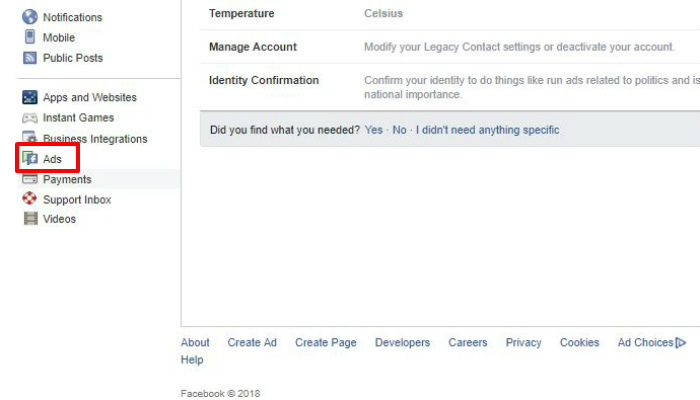
On Facebook you can see which advertisers have your personal info by heading into your account settings. Full disclosure: you may be in for a shock! To do so, point your browser to the Facebook website. Click the arrow in the top-right side to reveal a drop-down menu. Clicking on “Settings” will bring you to the Settings menu. On the left side you’ll notice a column with a list of options. Scroll down to the one labelled “Ads” and click that.
From there you’ll be brought to your Facebook profile’s Ad Preferences page. Clicking on “Advertisers You’ve Interacted With” will list all of the businesses you’ve interacted with. Have you noticed any surprises? It’s not uncommon for users to see businesses they’ve never interacted with, much less have even heard of before. For example, the picture below is from my personal Facebook account. I’ve never had the need to purchase a surgical cap, nor have I ever been to Houston. (Although I’m sure the House of Blues there is a fine establishment.)
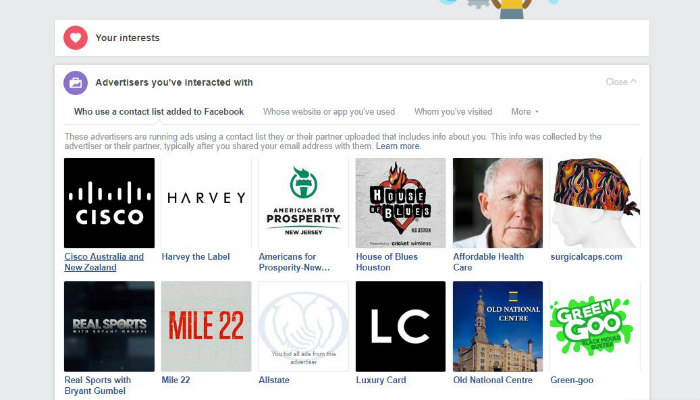
This is because until very recently, Facebook used middle man “data brokers,” entities who sell your contact info to businesses and corporations. You can block ads individually by highlighting each advertiser and clicking the “X” that appears. By default, Facebook only lists 12 advertisers, so don’t forget to click the teeny tiny “See more” button for even more surprises.
Change Your Ad Preferences
At this stage you’re probably feeling numerous emotions. Betrayal, anger, regret – these are all rational responses to the voluntary violations of privacy we all agreed to when we signed up for Facebook. Fortunately, you can wrestle some control back from the Facebook overlords.
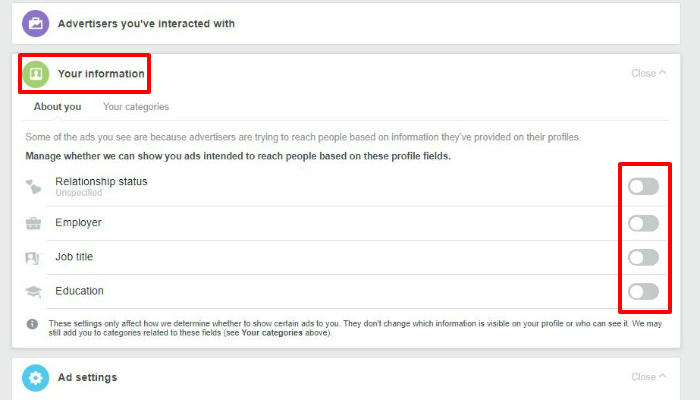
The first thing you’ll want to do is click on the “Your Information” banner on your profile’s Ad Preferences page. This will cue a drop-down panel to appear with toggle switches related to your job, employer, relationship status and education. By default, all of these toggles will be on. Go ahead and flick them all off. When on, this allows advertisers to find you and collect your info based on the details provided in your profile.
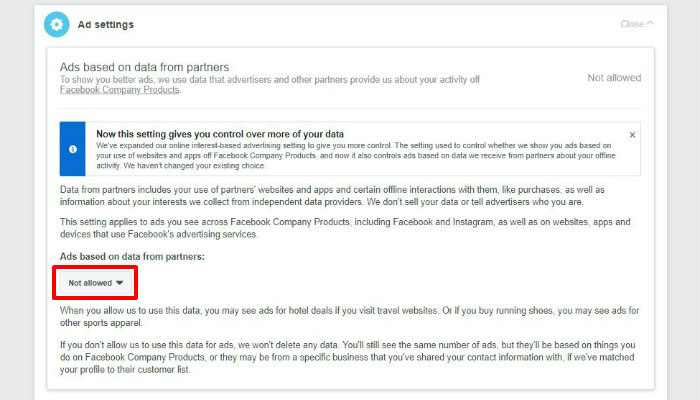
Next, click on the banner labelled “Ad settings.” Here you’ll see three buttons: Ads based on data from partners, Ads based on your Activity on Facebook and Ads that include your social actions. Clicking on each one will give you information detailing what exactly each one of those means, including what data is being collected and by whom. Additionally, you’ll see a drop-down box that allows you to prevent the collection and use of this data. As you may have guessed, you’re going to want to deny permission to each.
How to Opt Out of Advertising
Unfortunately, this isn’t really possible. Facebook’s bread and butter is advertising, so that’s not going to go away any time soon. There have been rumors floating around for some time suggesting that a subscription model might be in the works; however, this is unlikely. It’s just more lucrative to harvest and sell user data. However, you may consider giving up Facebook altogether. Before you do, make sure you download all of your important data.
How do you feel about data collection as it pertains to Facebook and other social media companies? Let us know in the comments!