


Modern video compression algorithms aren’t the same as the image compression algorithms you might be familiar with. The additional dimension and time means different mathematical and logical techniques are applied to the video file to reduce the size while maintaining video quality.
In this post we’re using H.264 as the archetypal compression standard. While it’s no longer the newest video compression format, it still provides a sufficiently detailed example for explaining big-picture concepts about video compression.
What Is Video Compression?
Video compression algorithms look for spatial and temporal redundancies. By encoding redundant data a minimum number of times, file size can be reduced. Imagine, for example, a one-minute shot of a character’s face slowly changing expression. It doesn’t make sense to encode the background image for every frame: instead, you can encode it once, then refer back to it until you know the video changes. This interframe prediction encoding is what’s responsible for digital video compression’s unnerving artifacts: parts of an old image moving with incorrect action because something in the encoding has gone haywire.
I-frames, P-frames, and B-frames

I-frames are fully encoded images. Every I-frame contains all the data it needs to represent an image. P-frames are predicted based on how the image changes from the last I-frame. B-frames are bi-directionally predicted, using data from both the last P-frame and the next I-frame. P frames need only store the visual information that is unique to the P-frame. In the above example, it needs to track how the dots move across the frame, but Pac-Man can stay where he is.
The B-frame looks at the P-frame and the next I-frame and “averages” the motion across those frames. The algorithm has an idea of where the image “starts” (the first I-frame) and where the image “ends” (the second I-frame), and it uses partial data to encode a good guess, leaving out all the redundant static pixels that aren’t necessary to create the image.
Intraframe Encoding (I-frames)
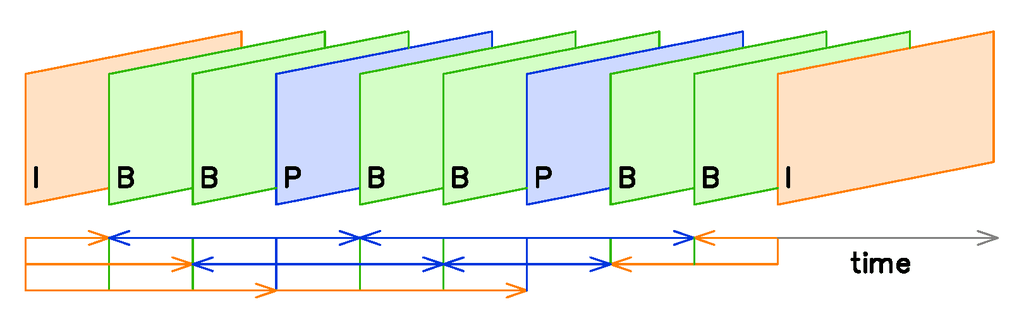
I-frames are compressed independently, in the same way still images are saved. Because I-frames use no predictive data, the compressed image contains all the data used to display the I-frame. They are still compressed by an image compression algorithm like JPEG. This encoding often takes places in the YCbCr color space, which separates luminosity data from color data, allowing motion and color changes to be encoded separately.
For non-predictive codecs like DV and Motion JPEG, that’s where we stop. Because there are no predictive frames, the only compression that can be achieved is by compressing the image within a single frame. It’s less efficient but produces a higher-quality raw image file.
In codecs that use predictive frames like H.264, I-frames are periodically shown to “refresh” the data stream by setting a new reference frame. The farther apart the I-frames, the smaller the video file can be. However, if I-frames are too far apart, the accuracy of the video’s predictive frames will slowly degrade into unintelligibility. A bandwidth-optimized application would insert I-frames as infrequently as possible without breaking the video stream. For consumers, the frequency of I-frames is often determined indirectly by the “quality” setting in the encoding software. Professional-grade video compression software like ffmpeg allows explicit control.
Also read: What You Need to Know About Video Encoding
Interframe Prediction (P-frames and B-frames)
Video encoders attempt to “predict” change from one frame to the next. The closer their predictions, the more effective the compression algorithm. This is what creates the P-frames and B-frames. The exact amount, frequency, and order of predictive frames, as well as the specific algorithm used to encode and reproduce them, is determined by the specific algorithm you use.
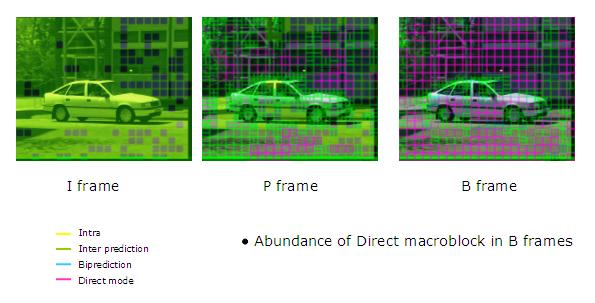
Let’s consider how H.264 works, as a generalized example. The frame is divided into sections called macroblocks, typically consisting of 16 x 16 samples. The algorithm does not encode the raw pixel values for each block. Instead, the encoder searches for a similar block in an older frame, called the reference frame. If a valid reference frame is found, the block will be encoded by a mathematical expression called a motion vector, which describes the exact nature of the change from the reference block to the current block. When the video is played back, the video player will interpret those motion vectors correctly to “retranslate” the video. If the block doesn’t change at all, no vector is needed.
Conclusion: Data Compression
Once the data is sorted into its frames, then it’s encoded into a mathematical expression with the transform encoder. H.264 employs a DCT (discrete-cosine transform) to change visual data into mathematical expression (specifically, the sum of cosine functions oscillating at various frequencies.) The chosen compression algorithm determines the transform encoder. Then the data is “rounded” by the quantizer. Finally, the bits are run through a lossless compression algorithm to shrink the file size one more time. This doesn’t change the data: it just organizes it in the most compact form possible. Then, the video is compressed, smaller than before and ready for watching.
Image credit: VC Demo, itu delft