

Depending on your opinion of Amazon, Amazon Sidewalk is either an amazing technological achievement, or just another vaguely creepy way Jeff Bezos is completing his transformation into a full-on Bond villain.
What Is Amazon Sidewalk?
Amazon Sidewalk is essentially a big Wi-Fi network that you share with your neighbors. It is designed to make the capabilities of various smart-home devices function beyond the threshold of your home Wi-Fi network. It achieves this by linking your Wi-Fi network with that of your neighbors’ Wi-Fi networks. This creates a big “mesh-like” network that everyone can share.

At first glance this may seem useful. Perhaps you’re out in the shed and need to ask Alexa something. You say, “Hey Alexa” but get no response. It turns out that you’re too far away from your router, and the Wi-Fi signal has dropped from your phone. With Amazon Sidewalk, you’re never out of range, as your network will communicate with your neighbor’s and your neighbor’s neighbor and so on. There are multiple benefits to Amazon Sidewalk. That being said, critics have highlighted some fairly serious concerns that folks should consider.
What’s the Problem?
In theory, Amazon Sidewalk sounds like an excellent idea. Amazon likes to point out a myriad of potential uses for Amazon Sidewalk. However, at the end of the day, the one thing the average user will benefit from is convenience – namely always being connected to your Amazon smart devices.
That being said, many see Amazon Sidewalk as a privacy nightmare. Cyber security experts around the world have expressed skepticism about how Amazon is going to protect user data. By the very nature of Amazon Sidewalk, you are allowing devices that are connected to your home network to link up and communicate with other devices on other unknown networks.
The way Amazon Sidewalk works seems to fly in the face of even the most basic cyber security principles. We all know we should password-protect our Wi-Fi networks and be wary of connecting to public Wi-Fi. However, Amazon Sidewalk seems to disregard these safety measures completely.

We know what some of you are thinking – you’ve already made peace with the fact that giant tech companies are harvesting your data. You may even see it as a fair trade-off for Wi-Fi everywhere. Amazon makes it clear that Sidewalk is not a replacement for your home Wi-Fi. The bandwidth allocated to Amazon Sidewalk is tiny, something along the lines of 80 kbps. This means you won’t be streaming Netflix while walking the dog. While you may not be able to catch up on “The Queen’s Gambit,” Amazon is going to know the frequency of your pooch’s journeys around the block and how many times it stops to mark its territory.
How to Opt Out of Amazon Sidewalk
In a creepy supervillian-y move, Amazon has made Sidewalk opt out, not opt in. This means that if you take no action, you’ll eventually be a part of Amazon Sidewalk whether you want to or not. If the idea of your devices connecting to random Wi-Fi networks, potentially compromising your sensitive personal information ruffles your feathers, we’ve got some good news. You can still opt out of the program; and it’s fairly easy to do so.

Just launch the Alexa app on your iOS or Android device. At the bottom of the screen there is a menu ribbon. On the far right there is an icon labelled “More”. After that, navigate to “Settings -> Account Settings -> Amazon Sidewalk.”
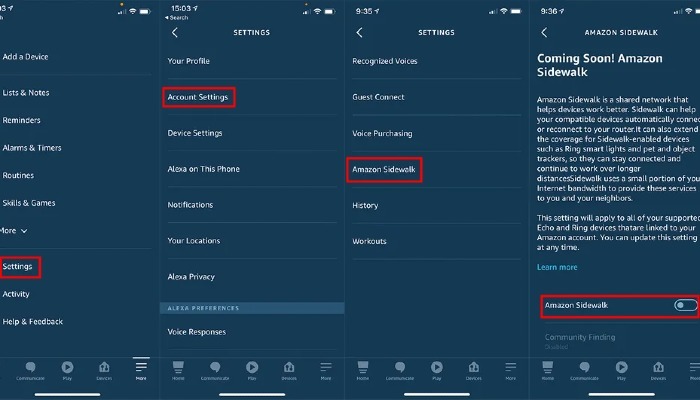
When you tap on “Amazon Sidewalk” you’ll be taken to a screen that details what Amazon Sidewalk is. Below that you’ll see a toggle button labelled “Amazon Sidewalk.” To opt out of the program, simply slide that toggle button into the off position (you’ll know it’s off if the toggle button becomes grayed out). That’s it -you’ve successfully disabled the Amazon Sidewalk feature.
Now that you have opted out of Amazon Sidewalk, you can rest comfortably knowing that your smart devices aren’t going to be hijacked for some nefarious plan for world domination. Of course, if you want to get rid of Amazon entirely, you have to go nuke and delete your Amazon account, which itself is not a straightforward thing to do.