

If you are someone who always like to test out bleeding edge products and applications, then Firefox 3.1 is something that you definitely don’t want to miss. Not only does it comes with more improved features, it is also much faster than its predecessor and other browsers. The current version is at beta 2 and is available for download for all platforms. Even though it is not recommended to install in a production machine, it is already very stable and can be used on a daily basis.
If you want to test out Firefox 3.1 beta 2 (or other versions) on your Ubuntu, but don’t want it to mess up your existing Firefox setting, you can easily do so by creating a new profile. Here is how you can do so.
Go to Firefox 3.1 beta 2 download page. Download the Linux package (firefox-3.1b2.tar.bz2) for your preferred language to your Home folder.
Unzip the downloaded file to your Home folder. You should see a Firefox folder.
Before we launch Firefox 3.1 beta 2, we need to create a new Firefox profile so that it won’t interfere and conflict with our current version of Firefox.
In the terminal,
cd ~/Firefox

./firefox --no-remote -P new_profile
You should see the Firefox profile manager. Select the new profile and rename it to a name that you can remember easily.
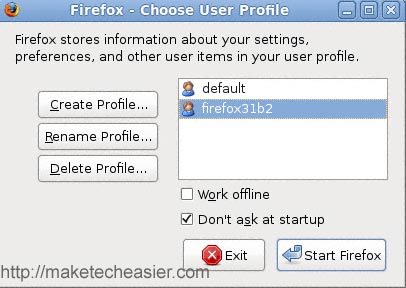
Click “Start Firefox“.
Firefox 3.1 beta 2 should now start with a new profile.
To make sure that it will start with this profile every time, we need to create a desktop entry where you can easily click to launch it.
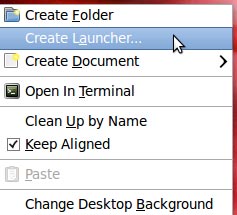
On your desktop, right click the mouse and select Create Launcher.
Fill in the detail as shown in the screenshot below. Remember to change the USERNAME to your own username and the your_profile_name to your own newly set profile name. You can find the Firefox icon at the Firefox -> Icons folder.
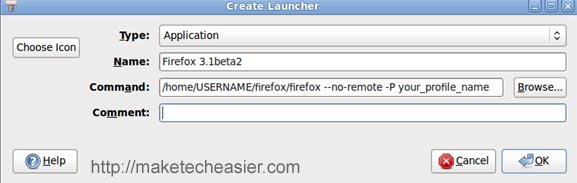
Click to enlarge
Next, we are going to modify the entry for the current of Firefox so that it won’t boot up from this new profile.
Right click on the menu bar and select Edit Menus.
Navigate to the Firefox section (Application -> Internet -> Firefox) and select Properties.
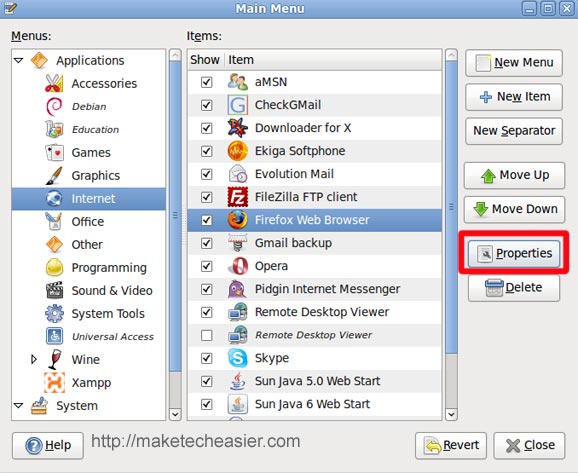
In the Add the following command
In the Command field, append the following code to then end:
--no-remote -P default
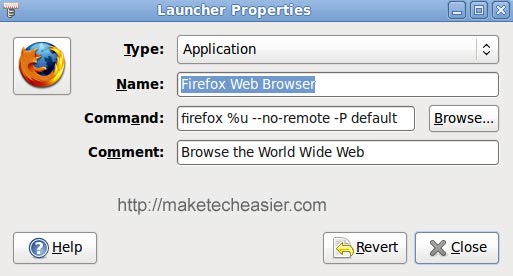
If you have added Firefox shortcut to various places (such as the dock, panel etc), you need to change their entries as well, else they will start up with the new profile.
That’s it. You can now test out Firefox 3.1 and run your existing version of Firefox simultaneously without affecting the setting of each other.