

Since fingerprint scanners first appeared on smartphones in 2011 they’ve become pretty much a standard feature. They’re fast, convenient, and relatively secure, since fingerprints are unique enough that the odds of anyone having a similar enough print to unlock your phone are very low, unless someone cares enough to design a convincing duplicate of your fingerprint.
There’s not just one type, though: some scanners rely on light, others on electricity, and still others on sound to map the ridges and valleys of your fingers. Capacitive (electronic sensors) are popular in smartphones because they’re accurate, small, and fast, but optical and ultrasonic technologies have the advantage of enabling in-display scanning. But what’s actually going on in those milliseconds right after you put your finger on a scanner?

Optical fingerprint scanners
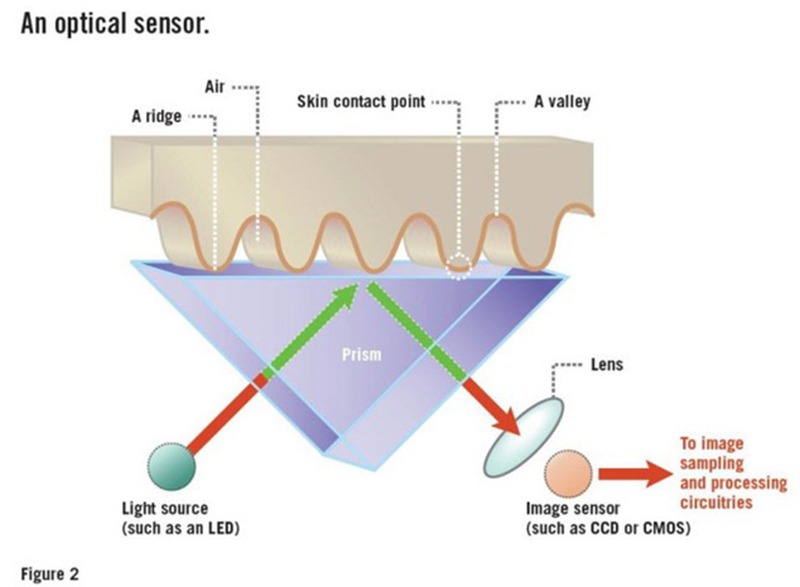
The most basic type of fingerprint scanner works along the same lines as a digital camera. To oversimplify the process a bit, it just takes a picture of your finger and sends that picture off for processing. The following is the general idea:
- The scanner shines a bright light onto your finger using LEDs and takes a picture.
- If the average pixel value of the photo is too dark or light, it adjusts the exposure and tries again.
- It also checks for good resolution by seeing if dark and light areas are alternating in a way that’s consistent with clearly-defined ridges and valleys.
- If the picture is clear, the image can be processed!
This type of scanner is most common in places like police stations, airports, and secured entrances, but isn’t often used in smartphones, which favor smaller, more secure capacitive sensors.
The exception is smartphones that have in-display fingerprint scanners, some of which use optical or ultrasonic sensors under the screen to get an image. Even here, though, optical sensors tend to lose out to ultrasonic scanners, which are slower but have the advantage of not being vulnerable to 2D images of fingerprints.
Also read: 4 Questions About Fingerprint Authentication Answered
Capacitive fingerprint scanners
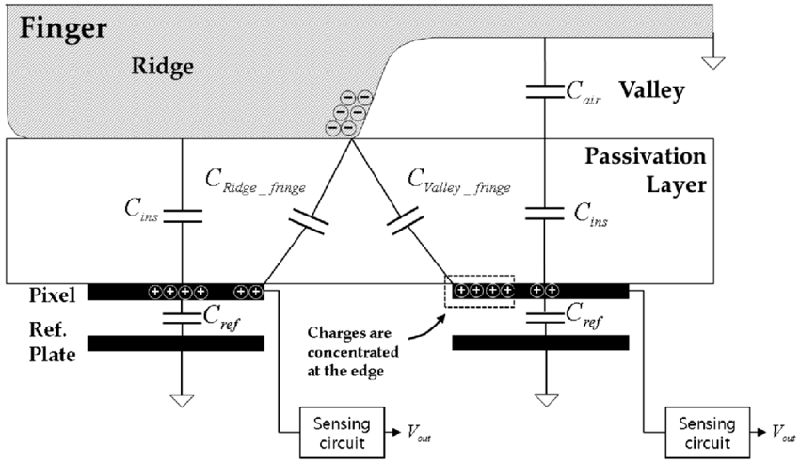
When you put your finger on a capacitive scanner, it’s using tiny amounts of electricity to measure the distance between different parts of your finger and the scanner. Inside the scanner are rows of tiny capacitors, each of which can carry an electrical charge. If one of the capacitors is below one of your fingertip’s ridges, it can hold more charge since it’s coming into contact with your skin. If it’s below a valley, the capacitor will remain in contact with air, which doesn’t allow it to store much extra charge.
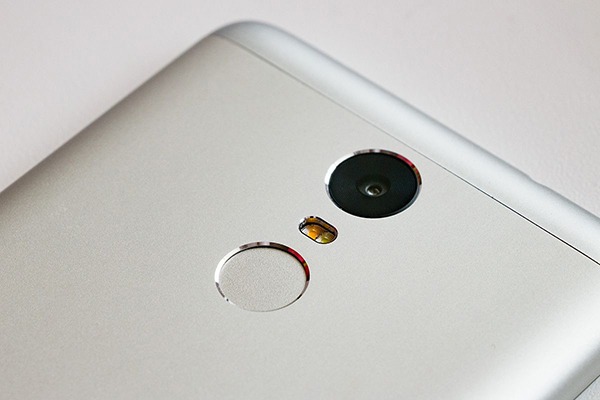
You can somewhat think of these capacitors as pixels in a camera. If one is holding more of a charge, that can be interpreted as a ridge area, while the others are read as valleys. Taken as a whole, this gets you an image of a fingerprint that’s just as accurate as one from an optical sensor and even more secure, since tricking it would require a 3D model of the fingerprint rather than just a 2D one. This, combined with its smaller size, makes it a popular choice among smartphone manufacturers.
Ultrasonic fingerprint scanners
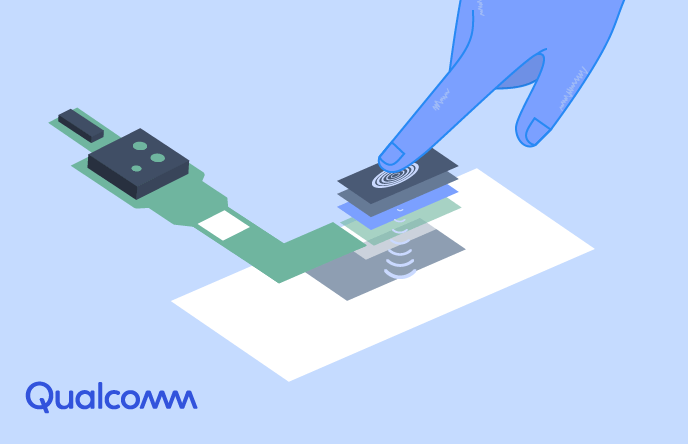
If you can read fingerprints with light and electricity, why not sound? Ultrasonic scanners fire out a high-frequency pulse of sound that then bounces off the user’s fingertip back to the receiver, a sensor that can measure mechanical stress. That sensor is looking at the intensity of the returning pulse at different points on the finger and can use that data to calculate where the ridges and valleys are. It’s a little bit like the way a bat navigates by making high-pitched noises and listening to the echoes – the returning sound carries some important data about distance and size.
Because sound waves can measure the depth of the valleys in a fingerprint, the resulting map is 3D, which makes ultrasonic scanners even more precise and secure (if a bit slower) than capacitive models. They can also work as under-display fingerprint scanners, as the sound waves can easily travel through glass, making them a more secure alternative to optical versions.
Also read: What You Need to Know About USB Fingerprint Readers
Analyzing, storing, and using the fingerprint
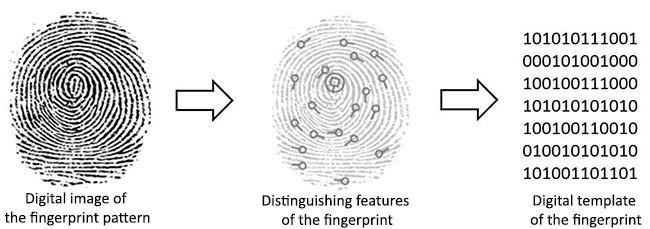
After the image is captured, whether through light, electricity, or sound, the software needs to check if the fingerprint matches with an authorized user. Figuring out fingerprint matches, whether you’re a human or a computer, is largely done by looking for things called “minutiae” – points of the fingerprint where something relatively interesting happens, like a place where ridgelines terminate or split.
Each of these features is assigned a position relative to the other detected minutiae, and using the distance and angle between each item, the scanner software can make sort of a map that can be represented as a number. That number is essentially the encoded fingerprint.
Any data that your phone stores about your fingerprint, even if it’s just the maps of minutiae, is generally locked away in a secure environment, isolated from other apps that might try to get access to that information. Any apps or websites you use your fingerprint to access won’t ever actually receive your fingerprint data. They’ll only get a confirmation from your device that the fingerprint that was scanned matches one of those in storage.
Are fingerprint scanners secure?
Fingerprint scanners aren’t the most foolproof way to control access to something since they can often be tricked by good models, anything from a 2D picture to a 3D prosthetic. They are improving, and the security protocols for handling fingerprint data are fairly strong (as long as they’re being followed), but if you’re really worried about someone getting physical access to your phone, fingerprints aren’t the strongest lock. As ultrasonic sensors improve, though, they’ll probably get faster and more secure, and having them embedded under the display is a very neat perk.
Image credits: Fingerprint (PSF), Crime scene fingerprint, capacitive fingerprint sensor, Xiaomi Redmi Note 3, fingerprint reader, Qualcomm