

Have you ever wondered how your computer seems to know what time it is? Even if you know about how it gets the time in the first place, how does it remember it while it’s turned off? Let’s explore how your computer tells the time and how it remembers every reboot.
How Does Your Computer Know What Time It Is?
It’s likely that when you first booted up your computer, it already had the time showing correctly. This is because most modern-day operating systems use the Internet to sync with a time server. This lets the computer know what time it is, and your PC sets the clock accordingly.
For example, this Windows 10 clock uses the National Institute of Standards and Technology to get the correct time. If you visit NIST’s time website, you can see it keeping track of US time. Of course, if you live in another country, your own system clock may use a different website, as NIST is run by the US government.
Why can we can trust NIST (or your regional equivalent) with our time? These timekeeping organizations use Cesium atomic clocks to keep track of what time it is. These are very accurate, as they don’t have moving parts that can go wrong (like a wall clock) or data that can get corrupted or changed (like a digital clock). In fact, a second as a time unit is defined by 9,192,631,770 cycles of Cesium, meaning these clocks use the same technology that scientists use to define a second in the first place!
How Does Your Computer Remember What Time It Is?
This is all well and good, but let’s consider a specific scenario. Let’s say you lose your Internet connection, which means your PC can’t sync anymore. Annoyed at the lack of Internet, you decide to go to bed, only to find the Internet is still down in the morning. You boot up your PC, and – despite there being no sync capabilities – it still knows what the time is!
This is because, even without Internet sync, your PC can remember and keep track of time by itself. In fact, you can see your PC’s ability to remember the time in the UEFI/BIOS. This loads before you boot into an operating system, and you can see the system clock ticking away when you access the UEFI/BIOS screen. This lets you see your PC’s time-telling abilities in action without an operating system stepping in with its time-sync feature.
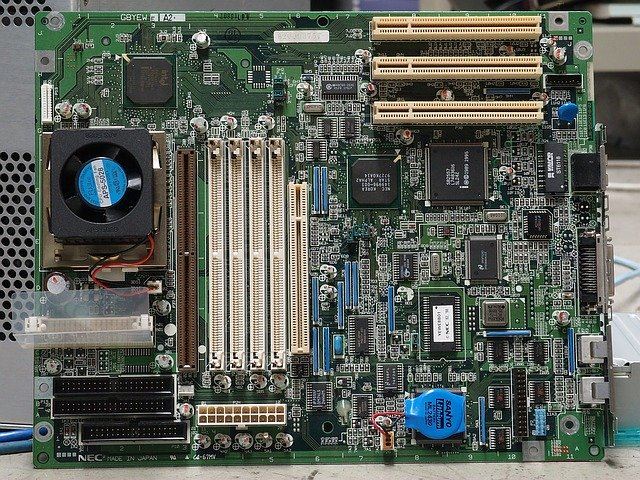
How is the computer remembering the time after it shuts down? Inside your computer is an internal clock, which keeps track of the time. When your computer shuts down, this clock keeps ticking even if you unplug the PC from the mains. That’s because the computer’s motherboard has a Complementary Metal Oxide Semiconductor (CMOS) battery on it which keeps the clock powered up even if the rest of the motherboard has no power.
CMOS batteries are meant to last around 10 years, but things can go wrong with them. For instance, if you boot up your PC, and it has since forgotten the time, that means the battery is dead and isn’t powering the internal clock. You may also get warnings about a “CMOS error” while booting up.
Keeping Track of Time
Our computers keeping track of time is so second nature, we often don’t ask how it manages it. Whether it’s syncing to a Cesium atomic clock or remembering the time via a battery, there’s plenty going on inside your PC to make sure you don’t miss your fave TV show.
Have you ever experienced a CMOS error before? Let us know below.