


As with most services, Google has long cornered the translation app market. However, after Apple launched its Apple Translate app with iOS 14, can the competing giant give Google Translate a run for its money? In this Google Translate vs. Apple Translate post, find out where the two translation apps diverge.
User Interface (UI)
Both Google Translate and Apple Translate avoid icon clutter and mental load, aiming for an immediately readable and accessible design. Nonetheless, the Apple Translate app has a more accentuated space design. Its two buttons, each representing one side of the language translation, show right away which languages are selected. In contrast, Google Translate doesn’t have buttons and has a menu instead. It’s not a huge deal by any means but something to be improved upon.
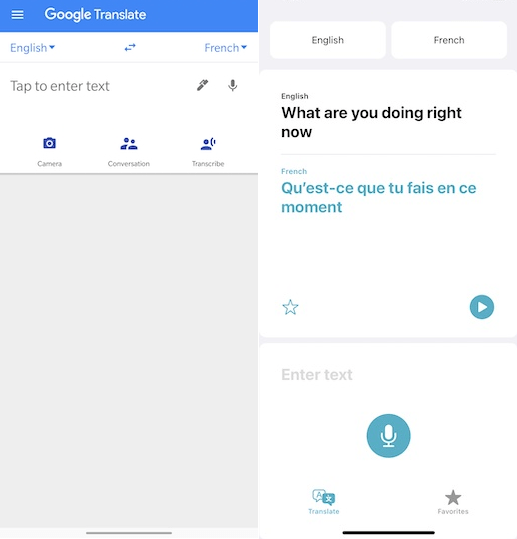
When it comes to usability, Google beats Apple because it is easier to copy-paste the text in need of translation. This is an artifact of the iOS UI, where you have to keep holding and selecting the text. Again, it’s not a significant detraction, but Android users may need some time before they get over it.
Overall, Apple Translate is more pleasing to the eye, while Google Translate is overly utilitarian, as if the aesthetic design shouldn’t even be a part of the design equation.
Also read: The Google Translate Guide for Easy Communication in Any Language
Translation Accuracy
You might have noticed that whenever you use Chrome’s translate page feature, it yields less than ideal results if the sentences are not simple. The same is true for both apps. It seems machine learning hates complex and compound sentences.
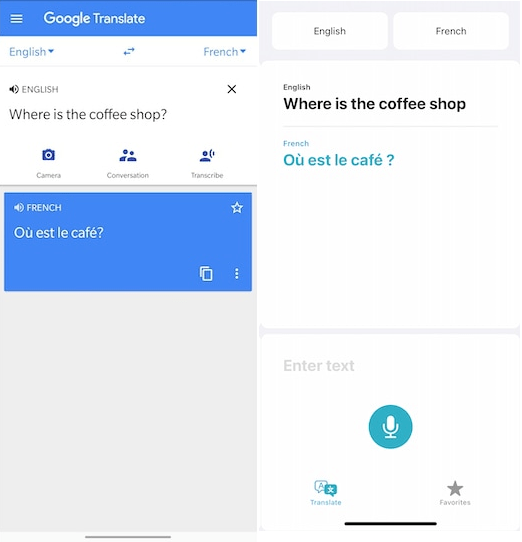
Therefore, if you use simple, low-word-count sentences, both Google Translate and Apple Translate will perform equally well. Of course, translation accuracy may differ from language to language, but one can assume they both have access to the same grammar rules and vocabularies.
Either way, it is impossible to notice any difference between the two when it comes to translation accuracy.
Language Support
Unfortunately for Apple Translate, this category goes firmly in the Google camp. Apple supports only 11 languages as of the last official update on September 16, 2020. Those 11 supported languages for Apple Translate are Spanish, Italian, German, English, French, Arabic, Russian, Chinese, Japanese, Korean, and Portuguese.
In stark contrast, Google Translate supports over 100 languages, which for all intents and purposes accounts for most populations on the planet. However, out of those 100+, bilingual on-the-fly translation is only available for 43 languages, which is still four times higher than what Apple Translate offers.
When it comes to camera-assisted translation – image to text – Google Translate further limits it to 37 languages. Even lower than that, 32 are supported for audio translation. In the end, given that Apple Translate is not even a year old, such disparity in language support is to be expected.
Translation Methods
Google Translate has six ways to translate languages:
- Typing
- Talking
- Viewing offline dictionary without Internet access
- Speaking
- Handwriting with a stylus, if supported by your smartphone
- Using the camera: either pointing the camera or snapping the text in view
Out of those features, Apple Translate only supports three: typing, speaking, and offline dictionary (built in). However, both apps can link with their respective ecosystems: Assistant for Google Translate and Siri for Apple Translate. Voice translation for both is efficient.
Lastly, both apps have a nifty phrasebook feature, where the most commonly translated phrases can be saved for later use.
Monetization
Thankfully, both apps come free from ads or other forms of monetization. You can simply download them from their respective stores for free. You can find Google Translate here for Android and here for Apple iPhones.
Conclusion
With Google Translate already available in the Apple App Store, it doesn’t make much sense to prioritize Apple Translate over it. The native Apple app is still missing a host of features and languages.
Nonetheless, if those that are supported are more than enough for your needs, Apple Translate does an equally solid translation job. On the other hand, if you want to go beyond mere apps and use a dedicated translator device, look no further than the Langogo Summit Language Translator.