


Just recently, something happened that pretty much ruined the cohesion of my Google Calendar. Every single day I had an “event invite” offering to win an iPhone, and to follow a link that, well, I can only assume doesn’t win me an iPhone but likely wants my email address or credit card details.
Getting rid of this kind of spam in Google Calendar – and preventing it from returning – can be kind of tricky, so we’ll take you through the whole process here.
Also read: Get the Most Out of Google Calendar’s New Features
Block Unconfirmed Events
By default, Google Calendar has an inexplicably open policy when it comes to event invites, and you can have events appear in your calendar that you never had any involvement in.
The first thing you should do is change event permissions so you only see events in your calendar that you either created or were invited and replied to.
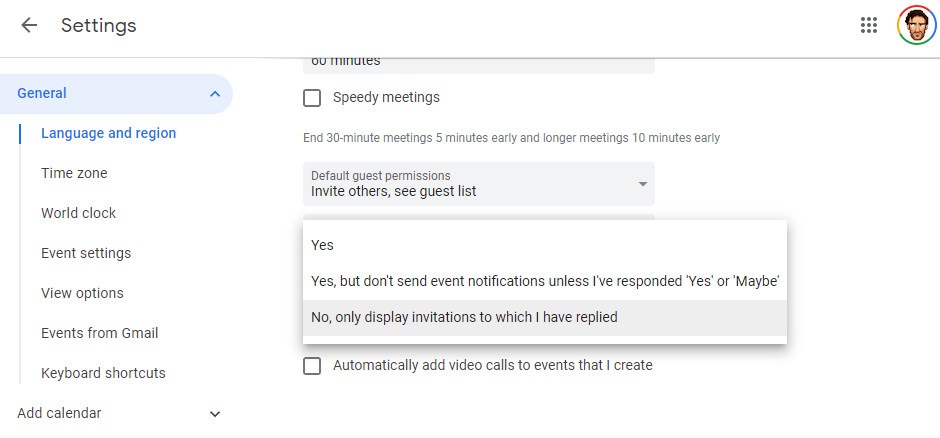
In Google Calendar, click the Settings cog at the top right corner -> Settings -> General -> Event settings, then in the “Automatically add invitations” drop-down select “No, only display invitations to which I have replied.”
This should make your iffy spam event disappear.
Delete Spam Event (And All Future Ones)
If the spam event is still there, then you’ll need to delete it manually from your calendar. Simply go to your calendar view, right-click the event, then click “Delete.”
Crucially, in the box that pops up after you click Delete, select “All events,” which will delete every spam event ever sent from this particular sender.
Stop Showing Declined Events
Another safeguard you can put up to stop spam events showing in your Calendar is to stop showing declined events. That way, if you turn down a spam event, all subsequent ones from that sender will no longer show up.
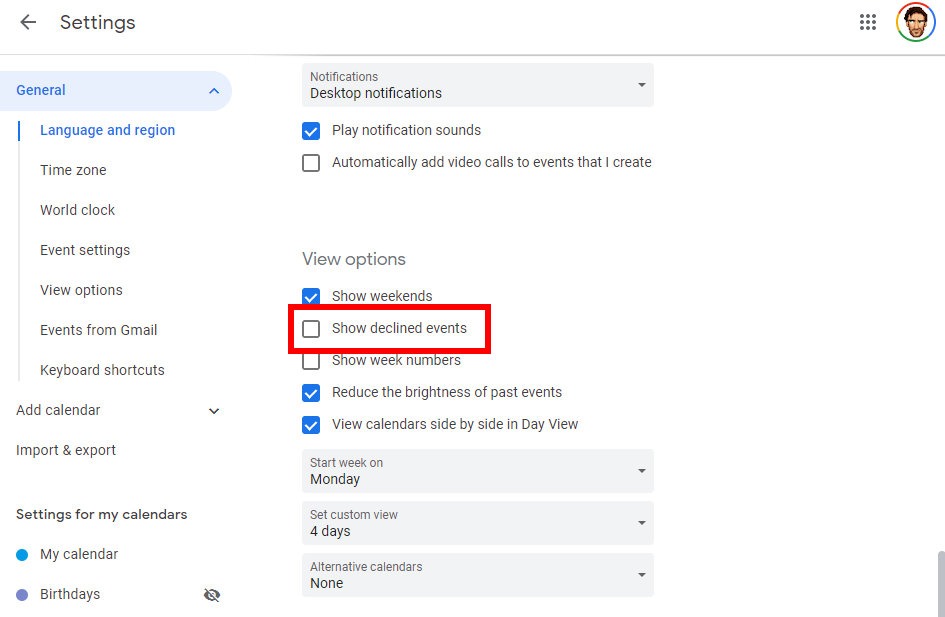
To do this, in Google Calendar go to “Settings -> General -> View” options, then uncheck the “Show declined events” box.
Block Declined Events on Phone
For some reason, blocking declined events doesn’t sync between the PC and phone versions of Google Calendar.
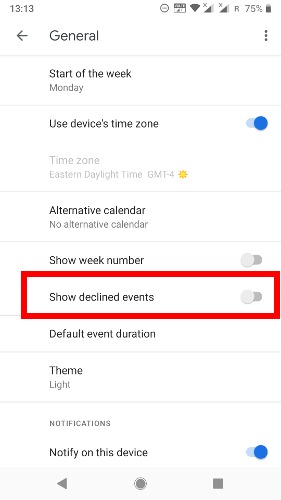
To block declined events on your phone, go to the Google Calendar app, tap the three-lined menu icon at the top-left corner -> Settings -> General, then make sure “Show declined events” is not selected.
Also read: Make Google Calendar More Useful with These Free Calendars
Block Automatic Events from Gmail
There’s also a possibility that the spam events appearing in your Calendar originate from a spam email sent to your Gmail inbox.
If you suspect this might be the case, then you’ll need to block events sent to your Gmail address from automatically being added into your Google Calendar.
To do this, in Google Calendar go to Settings -> General -> Events from Gmail.
Here, uncheck the box that says “Automatically add events from Gmail to my calendar.”
Conclusion
Those are the top solutions for getting rid of spam in your Google Calendar. But how do you avoid spam in the first place?
The best way to avoid avoid getting spam is to not give your email to every site that asks for it. A lot of sites tend to be liberal with giving email addresses away to third-party companies, and from there you just don’t know whose hands it will get into.
Keep your email address close to your chest!