


What would we do without Safe Mode? If we can’t get into our computers in the regular way, we use Safe Mode, and nine times out of ten it’ll work. The same goes for browsers. If your browser is acting up, you can restart it in Safe mode and fix it that way.
However, sometimes Safe Mode ends up being more stressful than the original problem, especially if you start your browser in Safe Mode and can’t get out, or every time you start Firefox it’s in Safe Mode. Worry not; you have a couple of options you can try.
1. Get Completely O ut of Safe Mode
Before you resort to the obvious, let me tell you that when you’re trying to get out of Safe Mode, just exiting doesn’t mean that you completely closed it out. The only way you can completely close out Firefox when you’re in Safe Mode is to close your browser and restart your computer. When you start Firefox again after you restart your computer, it’ll be normal.
2. Check the Target
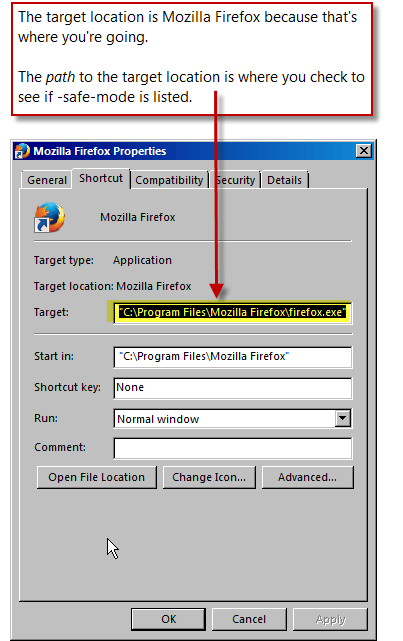
Every program you want to use has a target: that is, a path to follow to get to the program (or target). For instance, to get to Firefox, your target would be:
"C:\Program Files\Mozilla Firefox\firefox.exe"
Sometimes – due to whatever reason – the target can change. In this case, the target could have changed to make it so that you follow the path to Firefox Safe Mode instead of just Firefox.
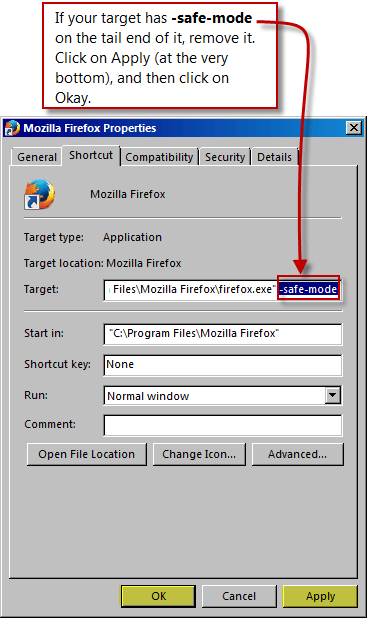
"C:\Program Files\Mozilla Firefox\firefox.exe" -safe-mode
To check the target, go to the shortcut you use for Firefox. In my case I use the shortcut in my task bar.

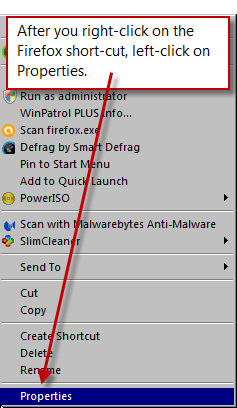
After you right-click on the Firefox shortcut, a menu will pop up. Left-click on Properties.
After you left-click on Properties, a dialog box will pop up. This will tell you the target location (which in this case is Firefox) and the target path, which is what you’re interested in. Look at the path and see if -safe-mode is at the end of it. If it is, remove it.
If -safe-mode is on the end of this, then the target path will load Firefox Safe mode every time.
Whenever you have problems with Firefox, and you can’t fix them, try Safe Mode; if you can’t get out of Safe Mode, try one or both of the options above.
Problems solved.