

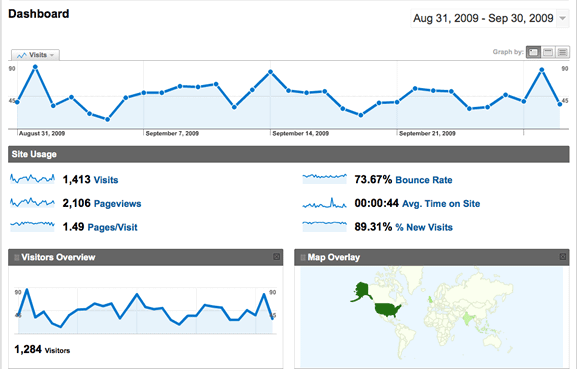
If you have a web site or blog, you probably rely on web analytics to understand about your visitors. It provides a way for you to know
1. How they found your site
2. The items on your site they find interesting and
3. Location information about your visitors.
The best known and most widely used web analytics tool is Google Analytics. There are over 80 reports that can be accessed to track and analyze the health of your web site/blog. Additionally, it also has an ad hoc reporting function that allows you to further tailor these 80 reports, or create your own from scratch. There are other tasks that allow you to monitor visitors’ paths on your site/blog, monitor your AdWords, group similar visits together, etc. What if you were able to extend the functions that Google Analytics offer? There is a Firefox add-on that will allow you to do that. It’s called the Better Google Analytics Firefox Extension (Update: this addon is no longer available).
What does it do?
Better Google Analytics Firefox Extension enhances Google Analytics by using a variety of GreaseMonkey user scripts. The add-on uses user scripts created by different developers into one area. It gives Google Analytics some of the user-friendly and additional features that are missing.
What do I need to do before I start using it?
The first thing you need is to go to the FireFox add-on page, and install GreaseMonkey. After GreaseMonkey is up and running, install the Better Google Analytics Firefox Extension add-on.
How do I personalize it?
After installing Better Google Analytics Firefox Extension and GreaseMonkey, go to “Tools -> Add-Ons -> Better Google Analytics Firefox”. Press the Preference button. There are three tabs: General, Reports, and Other.
What do I do in the General tab?
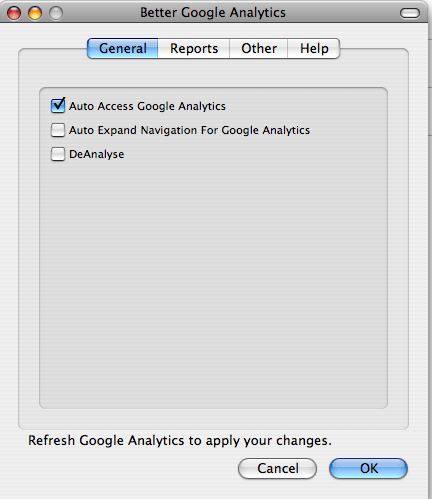
Go to the General tab. There are three options: automatically entering Google Analytics; automatically expanding the sub-navigation items; and increase the text boxes.
- If you want to automatically enter Google Analytics whenever the button is displayed, then check the check box next to this option.
- If you want to have all the sub-navigation expand automatically, then check the check box.
- If you want to increase the text boxes, then check this check box.
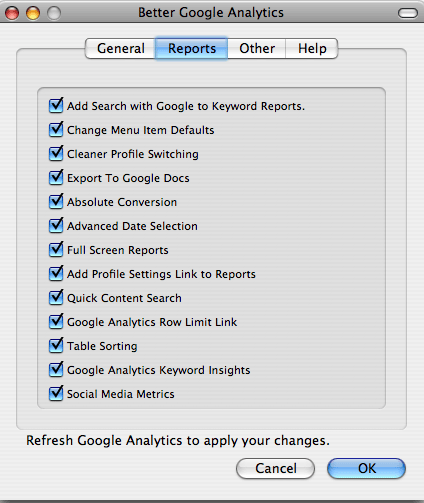
What do I do in the Reports tab?
In the Reports tab, it provides you additional report features that will make the Google Analytics’ reports area, more powerful. It adds search functionality, export capabilities, full-screen reader, profile enhancements, table sorting, and social media metrics. If you want to select one or all of the options, check the check boxes next to them.
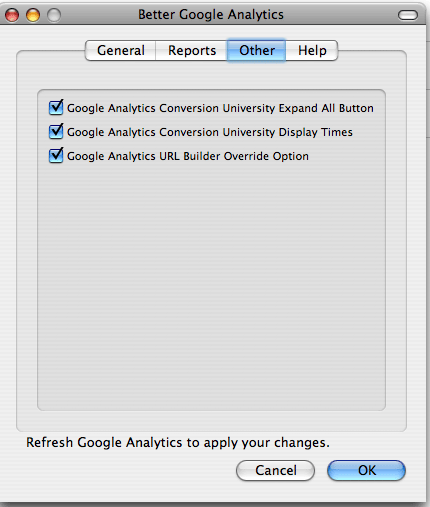
What do I do the in the Other tab?
In the Other tab, it allows additional features to other areas of Google Analytics. It provides two Google Analytics Conversion University functionalities: “Expand All” button and the time. Also, it has a URL builder override for the “utm_nooverride” url variable.
What did I think?
I really love this Better Google Analytics Firefox Extension. It gives extra functionality to Google Analytics that makes it more user friendly and easier to navigate. Before I found this add-on, I was using the basic functions that Google Analytics had to offer because I didn’t really understand how to use it. With this add-on, I am using it more, using more reports, and even the goals/funnel features. If you have never use it, and you have a web site and/or blog, install it.