

Mozilla has recently released the fourth beta of the Firefox 4 browser. I have been testing it since the first beta and I am happy to see the progress and the addition of new features with each beta. I have held on the review of Firefox 4 because most of the features are still unstable or not in place. With the release of beta 4, things are becoming more stable and plenty of new (and revolutionary) features are added to it, so it would be a great time to do up a review. There will probably be another one or two more beta before we see the release candidate and the final version.
New Interface
Firefox 4 has gone through a big design change. The first thing that you will notice is the replacement of the menu bar with a menu button (currently only available in WIndows and Mac version). The new big orange menu button is located on the very top left corner of the browser, and when clicked, will open up a compact menu window. While I don’t really like the orange color and the location that it is situated, I do welcome the idea of replacing the menu bar with the button. It makes the browser more clean and compact.
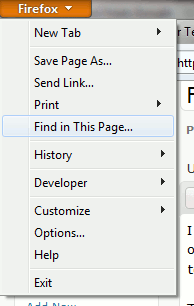
Note: The orange button in the nightly build comes with a two column menu layout, so the screenshot above will probably not be the layout in the final version.
Another visual change is the change of the tab bar to above the address bar – the same way as in Google Chrome. The Mozilla team even done up a video to explain why the tab bar is on top. For those who prefer the old design, you would be glad that there is an option for you to switch the tab bar back to below the address bar.

Other visual changes include:
- bookmark bar been replaced by a bookmark button
- The Stop/Reload button merged to one button
App Tab
This is one new feature that I like while testing the beta. You can now change your tab into an app tab and park it permanently in your tab bar. Just think of it as a “dock” in the tab bar.
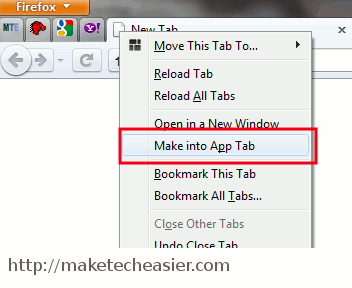
When a tab is converted to an app tab, the tab will shrink to show only the favicon. It will also move itself to the left hand corner of the tab bar. Whenever you start your browser, these app tabs will be loaded and you will have access to your favorite site instantly.
There is one caveat though. If you have too many app tabs, your browser might take some time (and system resources) to load itself up. Not a good idea if you just want to quickly check some information from the Web.
Panorama
This is probably the best feature in Firefox 4. I would even call it revolutionary. Panorama provides a new way for you to organize your tabs. It is mainly useful for those who like to have plenty of tabs opened.
What Panorama does is allow you to sort your tabs in groups. You can drag and drop related tabs to form a group and you can create as many groups as you want. For example, you can have an Email groups where it contains the login page of all your email accounts. You can also create another group that contains all your social network page, or if you doing research, a group that contains information from various sites. At any point of time, only one group is active and all the tabs in that group will be visible in the browser.
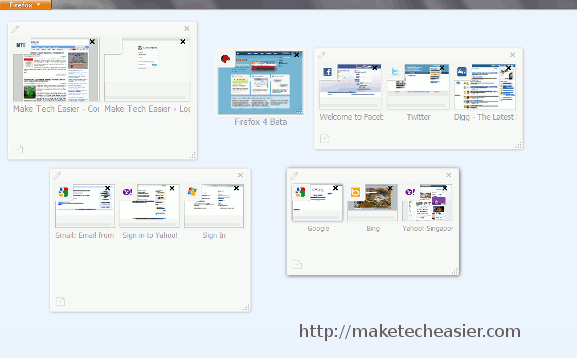
There is also some eye candy built into the Panorama feature. When you click on the Panorama button, located on the top right hand corner, all your groups will fly out in the Mac’s Expose style. Awesome!
Firefox Sync
We have previously discussed the Firefox Sync extension that you can install to sync your Firefox profile and settings across various computers. The good thing is, this is now included as default in Firefox 4. Simply go to “Options -> Sync” to setup the Sync.
New about:addons page
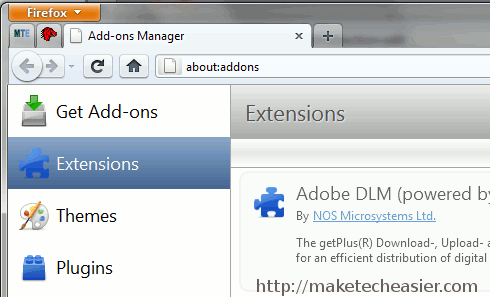
The addons manager is now moved to a new page, accessible with the about:addons URL. This new addons management area is also given a design overhaul.
Supports for HTML 5, CSS3, WebM format and full WebGL support
Firefox 4 now comes with native support for HTML 5, CSS3 and the WebM format. It might take some time for the whole Web to adopt these new standard, but it is good to see that Firefox is already providing support for them.
Search for and switch to opened tabs in smart bar
The Mozilla team is continuing to make improvement to the address bar. If you have plenty of tabs opened, you can now easily search for your tabs in the smart bar (which is actually the address bar) and switch to the tab easily. Nice move.

Crash protection for Flash, Quicktime and Silverlight
This is a crash protection for Flash, Quicktime and Silverlight. You should see lesser occurrence of a crash in the Flash player bringing the whole browser down.
Firefox 4 beta 4 is now available for download and testing. You can download it here.