


As smartphones and tablets become more powerful, they consume more electricity and use up their batteries faster. While flip phones could survive without a charge for days on end, you often have to charge your smartphone every night to make sure it has enough to get through the day.
Most phones, tablets, and other electronics today are powered by lithium ion batteries, but scientists and engineers believe that we are approaching the limits of how much we can store in them. Until the next better battery is developed, we will just have to make do with the batteries we have.
Here are some important tips for how to care for your cellphone and laptop batteries so as to extend their lifespan, as well as how to know when they are running dry.
Note:
1. The tips mentioned here are the ways to care for and maintain your battery so as to extend its lifespan. It is not about optimizing battery usage for OSes.
2. The term “battery” used here refers to laptop/smartphone batteries.

Unplug Your Laptop/Smartphone
One of the first things you can do to extend your battery’s lifespan is to unplug your laptop and smartphone.
A lot of people use their laptops as a portable desktop and keep it plugged in all the time, but that will hurt the battery over the long run. The heat created by electricity can hurt components in the battery. Furthermore, a higher charge percentage leads to a higher voltage level, which stresses the battery cells and lessens its lifespan.
Ideally, you should try to keep the battery at around half charge. A more realistic solution is to unplug the laptop every now and then and let it fall to half charge. Smartphone users should also do the same thing.
Watch for Heat and Cold
Heat and cold are the biggest killers for any battery. Heat can melt the module and other critical components of a battery, shortening its lifespan. Leaving a lithium battery out under extreme heat for a long time can occasionally cause the battery to explode. And in freezing temperatures a phone can struggle to recharge. The cold increases the battery’s internal resistance to being charged and lowers its capacity.
A battery operates best when it is between 50 to 86 degrees Fahrenheit, and thus laptop and smartphone users should keep their phone around that temperature.
If you are walking out in the snow or summer, keep your phone in a loose pocket by itself. Try to store your phone in a cool or warm place, and purchase a cell phone case with good ventilation to store it in. And while you may hear otherwise, never store your batteries in the refrigerator.
Know When Your Battery Has Run Dry
No matter how much you care for your batteries, they will run dry. But it will not happen overnight. The amount of time you can leave your laptop or phone uncharged will decrease bit by bit over the months (or years). You won’t notice it at first until you realize one day that it can barely hold a charge at all.
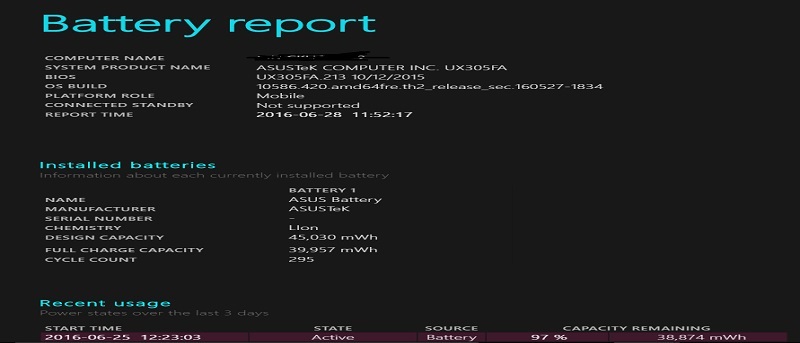
On a notebook it is easy to find how much capacity your battery has left. In Windows open the Command Prompt and type:
powercfg/batteryreport
This will save a report on your computer showing how much battery capacity is left.
If you have a Mac, then you can find the information in the “Hardware” section of your System Information Window. Note that Apple, like many other electronic companies, tracks battery lifespan by cycle counts. When a battery charges completely, that is one cycle count. The vast majority of MacBooks have a cycle count of 1000, which is when the battery is considered to be consumed. However, MacBooks from 2010 or earlier can have a cycle count of 500 or less.
For your smartphone, outside apps can help a lot. The Battery app for Android or BatteryLife for the iPhone or iPad can tell you what your battery’s lifespan is. Remember that you probably don’t need to replace either a laptop or smartphone battery until the capacity has fallen to around twenty percent, though you can do it earlier.
Plenty More to Do
There is more you can do to keep your battery’s lifespan running longer. Darken your screen display, find power saving modes, and don’t rely on your phone’s GPS so much. We have already covered plenty of battery saving tips for Windows, Mac OS X, Android, Linux and iOS, so do check them out. But above all else, you should keep your devices’ batteries at around room temperature and not fully charged so that they can continue to last over the long run.
But no matter how much work you do to keep your battery alive, they will fade eventually. So while you can keep your three-year-old battery working longer with proper care, check its levels. The last thing you want is to realize out of the blue that your computer or smartphone battery cannot hold a charge at all anymore.
Image credit: 2010.06.08