

Mozilla has begun to roll out two-factor authentication (2FA) in Firefox accounts, the mechanism which is used to synchronize history, add-ons, bookmarks and passwords across all your devices.
Enabling this feature on your account adds an extra security layer by requiring additional verification before logging you in. This means that even if your password is compromised, an attacker will not be able to use it alone to get access to your account.
This article describes how you can enable 2FA on your Firefox account right away. Before you proceed, you need an authentication app installed on your phone for generating TOTP (Time-based One-Time Password) codes. You can try Google Authenticator and Authy. Both are available for Android and iOS.
Also read: 12 Ways to Speed Up Firefox Quantum
Enable 2FA in Firefox
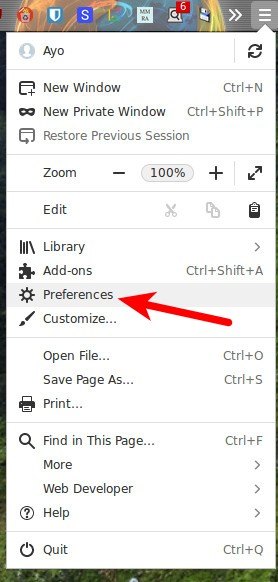
1. Launch Firefox, click the hamburger menu in the top-right corner, and then select “Preferences” from the dropdown list.
2. Click “Firefox Account” from the options on the left of the Preferences page. You will see your account and synchronization settings.
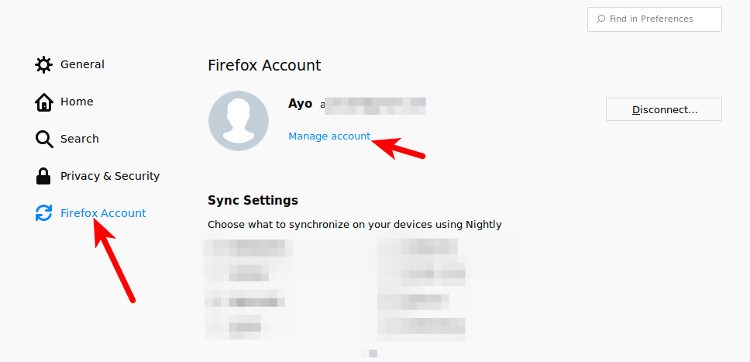
3. Click “Manage account” below your email address. This will open the Firefox Account page where you can change your account settings.
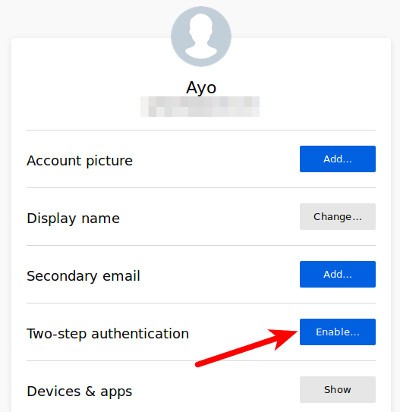
4. Find “Two-Step authentication” on the page. If you do not see the option, add add &showTwoStepAuthentication=true to the URL and refresh the page.
5. Click “Enable” on the Two-step authentication menu.
6. Open the authentication app on your phone and scan the QR Code presented. In Authy you can click the three-dots menu and then hit “Add account.”
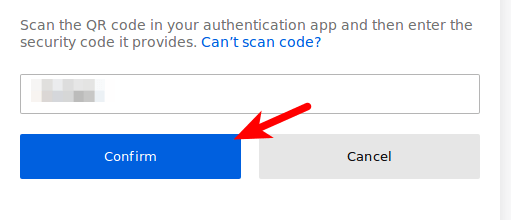
7. Once you’ve scanned the QR Code, your authentication app will provide you with a six-digit code. Enter it into the security code input field.
8. With that, 2FA should be enabled for your account. You will be presented with recovery codes that should be saved in a safe place so that if you lose access to your authentication app, you will not be locked out of your account.
With 2FA enabled, you will need to pull out the authentication app and enter the security code every time you log in.
Wrapping Up
While two-factor authentication is not 100% impervious to being circumvented, it’s much better than relying on just having a strong password for securing your account and makes you a less compelling target for attacks.
It’s very important if you synchronize your passwords with Firefox Sync because if a hacker gets ahold of your account, he/she could potentially access your entire online life. So make sure you take a few minutes to enable it today. Don’t forget to share your thoughts in the comments section below.