
How to Enable 2-Step Verification in Dropbox

Dropbox is one app that we use it everyday and it is where we place our important files that need to be synced to everywhere. This also the main reason why we take the security very seriously and even encrypt the files before they are synced to the Cloud. If you are looking for ways to tighten up the security even further, Dropbox has introduced a new 2-steps verification that make it a tad bit more difficult for people to access your account.

Here is how you can enable the 2-step verification in Dropbox.

1. Go to Dropbox.com and login to your Dropbox account.

2. At the top-right of the page, where it shows your name, click the Down arrow and select “Settings”.
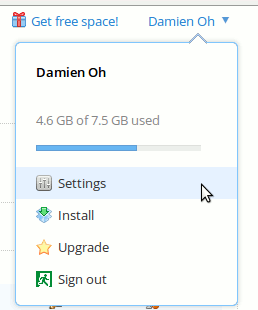
dropbox-settings

3. Click the “Security” tab and scroll down all the way to the bottom. You should see “Two Step Verification” field under your Account Information. Click the “Change” link.
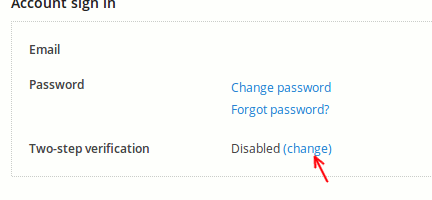
dropbox-change-link

4. On the popup screen, click “Get Started”.
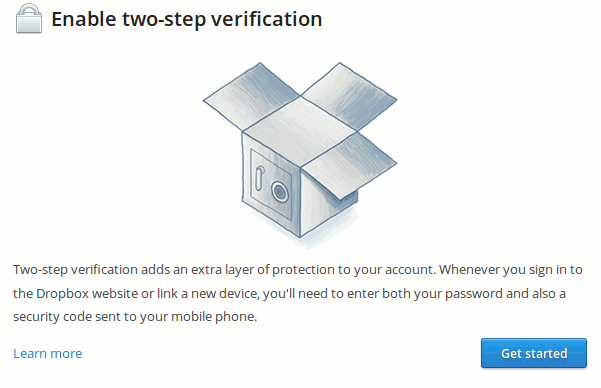
dropbox-enable-2step-verification

5. Next, you can choose between two verification methods – text message or mobile authentication.
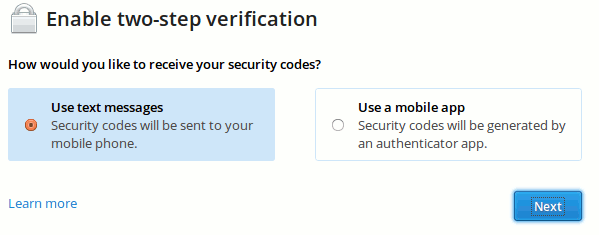
dropbox-verification-method

If you select the mobile app, it will show you a barcode where you have to scan to add in the key to the Authenticator app in Android/iOS (the one you use for Google Authentication). You will then be asked to enter the code for the first verification.

6. Lastly, it will show up a string of text and number that you need to write down and store it in a safe way. In the event that you lose your phone or the 2-step verification fail, this emergency code is required to disable the 2-step verification.
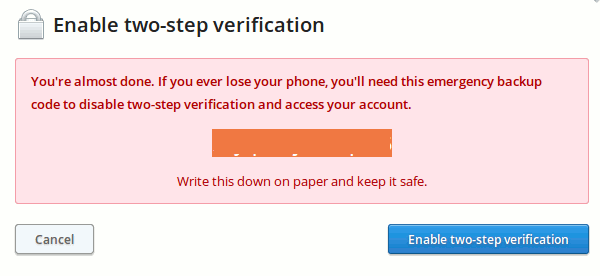
dropbox-emergency-backup

That’s it.

Subscribe to our newsletter!

Our latest tutorials delivered straight to your inbox

Damien Oh Avatar

Read next

Suzanne Simard sealed paper birch and Douglas fir seedlings inside plastic bags, fed them carbon-14 and carbon-13 dioxide, and nine days later found carbon had crossed between species through fungal threads in the British Columbia soil beneath her boots
A species of jellyfish called Turritopsis dohrnii can revert its adult cells back to a juvenile polyp stage when injured or starving, effectively restarting its life cycle, and biologists have so far failed to identify any natural limit to how many times it can do this.
A Japanese man named Jiroemon Kimura, who lived to 116, was born in 1897 when Queen Victoria still ruled and died in 2013, meaning a single human life personally overlapped with the invention of the airplane, the atomic bomb, the internet, and Instagram
The Hollywood sign originally read HOLLYWOODLAND when it was built in 1923 as a real estate advertisement for a housing development, and it was only meant to stand for 18 months, but nobody ever got around to taking it down and the city eventually adopted it as a landmark
Almost all of the world’s internet traffic does not travel by satellite but through fibre-optic cables lying on the ocean floor, a hidden web of wires crossing the deepest parts of the sea to connect the continents.
People who flip their phone face down on every table aren’t being secretive. They figured out that staying interruptible meant handing their time to whoever rang first
Twitch vs. Facebook Gaming vs. YouTube Gaming: What’s the Best Live Game Streaming Platform?
Chrome Extensions Ownership Transfer is a Direct Threat to You: How to Stay Safe