

If you are a webmaster, most probably you have used Tweetmeme or Topsy services to embed the Retweet button on your site. The good news is, Twitter has now released an official tweet button that you can use, so you don’t have to rely on third party to get your tweets across. The bad news is, you will have to change your existing code to show the Tweet button (the Tweetmeme or Topsy tweet button will continue to work fine if you decided not to change).
The benefits of using Twitter official Tweet button include:
- You can get a better (and more accurate) stats of the number of times your posts have been shared (retweeted).
- The Tweet button uses t.co as the URL shortener, and it will show the full URL in your tweets, thus making your links more credible.
- It allows you to recommend relevant Twitter accounts to your readers. This may help you to gain more followers.
- It is easy to implement
The easiest way to embed the Tweet button in WordPress
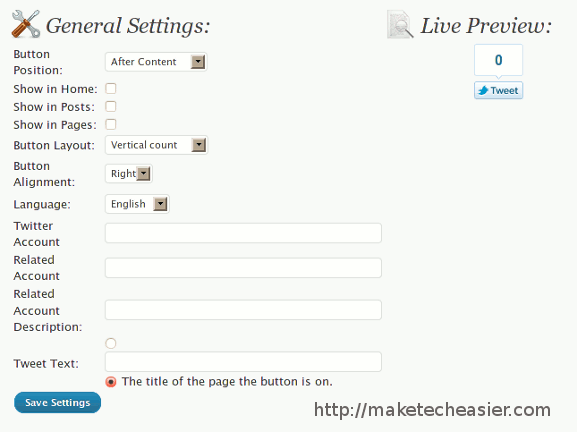
Needless to say, the easiest way to get thing done in WordPress is via plugins. Developer Ahmed Hussein has been quick to release a Twitter Tweet Button plugin. This will be handy for those who have completely no knowledge of coding, or for those who don’t want to dabble with code.
After activation, the plugin will automatically display the button on your site.
In the Settings page, you can configure the Tweet button to show before/after content, on the Home/Posts/Page, the type of button to display (vertical, horizontal etc) and several other options. There is also a Live Preview where you can check out the layout of the button.
The manual way
While the plugin can make life easier for you, it could add overhead to your server. Moreover, it gives you little control over where exactly to show the button.
Instead you can use the manual way to embed the Tweet button to your site. It is easy and only requires you to insert two lines of code to your theme file.
Go to the Twitter Tweet button page. Here is where you can customize and configure the Tweet button.
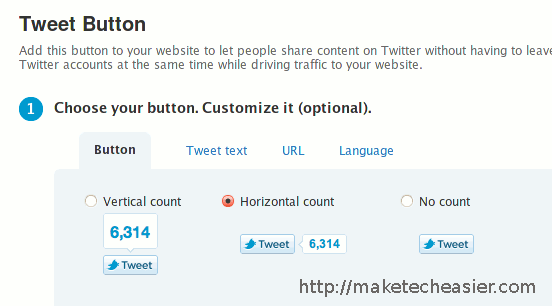
Things you can configure include the button layout, tweet text, URL and the language.
Scroll down further and you can include the Twitter accounts to recommend to your readers.

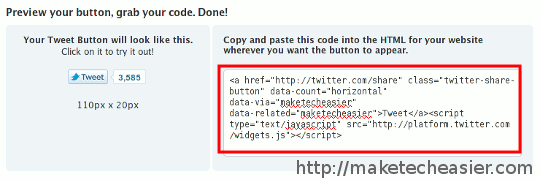
Lastly, grab the code and insert it to your theme file, in the location where you want it to display.
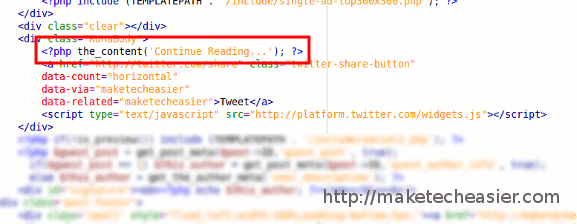
The most common place to display the Tweet button is at your Posts page, after the content. In your theme folder, open the single.php file and place the code after the tag
Further customization
If you want to further customize the Tweet button, like changing the button image, or use a text link instead of an image, you can also do it by adding a few attribute to the code.
To insert a pure HTML code without any javascript
Use the code:
&text=&via=TWITTERHANDLE&related=TWITTERHANDLE">Tweet this
Remember to change the TWITTERHANDLE to your own Twitter username.
To use your own Tweet button
Use the code:
* referenced from dev.twitter.com
Remember to change the “your-tweet-button-image-url” to the URL of your Tweet button.
For more customization options, refer to the Tweet Button Documentation.
Have you embedded the Twitter Tweet button to your blog? How’s your experience with it? Share with us in the comments.