

You probably have done a lot of work on Excel or other spreadsheet application and you want to convert all of them into HTML document so you can place it on the Web. What should you do? This may seems like a simple question with obvious answers, but plenty of people are still having difficulty getting it done. There are several ways that you can convert your spreadsheet to HTML document, and luckily, you don’t need to be a HTML coder to do so.
Also read: How to Find and Remove Duplicates in Excel
1. Use the “Save-as” tool in your office suite
I am not sure about all the office suite, but for Microsoft Excel, OpenOffice and LibreOffice, they allow you to save your document as a HTML file. And yes, all your data will be converted to HTML format too.
To do this, you just have to go to “File -> Save as” and select HTML web document from the list. The naming convention might vary for different office suite.
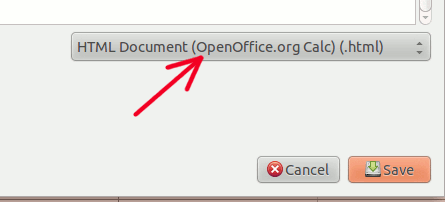
Once you have exported it, you can edit the HTML document or open with a browser to view it.
Also read: How to Link Data Between Spreadsheets in Google Sheets
2. Google Docs
What if you don’t have office suite on your PC and you don’t have permission to install software on your system? Here’s a simple walk-around: use Google Docs (or Google Drive)
1. Upload your spreadsheet document to Google Docs.
2. Go to “File -> Download As” and select “HTML”. It will probably open your current spreadsheet in a new tab, in webpage format. All you have to do is to right click your mouse and select “View Source”. Copy all the source code.
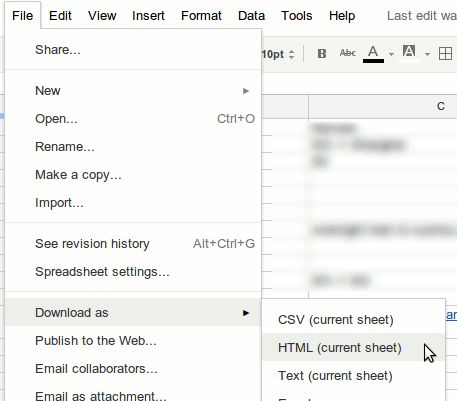
3. Paste the HTML source code to a text editor and save it with a .html extension.
3. Using a web service – Tableizer
If you prefer a more manual method, you can make use of a web service to convert your spreadsheet to HTML document.
1. Go to Tableizer.
2. Copy the data in your spreadsheet document and paste it in the input field. Click “Tableize it”.
That’s it. It will generate the HTML table code as well as a preview of how it looks like on the Web. You can simply copy and paste the HTML code to your Web document.
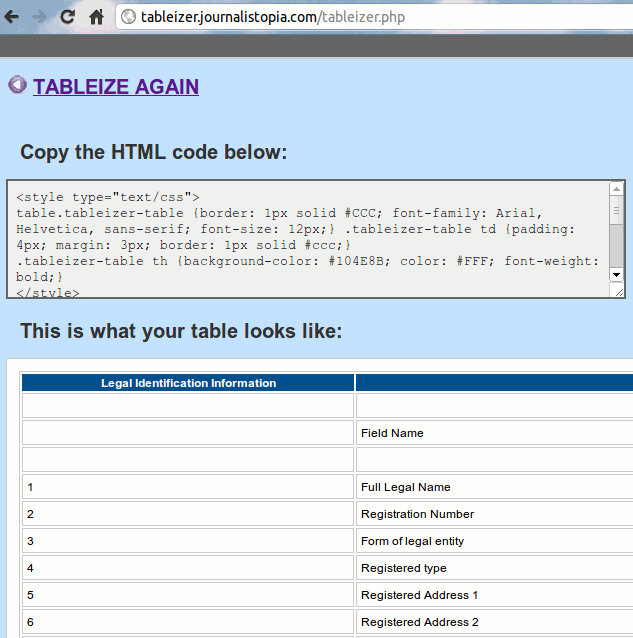
I have tested Tableizer with several documents and it works well with most of them. For some instances, it has difficulties interpreting a carriage return within cells. Your result may vary.
Note: If you have used Macros or formula in your spreadsheet, they might not translate well in the HTML format.
What other ways do you use to convert your spreadsheet to HTML?