


It’s something almost everyone has done at least once. You allow apps to access your Gmail data so you won’t have to sign up the old-fashioned way. It’s true that you’ll save yourself a few minutes, but are those minutes worth the app looking at your data?
If you’ve given it some thought and want to deny the apps the permission you once gave them, you can. You’ll finally be able to relax knowing that the apps that you don’t even use anymore can’t get your data any longer.
Why You Should Deny Third-Party Apps Permission to Your Gmail Account
When you use your Google account to sign up to use an app, there are three different levels of information they can ask for: basic, read and write and full access. Some apps will even ask you for permission to add events to your Google Calendar.
When you give an app “Full Access” to your Google account, you’re giving them permission to delete your account, view your account activity, change your password, and use Google Pay to send cash (among other things).
With “Read and Write” access, you allow, for example, a calendar app to create tasks lists, manage your Google Calendar and delete and send emails via Gmail.
With the “Basic” Information permission, the app will only have access to info such as your name and email. Also, the information that you have added to the Google personal info page will also be accessed by the app.
How to Deny Third-Party Apps Access to Your Google Account
To see how many apps have access to your Gmail account, sign into the account. Once you’re in, go to “My Accounts -> Sign-in & Security -> Connected Apps & Sites -> Manage Apps.” You can follow these steps if you’re already in your Gmail Account, but if you don’t want to go through all these steps, you can go directly to the Manage Apps page.
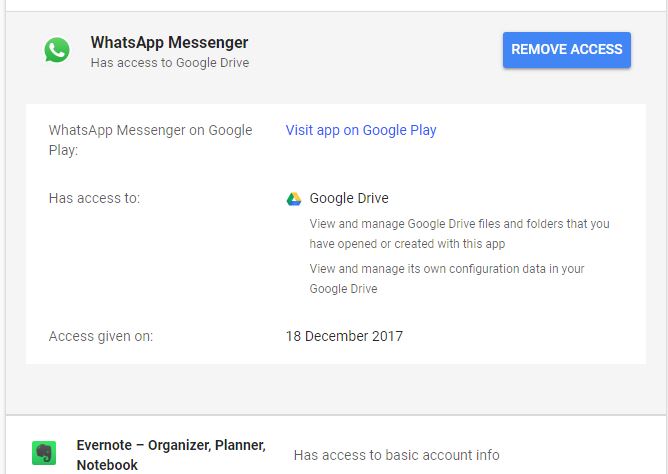
The Manage Apps page will show you all of the apps that have access to your Gmail account and the permissions they have. Below each app you’ll see what kind of information it has access to in detail. To remove the app, just click on it, and the blue “Remove” button should appear to the right. Click on it and the app will no longer have access to your Google account.
Conclusion
Companies are continually trying to find ways to get their hands on your information. Creating apps with their invasive permissions is how they’re getting it since you probably need to use the features the app has. Do you think that any app is worth giving full access to your Google account? Let us know what you think in the comments below.