


In Firefox 44 Mozilla finally catches up with Chrome. With this version you’ll be able to receive desktop-style web push notifications from select websites right onto your desktop. Best of all, you won’t even need to have the website open (much like when you get push notifications on your smartphone without an app being open). It’s a pretty cool feature, and there is no doubt Firefox users are giddy to try it out.
However, since this feature is now present in at least two mainstream browsers, the nagging-to-accept Desktop notifications are about to explode. Soon enough you’ll see websites using these notification systems in really malicious ways. Of course, this hasn’t happened yet, but it’s usually easy to see these things coming.
So, how do you disable them? It’s actually quite easy to do.
Disabling Notifications
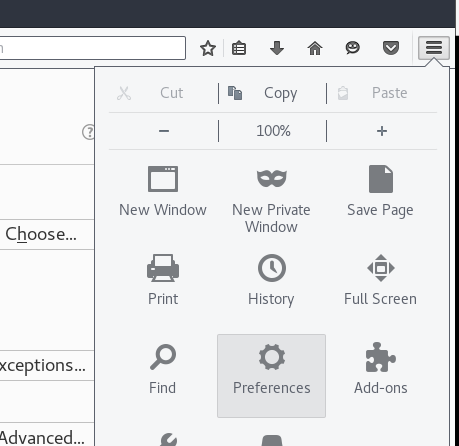
Disabling these new notifications is a mostly one-step process. All that’s required is to go over to the Settings page in Firefox. Do so by clicking the menu button in the browser and then clicking the Preferences button.
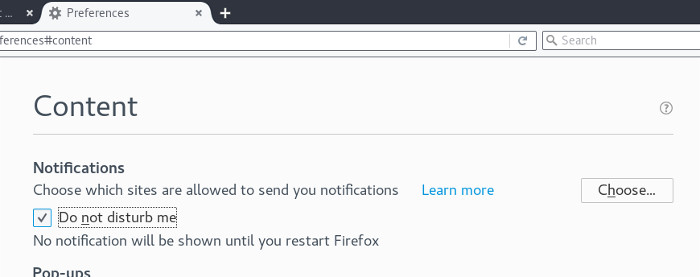
From here you’ll need to navigate over to the Content tab of the Preference window. You should see something that says “Notifications.” Click the “Do not disturb me” checkbox. Then, just close Firefox and re-open it. You’ll be free from pestering websites asking for you to “turn on notifications.”
Want to go back? Just uncheck the box and restart Firefox again!
Disable Web push notifications via About:config
If you don’t see the “Do not disturb me” option as shown above, you can use the about:config method to disable web push notifications permanently.
1. In Firefox type about:config in the URL bar and click Enter.
2. Click the “I’ll be careful, I promise!” button to proceed.
3. In the search bar at the top, type dom.webnotifications.enabled. It should show an entry such as the one pictured below.
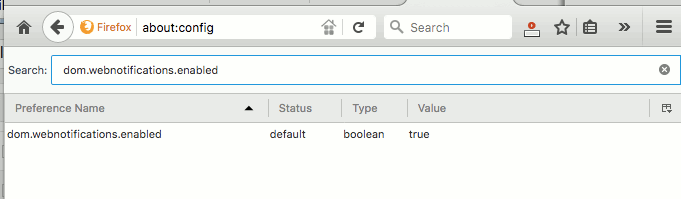
Double-click on the entry to change the value from “true” to “false.”
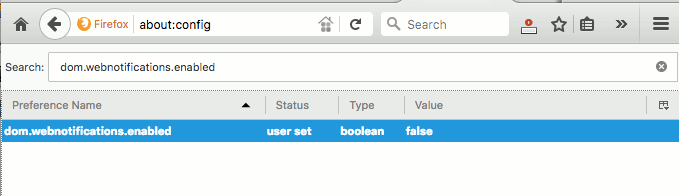
4. Close the tab to finish.
Choosing which sites can use Firefox notifications
Maybe you don’t want to disable notifications completely. It’s understandable, as websites these days are adding more and more features in the way of “push” style notifications. There’s a simple way to do it to be able to pick and choose.
Same as before, head to the Content section of the Preferences page in Firefox. You won’t exactly be able to create a traditional white-list, or black-list for that matter. There is no allowing or banning websites here. I’m sure that this feature will be implemented in future releases.
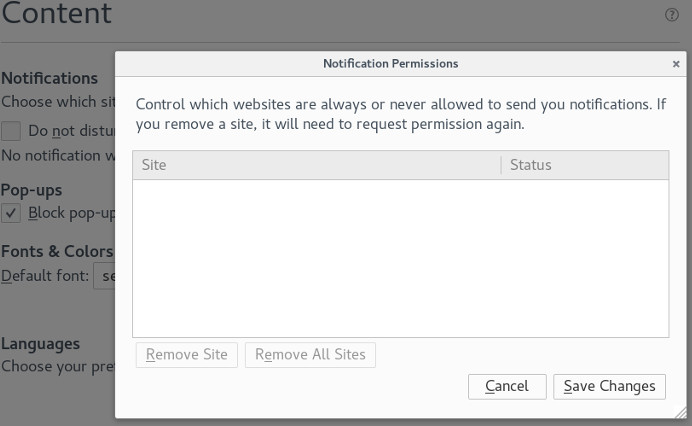
Instead, you’ll need to go through this list and delete access to websites you would prefer to not have access to your browser’s notification settings. That way only the websites you truly want to deliver notifications can.
Conclusion
Desktop notifications are a useful thing. They make it so it’s possible to keep up with pages even when they’re not open. This makes it great for social media sites that require a ton of attention. Still, with this new feature being introduced, websites have been getting somewhat forceful about it.
Some websites are more aggressive and “persuasive” about turning it on for their site. This can be a nuisance. In fact, as with many of them, it just starts to be annoying.
However, it should be noted that on the Internet we usually can’t have nice things. Often creators can take useful features and turn it against their users for their own gain. That’s bad news and something that we should be vigilant about.
Image Credit: Johnathan Nightingale