


When browsing articles and blogs on the web, you may want to copy a headline or a phrase that has a link. Usually, when following the usual copy-and-paste method, the highlighted phrase will paste along with the link, especially when you paste it into a word processor or an HTML editor. This can be an annoyance, particularly when you only want to copy and paste the text and not the link.
While there are many workarounds to this, there is a quicker, easier approach to the problem. Instead of copying and pasting text with links and then removing them later, there’s a way to remove the link before you start copying.
A Firefox add-on called Link Stun enables you to temporarily disable links in highlighted text so you can copy and paste them as plain text. Here’s how it works:
1. First, you’ll have to download and install the add-on. After installing, you’ll need to restart Firefox.
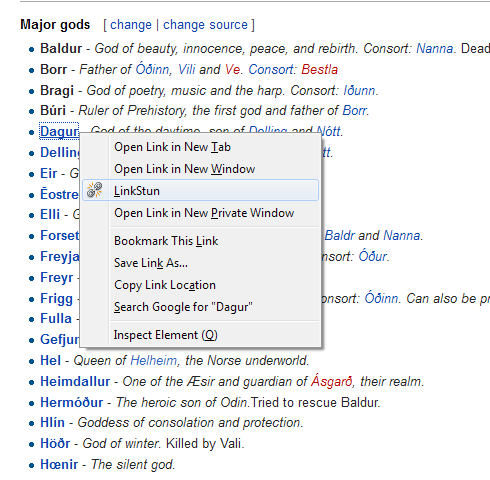
Once restarted, you may browse into a web page of your choice and activate Link Stun using the context menu.
2. Right-click on the text you want to copy, and select “Link Stun”. This will immediately clear out any links associated with the highlighted text. You will notice that a cursor appears when you hover over the text instead of an arrow. This means that the text can now be copied without including the link.

Also, any font style that applies for a linked text will disappear when selecting Link Stun. For instance, a link in Wikipedia entries is usually in blue. When Link Stun is activated, the text becomes black.

3. Highlight the text and copy and paste as normal.
This is how the text looked when pasted to a Word file:

It should be noted, though, that the copied text will still maintain formatting properties, i.e., font size and style. You will need to manually change this should you need a different text format.
Link Stun is particularly useful when removing links from footnotes before copying them into your own text document. It’s also handy when you need to copy a long list of text without copying the links as well, such as a database or archive page.
While there isn’t a way to “stun” multiple links in one go, this is still possible by manually disabling links one by one. This lessens the convenience, but it’s well worth the effort.
There’s also no option in the context menu to re-enable the links. You would have to reload the page to get the links back into the text.
Link Stun is a quick fix for removing unwanted links in text for more convenient copying, but it does need quite a few improvements. It’s not flexible and advanced, but it does get the job done, and it’s easy to do. If you ever, at some point, want to remove links from text as easily and as fast as possible, this add-on is one of the best ways to do it.