


Many people misuse the Facebook tagging feature and tag all of their friends in posts. If you have such friends, then most probably your timeline is filled with posts you may not have direct connection with.
If for some reason you can’t unfriend such people, then you should at least review what they are tagging you in before it is posted on your Facebook Timeline. This will ensure your Timeline is clean of all the junk. Let’s see how to do this.
What You Can Control and What You Can’t
Before we tell you how to control what appears on your Facebook Timeline, it is important to know what you can actually control. Facebook allows you to show or hide tagged posts on your Timeline. This doesn’t mean other people won’t be able to tag you without your permission. The only thing you can do is stop it from appearing on your Timeline so your Timeline will stay clean of all the junk you don’t want your profile visitor to see.
The tagged post will still be shown to other people in the Facebook newsfeed, like “X person tagged you in that post.” Additionally, other people can also search for the post to see who tagged you. Of course, you can always untag yourself using the “More” option if you are not comfortable with the post.
Furthermore, if someone posts directly on your Timeline instead of tagging you in the post, then it will be posted without any permission from you.
Control What Appears on Your Facebook Timeline
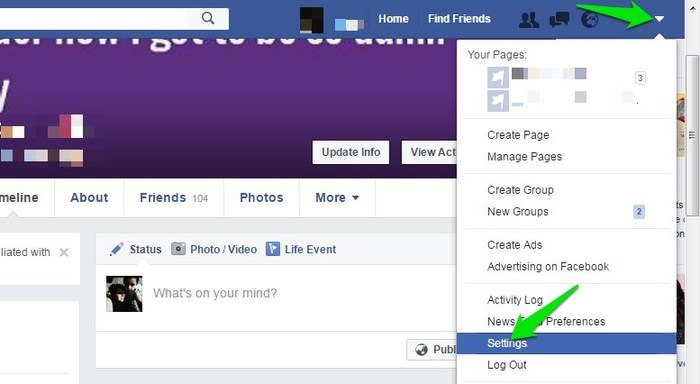
Now let’s see how you can control posts that appear on your Facebook Timeline. Click on the upside down arrow on the top left corner of the window and select “Settings” from the menu.
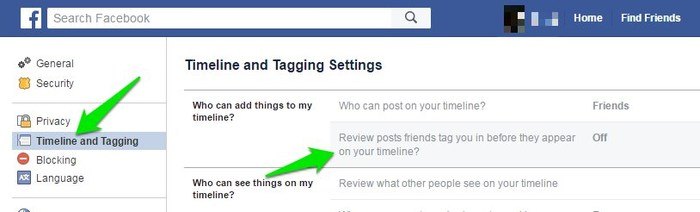
Move to the “Timeline and Tagging” section in the left sidebar and click on the “Review posts friends tag you in before they appear on your timeline?” option. You will see a button below that will be set as “Disabled.” Click on it and select “Enabled” from the menu.
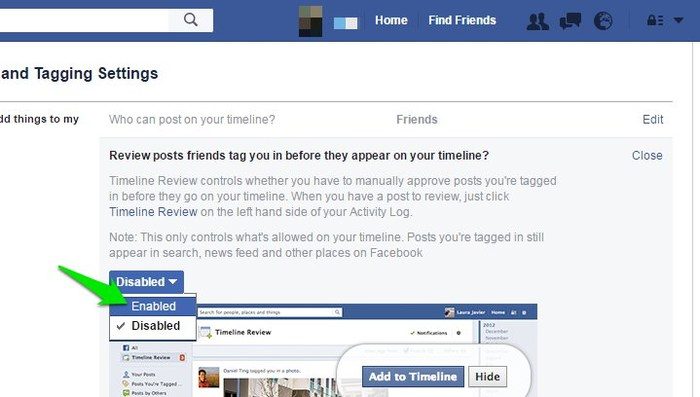
This will enable the “Review” feature that will stop posts on your Timeline until you review and confirm. Whenever someone tags you in a post, you will receive a notification with a “Timeline Review” option next to it. You can click on it to see the post and then click on “Add to Timeline” to show the post on Timeline or click on “Hide” to hide the post from the Timeline.
Conclusion
That’s how you can simply control what appears on your Facebook Timeline and keep it clean and tidy. If you have such awkward friends who misuse the tagging feature, then you should definitely enable the review feature. It will stop other people from immediately seeing what appears on your Timeline. Additionally, you will also have time to untag yourself if you don’t want to become a part of a post.