

Going on holidays where there is limited Internet access is a tough decision especially for those who are always connected to the Internet. If you are an Internet geek and never turn off your computer, it will be a hard work to go anywhere without your computer. But if it is necessary to go without your computer, you should setup your computer such that you can control it from a remote location if needed.
There are several utilities which can serve as a remote control for your computer. If you are in a hurry and want basic remote control over your computer with minimal configuration, you can do this by using a Gmail account. sRemote is a tiny portable application which is made for the exact purpose of controlling a computer remotely using a Gmail account. It allows some basic commands to be executed on the computer remotely through Gmail.
1. Download sRemote. It will come as a zipped file. You should unzip it in a folder so that it may be able to save settings (which will not be possible while residing inside the zip file itself). When you start sRemote for the first time, it will ask you to define a master password which will be used to access the computer on which sRemote is running.
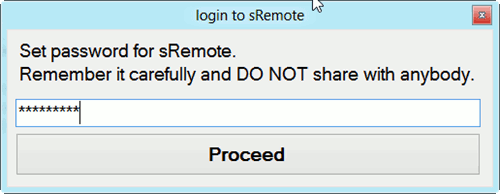
Please note that you should never give this master password to anyone because anyone who has this password will be able to take control of your computer remotely.
2. The next step involves setting up your Gmail credentials for sRemote. Just click on Gmail settings and enter your Gmail email address, password and a reply to address which must also be a Gmail account.
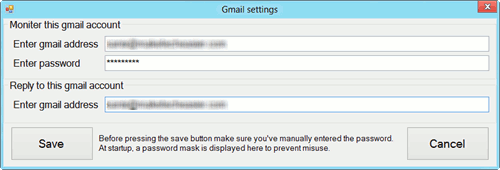
One thing to note here is that if you have enabled two step authentication in your Gmail account, you will need to configure a new application password for sRemote. The original Gmail account password will not work.
3. After configuring the Gmail account settings, click on the Start monitoring button. This will trigger sRemote to check your Gmail account for new email. The default monitoring interval is 5 seconds. You can configure it according to your needs.
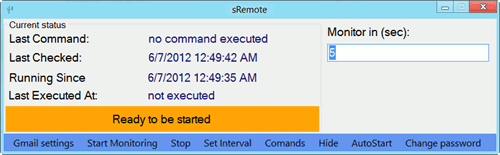
Now comes the exciting part where you will actually issue commands to your computer remotely. For this, you can use any email address and any device. Basically you will have to send an email with specific command syntax to the Gmail account configured before (in sRemote). For example, if I have configured mycomputer@gmail.com in sRemote, you can send an email from anyone@hotmail.com to mycomputer@gmail.com with the following syntax:
password();command();
Where “password();” is the master password we had configured when starting sRemote and “command();” is any command supported by sRemote. These commands have to be in the subject line of the email. Please note that the password needs to be specified before any command in the subject line. If the password is not found by sRemote, it will simply ignore the command email.
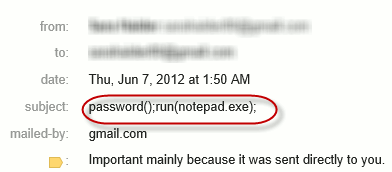
The following commands are supported by sRemote:
- screenshot();
- shutdown();
- logoff();
- restart();
- abort();
- run(program,parameters);
- play(path);
- msg(text);
- log(text);
- exit();
- beep();
- forceshut();
- mail(sender,password,receiver,body,subject);
- processes();
- ping(address);
- getfile(path);
- delfile(path);
- deldir(path);
- uptime();
- copy(oldpath,newpath);
- move(oldpath,newpath);
- help();
Overall sRemote is a handy program which becomes more useful when the person is in a hurry and wants to configure remote control settings in a few minutes. There are two areas that need to be improved in sRemote. One, sRemote does not support Google Apps addresses which also use the Gmail technology. Secondly, there is no confirmation if the command has been executed on the remote computer or not. In my opinion, one should get an email reply that the command has been successfully executed on the remote computer.
What are your thoughts about this nifty program? Will you be using it for your computer when you go remote?