
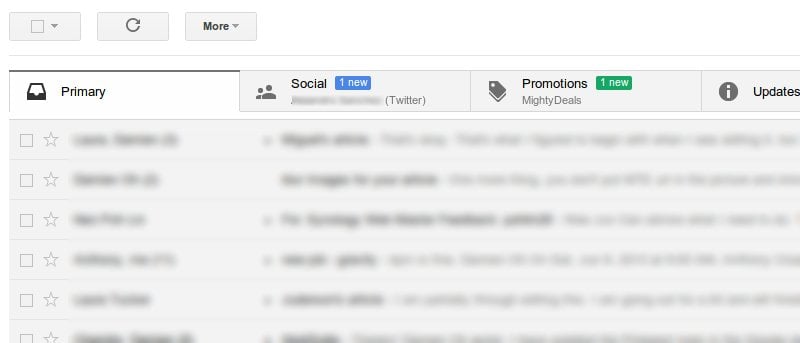

Google has recently introduced the new tabbed inbox in Gmail. This new interface will auto-sort your emails into various tabs and help you to be more productive. Unlike many features that are activated by default, the tabbed inbox interface is not visible until you activate it manually. This article will show you how you can activate and configure the tabbed inbox in Gmail.
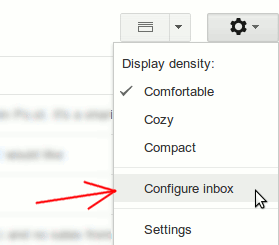
The tabbed inbox is not implemented by default. To activate it, you have to click the “Settings” (the wheel cog icon) and select “Configure Inbox” from the drop down.
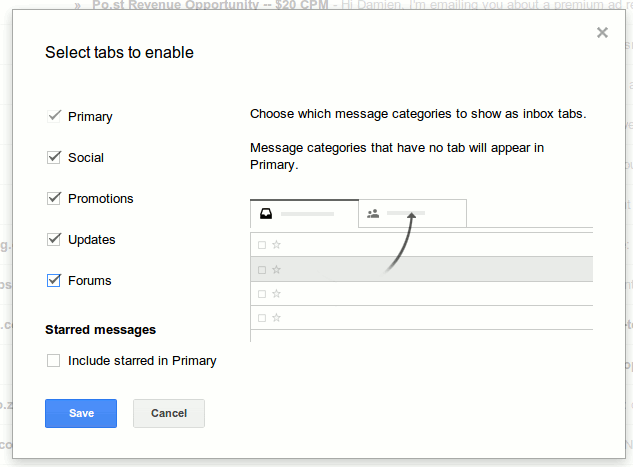
A popup window will show up. Other than the Primary tab that is checked, you can choose to enable Social, Promotions, Updates and Forums tab. As you hover above each section, it will show a snippet of the existing emails that will in fall in the respective section. For example, when I hover my mouse over the Social section, it show up all my Twitter and Facebook notification emails.
After you have clicked “Save”. It will bring you back to the inbox. You should now see the new tabbed interface in action. If you have plenty of unread emails, you should also see the unread count dropped drastically (only the important unread email are used for the Unread count).

Configuring the tabbed inbox
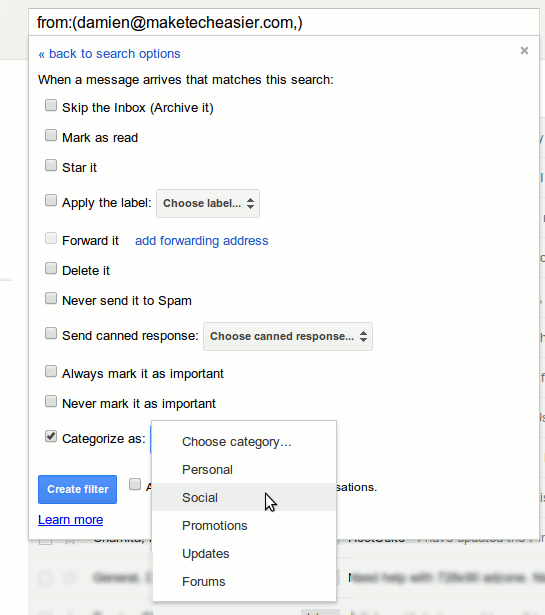
To configure which emails go to which tabs, you have to go to “Settings -> Filters”. Create a new filter.
Fill in the input field that you want to filter and click “create filter with this search”.
Lastly, under the “Categorize as” section, select the tabs where the emails that match this filter will go to.
Restore to the classic interface
If you have tried the tabbed inbox interface and didn’t like it, you can get it to return to the classic interface by unchecking all the boxes.
However, if you are previously using the “Multiple Inboxes” feature to show multiple inboxes, you will find that it no longer work. To restore the multiple inboxes:
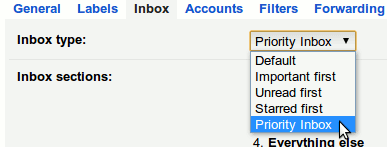
1. Go to “Settings -> Inbox”.
2. In the “Inbox Type” dropdown box, you should see the option “Default” selected by default. Click the drop down and change to “Priority Inbox”
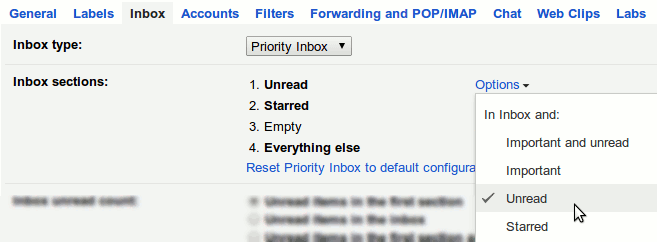
3. Now, you can create up to 4 multiple inboxes. You can click on the Option link to configure the emails that show up in each inbox.
Conclusion
Personally, I have tried the tabbed inbox and I don’t really like it. I prefer to see all my emails in one whole list so I won’t miss out important emails. In addition, the inability to control which email go into which tab and create your own tabs make it a less useful feature than it seems. What about you? Do you love the new tabbed inbox interface in Gmail?