

Google has added an exciting feature that is going to make things easier when it comes to working with more than one document. The new feature is going to allow users to compare two documents and also be able to see the differences between the two.
This new feature is going to be loved by teachers and hated by certain students. Why? Because this new feature will be able to let teachers know if a paper was inspired by another. The function can only be used on the online version of Google Docs for now.
How to See the Difference Between Two Google Docs Documents
The feature is just rolling out to everyone. So if you don’t see it yet, you will be getting it shortly. Sign in to the account that has the documents you want to compare. When you have one of the documents open, click on the tools option at the top.
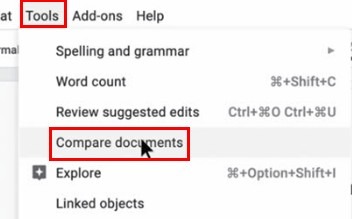
The “Compare documents” option should be under the “Review suggested edit” option. When you click this option, you will be taken to your Drive where you will need to choose the second document. Once you’ve selected it, click on the Open button at the bottom left of your screen.
Under where it says “Select the comparison document,” you can see the name of the file you selected. Give it a second look to make sure you didn’t pick the wrong document.
If you did choose the wrong document, simply click on the second file and choose the right one. The Compare button will not turn blue until you’ve selected a second document to compare.
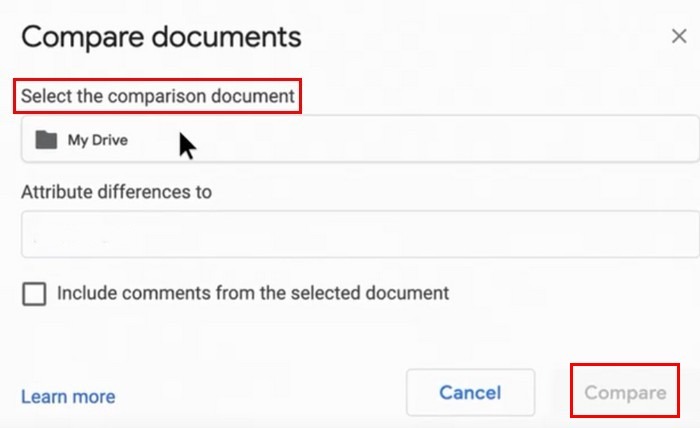
Your credit won’t go unnoticed since you can type your name in the section that says “Attribute differences to,” so everyone will know who made those changes. There is also an option to add comments from the document you selected. If you want to use this option, check the box to the side of it.
Ready to Compare
When the comparison is ready, Google Docs will show you a message letting you know. Click on the Open button, and the next document you will see will be one with all current suggested edits that can be seen as highlighted changes from both documents.
In the right pane you will see the name of the person who made the changes, what changes were made, and at what time. The new feature will even tell you what text was replaced and what it was replaced with.
There has been no word on when it’s also going to be available for the app, but hopefully it will be soon.
Conclusion
The feature should be rolling out to users who don’t have it yet in the next couple of days. It’s easy to use and to find and very useful. If you were using an extension or program to do what this new Google Docs feature can do, it’s up to you if you want to get rid of it or not. Do you find the new feature useful? Share your thoughts with us in the comments.