

WordPress comes with this “tag” feature that allows you to tag your posts. While it is a great feature for you to categorize your posts, there is one problem though – there are no ways to organize them. Over time, as your tag list grow, it becomes very messy and your database is full of those tags that you either have no use for them or have used only once. If you find that your WordPress blog is running slower and slower everyday, cleaning up your tag list is definitely one of the things you should do to regain the speed and power of your blog.
In WordPress, other than adding new tags, the only other option to manage your tags is to delete them. This is definitely not a good solution. There are times when we create two tags of the same meaning, such as “windows7” and “windows-7“. For such cases, the solution is to merge them into one rather than delete all of them.
A good plugin with the merge tag functionality is Term Management Tools. With this plugin, you can manage your terms (category and tags) easily.
Cleaning up your tags in WordPress
1. Install and activate the Term Management Tools plugin in your WordPress dashboard.
2. Go to your Post Tag list (Posts -> Post Tags).
3. The default view is to show 20 tags per page. If you have plenty of tags, it is going to take up a lot of your time switching between each page. What you can do is to increase the number of tags shown per page. Click the “Screen Options” button at the top of the page. Enter the number of tags you want it to show per page. The maximum number you can enter is 999.

4. Go through the list of tags and put a check beside the tags that have 0 post. At the top (or bottom), click on the dropdown menu and select “Delete”. Click Apply. This will delete the unused tags.
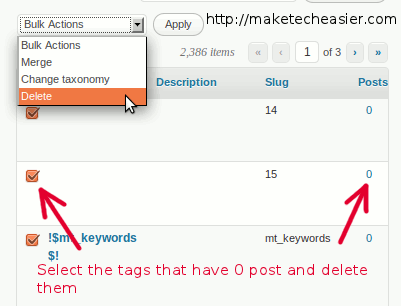
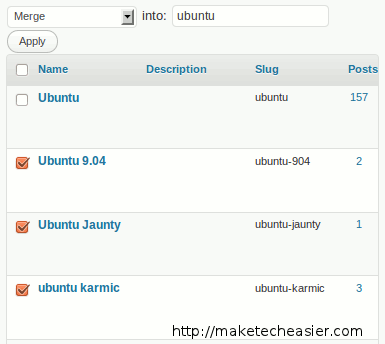
5. Next, go through the list again. For those similar or duplicate tags that you have created, put a check beside them and select “Merge” from the dropdown menu. An input field will appear for you to enter the tag name that you want to merge the two (or more) tags into.
6. If your tag list is long, it will take a long time for you to finish cleaning up your tags, but I assure you it is well worth the effort. Nothing is worst than a messed up and bulky database. Once you have completed the clean up, deactivate the plugin. You have no use for it anymore.
7. Lastly, optimize your database and do a full database backup (using the WP DB Manager plugin).
8. That’s it.
You might also want to check out other ways to clean up your WordPress blog.