

Have you ever encountered the situation where you have plenty of tabs open in your browser and one of them is blasting out loud advertisement video? Yes, I know, it is very irritating, especially when you don’t know which tab contains the annoying video and you have to flick through all the tabs to locate (and stop) the ad. With Chrome Toolbox, you can now easily mute all the tabs with a single click.
Chrome Toolbox is a Google Chrome extension created by Google. It is an enhancement and quick access tool combined into one.
After the installation, you will see a new icon on the toolbar where you can click to reveal a dropdown menu containing various useful tools, including the mute tabs option.
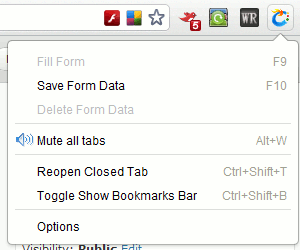
The dropdown menu also allows you to save form data for the existing site and quickly fill it up next time you visit the same site. You also can get it to open closed tab and toggle Show Bookmarks Bar. (Note: Some of these features have long been available in the form of shortcut keys, but are now grouped together to provide a faster access)
Toolbar/Tab option
The option page is where you can find more interesting things.
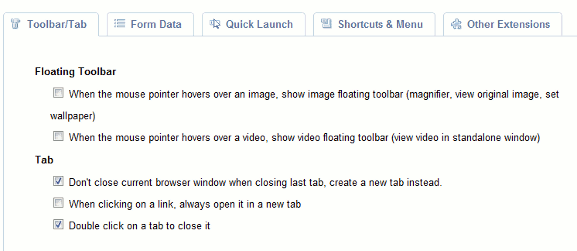
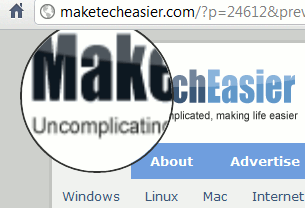
You can activate the floating toolbar option for images and videos so that every time you hover your mouse over an image or video, you can magnify it, set it as wallpaper or open the video in a new standalone window. For the video, you even have the ability to pin it “always on top” of all other windows.
By default, when you close the last tab, the browser window will close too. With this extension, you can now configure it to open a new tab when the last tab is closed.
Quick Launch Bookmarks shortcut keys
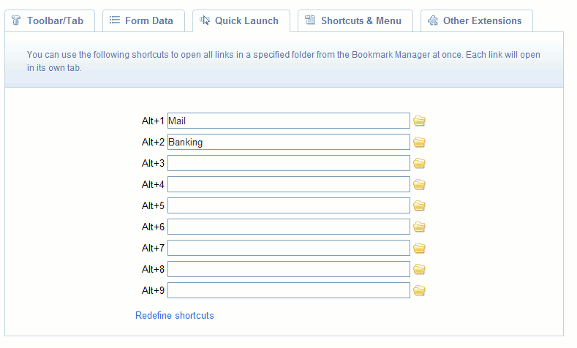
If you have organized your bookmarks into various folders, here is where you can assign shortcut (Alt + #) to open the links in a specified folder all at once.
Shortcuts and menu
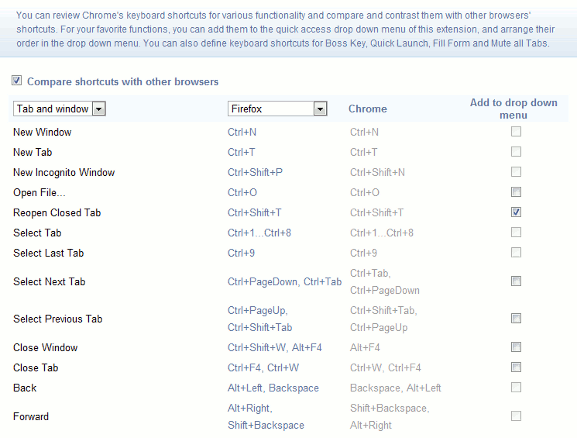
Google Chrome comes with plenty of keyboard shortcuts that you probably don’t even know their existence. This is where the Shortcuts and Menu option is useful. You can find all the keyboard shortcuts of the browser here. You can even compare the shortcuts with other browser and which one is the same and which is different.
For those keyboard shortcuts that you don’t use, you can also deactivate them.
Google Chrome is already well known for its speed and simplicity. With this extension, it is now even more user-friendly than before. What other features do you hope to see in the extension?
Note: The above extension was tested on a Windows machine. Some of the features are not available in the Linux version of Google Chrome.
Download Chrome Toolbox