


It’s been almost a year since Google first announced that it was going to add a built-in ad-blocker to Chrome. That day is finally here, and any ads that don’t play nice with the Better Ads Standard will be blocked.
For example, ads such as auto-play videos, pop-ups, full-screen ads, and more will be blocked. It doesn’t matter if you are using Chrome for desktop or Android, Google’s new ad blocker will be included. You’re not obligated to use the ad blocker; you can disable it if you want to.
How Google’s New Ad Blocker Works
Rather than naming it ad blocker, Google prefers to call it “ad filter,” as its main purpose is to filter out bad ads. It is built in to the Chrome browser, from version 64 onward. With Chrome’s ad filter, ads will now have to follow specific rules if they want to be displayed. Right off the bat, there are twelve types of ads that won’t be shown to users such as the ones mentioned earlier in the article.
The idea behind the new ad filter is to punish disruptive ads by blocking them and reward the ones that play by the rules by showing them. Sites are given thirty days to change how they display their ads so they comply with the Better Ads Standards.

When Chrome analyzes a page, it can fall into three categories: Passing, Warning, and Fail. If you own a site and want to know if you have any violations, Google has an Ad Experience Report for you to look into. Google will prevent all ads on sites that don’t comply with the Better Ads standard, not only the ads that violate it.
How to Disable or Enable Chrome’s Ad Filter
Whether you want to turn the ad filter on or off, the steps are the same. You’ll need to have Chrome open and click on the three vertical dots. Click on “Settings” and scroll all the way down.
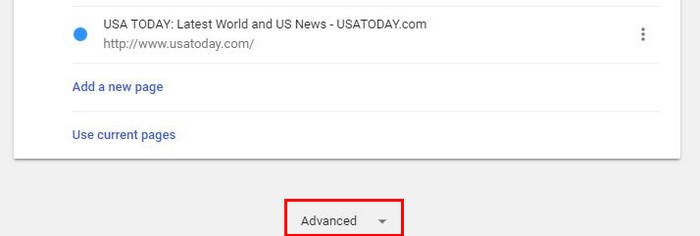
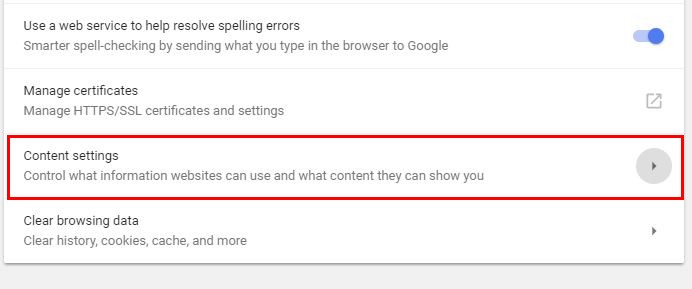
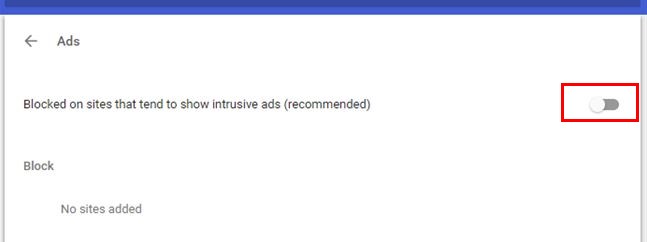
Select the “Advanced” dropdown menu and click on “Content Settings.” Scroll down and click on the Ads option. Once you’ve selected it, you should see the option to either toggle on or off the new ad-blocker.
It’s going to be on by default, so if you’re not happy with it, you can disable it. If you ever change your mind, you’ll already know how to undo what you did.
Only Admit Ads on Particular Sites
Some sites don’t bombard you with so many ads like others do. If you happen to come across a site that you like but just can’t stand the number of ads it has, you can always only allow the ads to show to particular sites.
To either allow or block ads on a site, go to the site in question. Click on the Secure option to the left or the URL. A dropdown menu will appear, but the choice you need to click on is Site Settings.
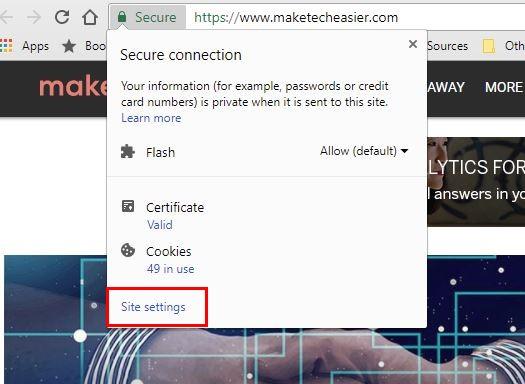
When the settings page appears, look for and click on the Ads option dropdown menu. It’s up to you what option you want to choose from here.
If you’re using Chrome on your desktop, you’ll see a notification similar to the ones that ask you if you’ll accept notifications. Android users will get a message telling them that ads on this site have been blocked at the bottom.
If you want to allow ads on that particular site, tap on details and toggle on the option that says “Always allow ads on this site.” Don’t forget to tap on OK.
Conclusion
Not all ads are bad since you do see things you like from time to time, but sometimes those ads can go too far. They can become intrusive and even make you hate all ads altogether. Will you be disabling Chrome’s new ad blocker? Share your thoughts in the comments.