


WordPress powers around 23% of all websites, and many users often need to customise the themes they use in some way. Some people choose to edit the theme files directly, but that poses a major problem: once the theme is updated, all modifications will be lost. This is where creating a child theme comes in.
What are child themes?
Child themes are simply custom themes that inherit the functions and style of the parent theme. By creating a child theme, you can easily make modifications to the parent theme and keep those changes even when the parent theme is updated.
Now that you know what a child theme is, let’s look at a few ways you can create child themes and some of the best practices to follow.
Getting started
I will be using the Twenty Fifteen theme for this tutorial, but this will work for any theme you choose to use.
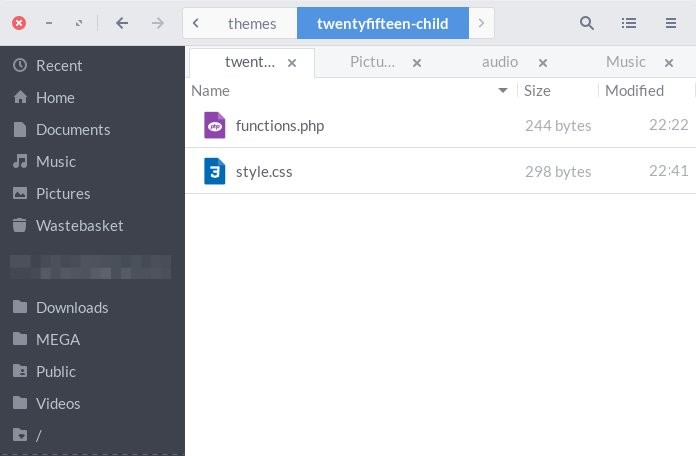
To create a child theme, simply navigate to your “wp-content/themes” directory and create a new folder for your child theme. You can name the folder “twentyfifteen-child” or something like that.
Next, you’ll need to create a “style.css” file within your new child theme folder and populate the file with the following content:
/*
Theme Name:     Twenty Fifteen Child
Theme URI:      https://maketecheasier.com
Description:    Twenty Fifteen Child
Author:         Ayo Isaiah
URI:            https://maketecheasier.com/author/ayoisaiah
Template:       twentyfifteen
Version:        1.0.0
*/
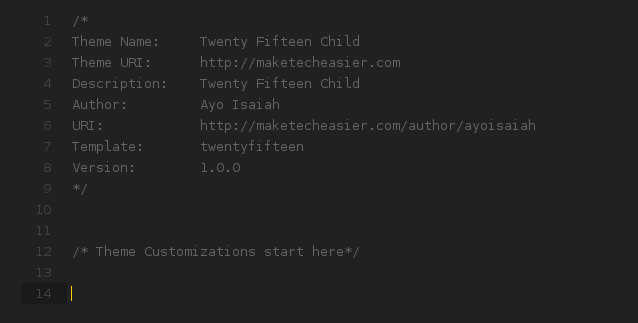
You can replace the theme name, URI, description and author name with details relevant to your child theme. The “Template” part, however, must be named after the directory of your parent theme.
In this case, the directory name for our parent theme is “twentyfifteen,” so the Template will be “twentyfifteen.” If you are using a different theme, don’t forget to update the template accordingly, or your child theme will break.
The next step is to properly enqueue the parent theme’s stylesheets so that your child theme can inherit the styles of the parents, and you can build from there. Some websites recommend that you use @import to do this, but that is no longer the best practice and should be avoided.
The best way to enqueue the parent theme styles is to create a “functions.php” file in your child theme folder and add the following contents:
The trick here is to replace “parent-style” with the directory of your parent theme and along with “-css” at the end. In our case, “parent-style” will be replaced by “twentyfifteen-css.”
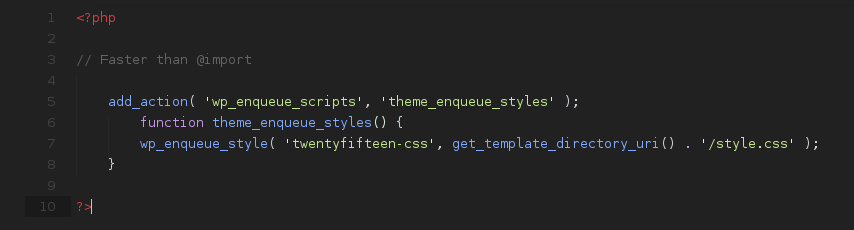
That’s it; your child theme is now ready to be activated.
Activating your child theme
Activating a child theme is exactly the same process as a normal theme. Simply navigate to “Appearance -> Themes” on the WordPress Dashboard and activate your child theme.
Creating a child theme with a plugin
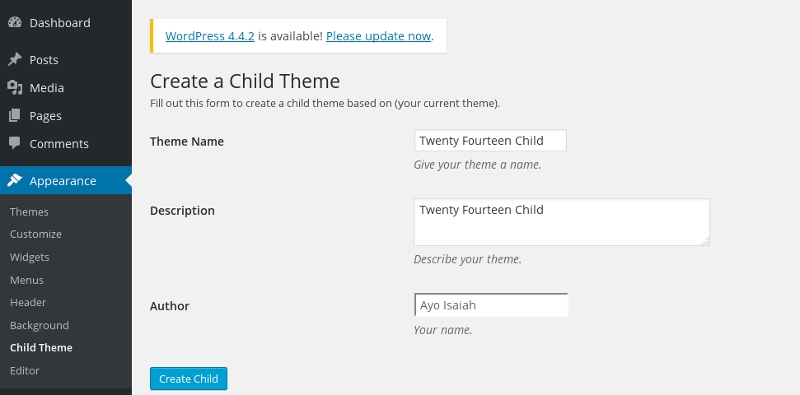
If you want to quicken the process of creating a child theme, you can use a free plugin to automatically create one for you. One-Click Child Theme makes it easy to do this at the click of a button. Simply install and activate the plugin, then go to “Appearance -> Child Theme” on the Dashboard and fill out the form on the page with the relevant details about your child theme. Once done, hit the “Create Child” button to create and activate your child theme.
Making Customisations
Now that our theme is activated, you can view your website to see how it looks. Assuming you did everything correctly, it will appear exactly the same as the parent theme. From this point on, you can add custom CSS to your child theme’s style.css file to override styles in the parent theme. Note that the styles you declare in your child theme will take priority over those in your parent theme, and you can now update the parent without any fear of losing your work.
If you want to add a new function to your website, you’ll need to declare the functions in your child theme’s “function.php” file which will be loaded alongside the parent theme’s “function.php” file.
Other template files
Other PHP files must be copied to the child theme directory and modified there. This is because unlike the “functions.php” file, the parent theme’s equivalent file will be ignored in favour of your own, so make sure you place the original file in the same position within your child theme as with the parent theme so everything works smoothly.
Bottom Line
Now that you know why a child theme is necessary for making customisations on your website and how to create it, there’s no reason for you to alter your theme files directly. If still you need further clarification, leave a comment below or visit the WordPress Codex for more information about child themes.