


When you navigate to a webpage, the response from the server will depend on a number of factors. The OS being used will be checked (Windows, Linux, Mac or Mobile) along with the browser (Firefox, Chrome, Safari and alike) and possibly the system architecture (x86, x64, etc.) These elements help web developers optimize their pages and are a vital part of the modern web experience.
This is done by reading the “user agent” within the browser. A user agent is a little like an ID card. It allows sites to determine specific details, which in turn alters how the page is served to the user. A browser that reports being from a mobile device will have a different site than a desktop one. For instance, menus will be easier to touch and read, and text will be more stripped down and readable.
Normally, users are oblivious to the exchange of browser user agent data; there are, however, ways in which users and developers can change the user agent to test for different platforms or simply to mask their browser ID.
Note: this is not the same as being anonymous or invisible on the Internet. Browsers have a fingerprint that can help uniquely identify users with the user agent being one of these factors.
How to change the user agent in Edge
There are a range of plugins and addons for all major browsers to change the user agent; however, it can be achieved from within the browser itself.
When using Edge, open a page and press the F12 key to access the developer settings.
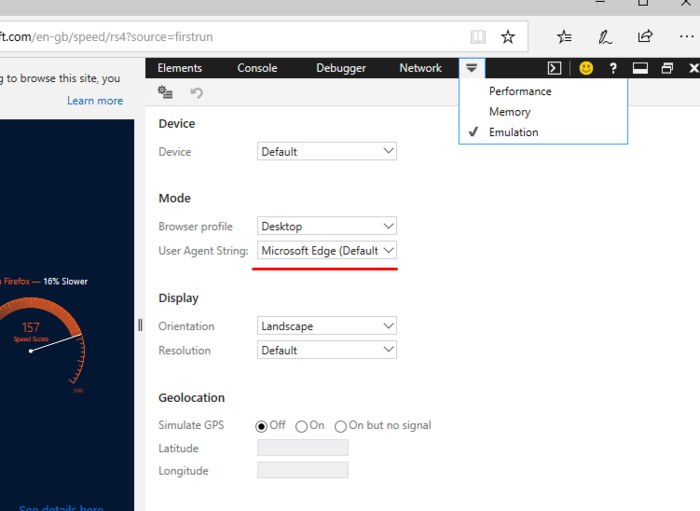
Select the “Emulation” tab and look for the “User Agent string list.” Here you can choose to make Edge mimick the browser of your choice. The page will refresh in real time so you can test easily.
How to change the user agent in Chrome
Just as with Edge, Chrome has a user agent change within the developer settings, although it is a lot more complicated to access.
Open the browser and click on the menu button on the top-right corner. From there click “Tools” and then “Developer Options.” You can also easily access this via the key combination of Ctrl + Shift +I.
As the developer tools windows pops up, select Network, then select the menu, which will look like three vertical dots. On this dropdown menu, choose more tools and Network Conditions. As you can see below, there will be an option to change the user agent by unticking the “Select automatically” box.
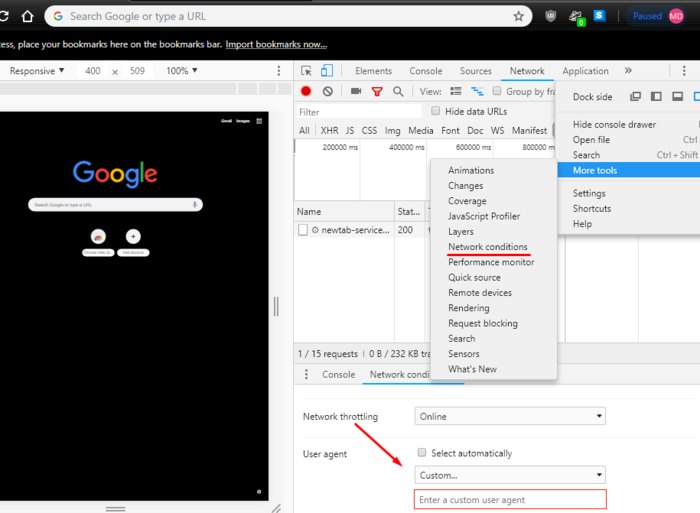
As with Edge, this will be limited to the tab and only while the developer options window is open.
How to change the user agent in Firefox
Firefox also shares the ability to change the user agent. Open a browser window and type about:config within the address bar. A warning will appear, but it is quite safe to proceed, providing you don’t change settings or flags without due care and attention.
Within the search box, find the following:
general.useragent.overridepreference
If you don’t have the value “general.useragent.overridepreference,” create it yourself. Right-click on the about:config page, and go to “New -> String” in the context menu. Name the new string “general.useragent.overridepreference,” and hit Enter to save.
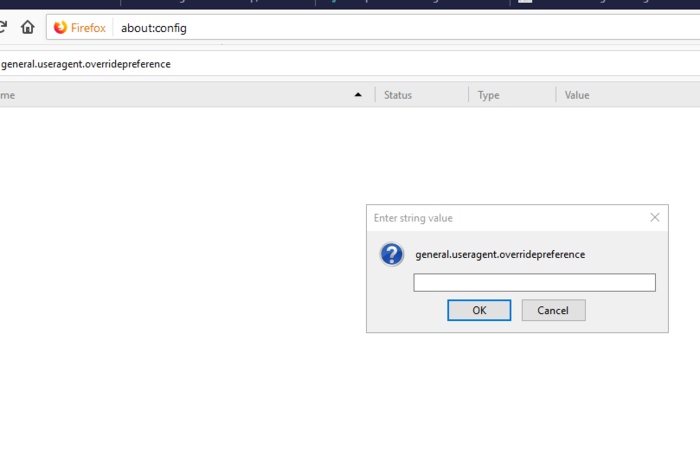
Now enter the following values based on your preference.
Chrome on Linux:
Mozilla/5.0 (X11; Linux x86_64) AppleWebKit/537.36 (KHTML, like Gecko) Chrome/65.0.3325.181 Safari/537.36
Microsoft Edge:
Mozilla/5.0 (Windows NT 10.0; Win64; x64) AppleWebKit/537.36 (KHTML, like Gecko) Chrome/46.0.2486.0 Safari/537.36 Edge/13.10586
Internet Explorer:
Mozilla/5.0 (Windows NT 6.1; WOW64; Trident/7.0; AS; rv:11.0) like Gecko
You can, of course, find other user agents online and use these.
What other options are there?
If you don’t fancy the idea of messing with a browser’s settings, then there are some addons and extensions that will do the job for you. These vary between browsers, but I will highlight two that work well for Chrome and Firefox.
Firstly, for Chrome there is User Agent Switcher. Not only does this work well, it is owned and maintained by Google themselves, so you can be sure it is safe.
For Firefox, normally I would recommend the User Agent Switcher from Chris Pederick. Unfortuately, it has not been updated by the developer for Firefox Quantum. Therefore, another addon I found was also of the same name, User Agent Switcher, but from Linder. The reviews seem mostly positive, but I cannot vouch for the accuracy of the addon as I have not used it. It is currently, at the time of writing this article, a featured extension from Firefox, so that may put to rest some concerns that users may have.
Changing the user agent is a good tool to use, especially if you are a web developer. Let us know in the comment section if you change yours and why.