

Although WordPress is one of the more powerful blogging platforms, I have always been a fan of Google’s Blogger.
After creating my personal tech blog, TechComet, on Blogger, I realised that my blog lacked a professional touch as its favicon was set to the default Blogger logo: the white and orange “B”.
If you want to create a brand for your blog, it is essential to replace the default icon with your own creation that matches the theme of your website.
In this article I will outline the steps to create and change the Blogger favicon.
Note: The steps outlined are geared towards Blogger users, however the general steps in creating a favicon can apply to any website or blog.
Use of a Favicon
A favicon is a 16×16 icon that appears on a browsers title bar or address bar. Browsers which support tabbed browsing also display the favicon on each individual tab.

As the screenshot shows, a favicon can really help your blog distinguish itself in a crowded browser as they are great visual indicators.
Creating a New Favicon
The first step is to create your own favicon.
Favicons are generally created using the .ico format, however you can also create the favicon using the GIF or PNG formats.
If you are not feeling particularly creative you can search the web for any image that you want to display as your favicon and shrink this down to the 16×16 size and save it as a .ico, .png, or a .gif file. There are also a number of favicon galleries where you can download ready-made favicons which are in the requisite size and format.
However, if you are going to the trouble of creating a brand for your blog, it makes sense that the favicon matches the theme of your blog. For example, I have a dark brown theme for my blog:

And I decided that it would be most appropriate if I create a favicon that matched the lettering and colour scheme.


Photoshop is probably the best application to use to create your favicon. Just remember to draw your image on a 16×16 canvas and save it as a .gif or .png file.
If you do not have Photoshop, there are a number of “favicon generators” such as this one, where you are able to create and edit an image on a 16×16 canvas.
Uploading Your Favicon
Blogger does not offer hosting services, but any images you attach to a blog post are saved automatically to your Picasa account.
So, all you have to do is create a blank blog post and attach your favicon to it. Then view the HTML version of your blog post by clicking on “Edit HTML”.
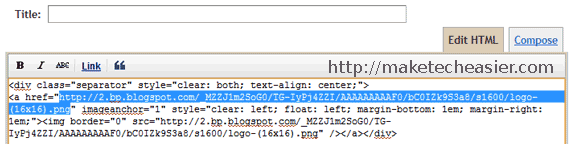
The location of my favicon is at “http://2.bp.blogspot.com/_MZZJ1m2SoG0/TG-IyPj4ZZI/AAAAAAAAAF0/bC0IZk9S3a8/s1600/logo-(16×16).png”. Keep a note of the link where your favicon is located.
If you use another image uploading service such as ImageShack, be sure to make a note of the direct link to the image (i.e. a link which ends with .ico, .png or .gif and not .html). For example, the ImageShack link for my favicon is at “http://img175.imageshack.us/img175/8924/logo16x16.png”.
Changing the Bloggers Default Favicon
Once you have created and uploaded a favicon you are satisfied with, open your Blogger dashboard and select “Design”.
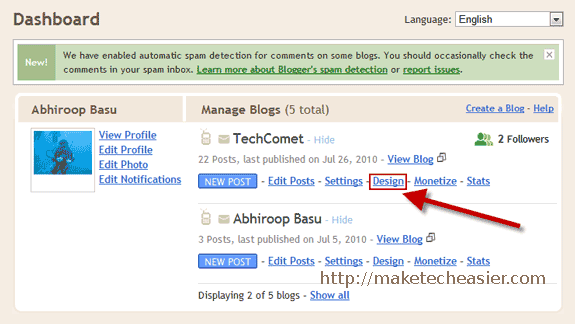
Next, on the main Blogger window select “Edit HTML“.

This will open up the HTML template editor. Here check “Expand Widget Templates” to ensure that all the HTML code for your website is visible.
Then scroll down and paste the following BEFORE the “” tag:
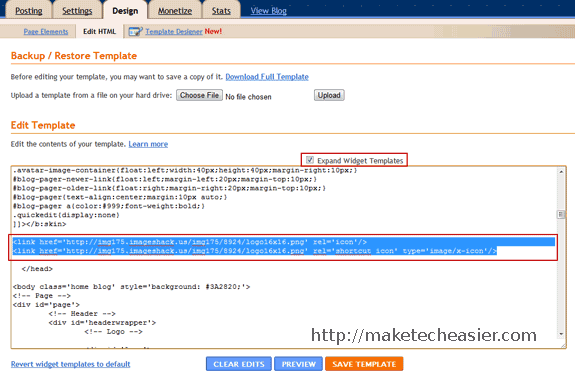
Refresh your blog and the new favicon should be visible.