

With the emergence of micro blogging websites like Twitter, Facebook, MySpace etc – an entire army of URL shortening services have evolved. You have used some of the popular URL shortening services e.g Bit.ly, Tinyurl.com, Goo.gl and so on.
All of these services allow you to shorten a long link, so that you can use the shortened form of the longer URL and share it on social websites like Facebook, Twitter, IM, Email and so on. Some of these URL shortening services also allow tracking features so that you may know how many users clicked a link, which is great !
One of the major limitation found in almost all the URL shortening services is that none of them allow you to shorten multiple URL’s and combine a group of shortened URL’s into one single link. Quite recently, Bit.ly announced Bit.ly bundles but shortening multiple web addresses and combining them into one single link has always been a missing feature among all the URL shortening services.
What if you can shorten all the URL’s and merge them into a single web link so that your friend can view an online slideshow of the links, one by one. BridgeURL is a new URL shortening service which attempts to fill this gap.
Using BridgeURL is fairly simple, head over to the homepage and enter all the links in the “List URL’s” text box. You may also want to associate a title and a description to the list of links, as shown below:
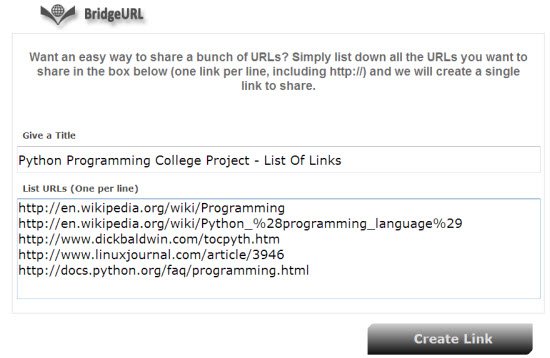
Be sure to add a meaningful description because the words used in the description field will be used to create your BridgeURL link. When you are done adding all the links in the “List URLs” text box, hit the “Create Link” button and BridgeURL will shorten all the URL’s to a single Bridge URL link.
On the following page, you will be shown the long BridgeURL link as well as a shortened Bit.ly version of the Bridge URL link, as shown below:
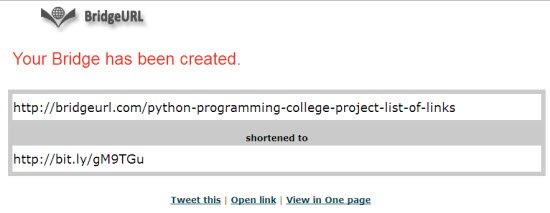
Now you have two options. You may either copy and use the long Bridge URL link or copy it’s shortened Bit.ly form, so that you can share it on social networking sites like Twitter, Facebook and so on.The Bit.ly link will automatically redirect to the same Bridge URL link so sharing any one of the above link will work just as fine.
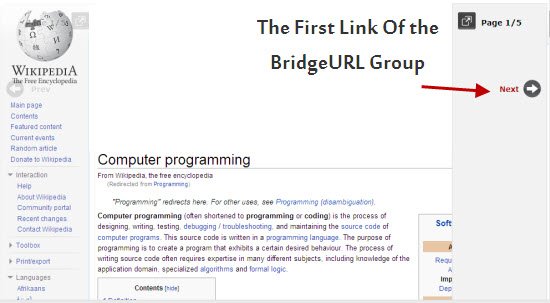
When other users or your friends click any of the above links, they will be taken to the first page which you added to the list. Here is how the interface will look like:
Note: Bridge URL might not work with links that do not support the iframe html tag.
As you can see, every webpage shared using BridgeURL will have two sliders – one at the left and another at the right. Users can use these slider links to browse through the group of URL’s one by one. Should you want to open a particular link and compare it with another, simply hit the “Arrow” icon placed at the right top of the page.
Usage
You may use BridgeURL for a variety of creative purposes, other than aggregating links at one place. As an example – you may enter the links of your social profiles one by one and then share the shortened Bridge URL on your Twitter or Facebook profile. If you are a blogger, you might create a Bridge URL of most popular blog posts of your blog and then share the shortened link on your Twitter stream, instead of sharing all the links individually one by one.
Overall, BridgeURL is one of the easiest ways to assemble a group of links and shorten all of them in one shot. The service is ad free and there aren’t any registration or sign-ups required.
Try BridgeURL today and if you know of any better service for shortening multiple links, share them in the comments section.
Image credit: chrisdlugosz