


Firefox is famous for its vast extensions library which has various add-ons and themes that you can use to customize your browser. You can find almost anything in the extensions library, and music-related add-ons are no exception. From playback controls for your favorite music platforms to audio equalizers and song recognition software, Firefox’s extensions library offers several add-ons that can enhance your online listening experience.
1. App for Spotify
App for Spotify is a simpler, lighter alternative to Spotify’s desktop and web music players. It provides all the essentials of a music player and automatically saves any changes that you make to your Spotify account, all without slowing down your browser.

Once it’s installed, you only need to click the toolbar icon to start the add-on. App for Spotify then launches in a separate, resizable window. This standalone music player also has an optional feature that keeps it on top of your other windows so that you can always access the controls.
Also read: 12 of the Best Music Extensions for Google Chrome
2. Audio Equalizer
With Audio Equalizer, you can adjust the frequency of your music in real time. The add-on appears as a popup window when you click on its toolbar icon and has a list of default audio options like “live,” “club,” “rock,” “dance,” and “reggae.” Audio Equalizer lets you customize your frequency settings and save them for later. You’ll find them in the “My presets” section of the drop-down menu.
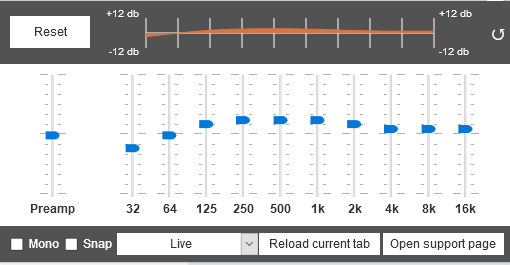
Audio Equalizer also has a Mono feature for individuals with hearing problems, so you won’t miss a beat while listening to your favorite tunes.
3. SoundCloud Control
SoundCloud is the go-to platform for anyone who likes listening to independent artists, underground musicians, or remixes of popular music. But while the website has a customizable music player, you can’t use the controls when you’re browsing in another tab. SoundCloud Control solves this problem by letting you access the SoundCloud music player from your toolbar. If you have SoundCloud running in another tab, click the SoundCloud Control icon in your toolbar to open a popup with album art and music player controls. If you don’t have SoundCloud open, clicking the icon opens in another tab.

4. YouTube Control Center
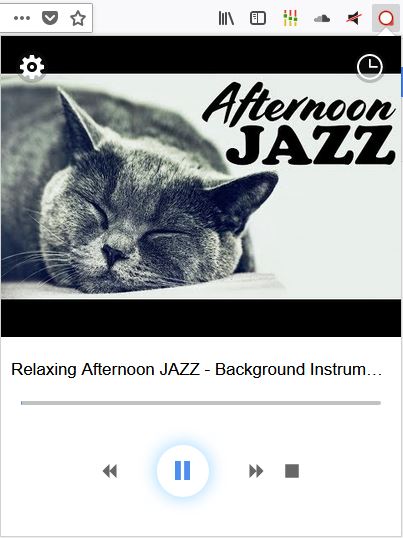
YouTube is an excellent place to find and listen to music, but like SoundCloud, you have to be on the website to use the music player. With YouTube Control Center, you can access playback controls even when you’re browsing in another tab. Just click on the toolbar icon to open a popup window and access the controls.
5. Simple Youtube Repeater

YouTube has an expansive collection of music, but one of the platform’s many drawbacks is the lack of automatic replay functionality for its videos. As the name suggests, Simple Youtube Repeater adds a repeat option directly to YouTube’s media player so that you don’t have to click replay.
6. Media URL Timestamper
Media URL Timestamper remembers where you were in a podcast, live stream, or video without using cookies or browser sessions. When you click the toolbar extension, it generates a timestamped URL that you can edit or copy and paste into any browser. The add-on works with several popular websites like Vimeo, YouTube, SoundCloud, and Twitch.

Media URL Timestamper is a great add-on to have if you’re watching a long video or listening to an extended interview and need to switch to a different device. Just paste your timestamped URL into the browser and pick up where you left off.
7. Song Identifier
If you’ve ever had trouble finding a song that you heard in the background of a video, you’ll benefit from adding Song Identifier to your browser. Much like Shazam or Soundhound, Song Identifier analyzes the music playing from your speakers and finds a match. All you need to do is click the toolbar icon and wait five seconds. Song Identifier works well with YouTube videos but has limited success on other platforms. Still, it’s one of the few music recognition add-ons that works with Firefox Quantum.
Conclusion
The Firefox extensions library has everything you need when it comes to improving your online listening experience. There are hundreds of add-ons available for you to choose from with new ones coming out every day (some even have similar names to match their similar functionality such as “MuteTab,” “Mute Tab,” and “Mute Tab (WebExtension).” If you’re not a fan of the ones listed above, you’ll probably find a few alternatives in the extensions library.