

A feature of Firefox that often gets overlooked is the keyword system. Firefox can be set up to accept keywords to do things like open a favorite page or search a particular website. Today we’ll try out some of the things you can do with keywords.
Bookmark Access
Often, it’s faster to send your computer instructions with the keyboard rather than with the mouse. This includes accessing your favorite websites. On my computer, for example, I’ve got a few different bookmarks for MakeTechEasier.com to access different parts of the site. If I want to log in to create a new post, I’ve got to grab the mouse, go into the Bookmarks menu, find the MTE submenu, find the section I want, and click the icon. While that’s not exactly rocket science, keywords can make that faster and easier.
Open your Bookmarks menu and pick something you use often. Right-click the icon and choose Properties. You’ll get a screen much like the one below. In the Keyword field you can enter whatever keyword you’d like to use to access that site.
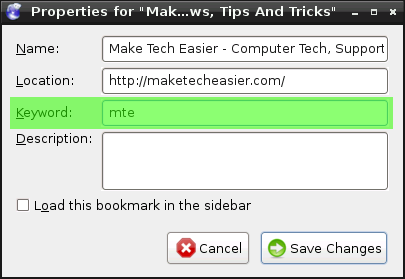
From this point on, you can click in the address bar (or use Ctrl+L) and type in your keyword to be taken immediately to that site.
Keyword Searches
This is my favorite use for keywords. By default, Firefox includes a fair number of search engines in the box in the upper right corner, and even more available to be added from their website, but they can’t cover everything. There are several websites I search regularly and we can use the Keywords feature to do it better. The same method from above can be used to search your favorite sites. Above, we took an existing bookmark and edited the properties to include a keyword. This time, we’ll take a different approach.
In our example, I’m going to set up a keyword search for, you guessed it, MakeTechEasier.com. As you read this, you may notice the search box in the top right corner of our site. This box allows you to search for articles from within MakeTechEasier.com.

We’re going to use that box to create a custom search for this site. Right-click the blank space in the search box and choose Add a Keyword For This Search. You’ll get a dialog box where you choose the name and keyword. Since I’ve already got a keyword named mte I made this one mtes.
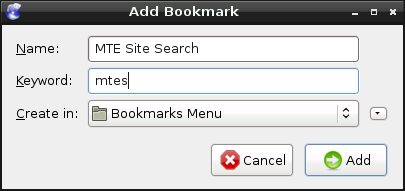
Now, wherever I am, I can click in my address bar (or use Crtl+L) and type mtes (search query) to find whatever I need on the site.
This works for all kinds of web sites. If you like movies you could make a keyword to search IMDb. If you download a lot of torrents, you can make a keyword to search your favorite torrent site. Keywords can be useful in many different ways to let you access just the information you want, right when you want it.
Do you have any other handy uses for this great feature? If so, let me know in the comments.