

Surviving in the 21st century is pretty easy. You don’t need to hunt, make your own candles, or worry about dying every time you get the sniffles. But as life has gotten easier in some ways, it’s gotten more complex in others.
Having basic technology skills is the new fire-making, and that doesn’t just mean knowing how to use a mouse or download an app. The level-one basics everyone needs today were mostly what we thought of as “nerd stuff” in the 1990s, and even the digital native generations aren’t always 100% up to speed. Here are some 101-level things you’ll need passing grades in to take full advantage of the modern world.
1. Typing

If you’re still using “hunt and peck” to write your emails, you should strongly consider trying to learn touch typing or at least practice with some sort of typing program to up your speed. Touch typing is best since it lets you focus your attention on something else while moving your fingers, but any method that gets you up to (or preferably over) the 40 WPM average typing speed is acceptable.
2. Search skills
Over a third of the world now owns a smartphone, so a lot of us have the answers to most of our day-to-day problems right within our grasp. If you don’t know something, then you can probably find out. Not sure if a news story is fake? Getting a weird error message? Search it. There’s no harm in trying!

Lesson number two is effective searching: use keywords instead of full-sentence queries, and if one set of keywords doesn’t get you great results, think about different keywords you could use to get better results. The truth is out there – it just might take a few tries to find it.
3. Troubleshooting
You’re using the same tools as everyone else, so a lot of your problems have already been solved. Use your newfound search skills to find those solutions! Tech literacy means at least knowing how to research and diagnose basic issues. If you try and fail to solve the issues on your own, there’s no shame in handing your machine off to an expert, but a lot of problems can be solved with a surprisingly small time investment.
4. Making backups

If you don’t have a backup for a file, you’re playing a dangerous game with that file’s life. Computers and storage devices will fail eventually, whether from age or unexpectedly and catastrophically. If the files on your Windows, Mac, Linux, or even smartphone are important, make a habit of backing them up to a cloud backup service or an external physical drive – or both, if you want to be extra safe.
5. File management
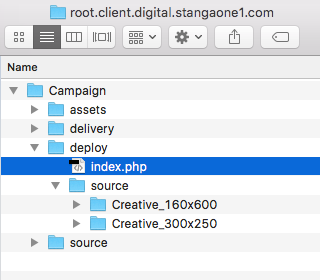
If your idea of organizing your files is to keep all your documents in your documents folder and your pictures in your pictures folder, maybe rethink your system. At the very least, you should have different folders for different categories of files (work, personal, etc.), and having a good system of subfolders can also make things a lot easier.
Bonus: try to establish a naming convention for your files to make them easier to find if you need to search for them later – having a million documents named “Report(1).doc” isn’t a great way to find your stuff in the future.
6. Keyboard shortcuts

There are many fancy keyboard shortcuts that are nice but not vital, like Alt + Win + left/right to switch between Windows 10 desktops. At a minimum, though, you should know copy (Ctrl + C), paste (Ctrl + V), save (Ctrl + S), undo (Ctrl + Z), and print (Ctrl + P). The more you know, the faster you can get things done, but having a good handle on the basics is essential whether you use Windows, Mac, or Linux.
7. Basic security/privacy

Cybersecurity is a constantly evolving field. New threats come out all the time, and even supposedly secure computers can be hacked. A few basic steps can go a long way, though: keep your antivirus and operating system updated, don’t click suspicious links in your browser or email, don’t recycle your passwords, and don’t run programs without knowing what they are. If your computer is acting strangely or you see something you suspect might be malicious, don’t ignore it. Research is fast and free.
8. Word processing and spreadsheets
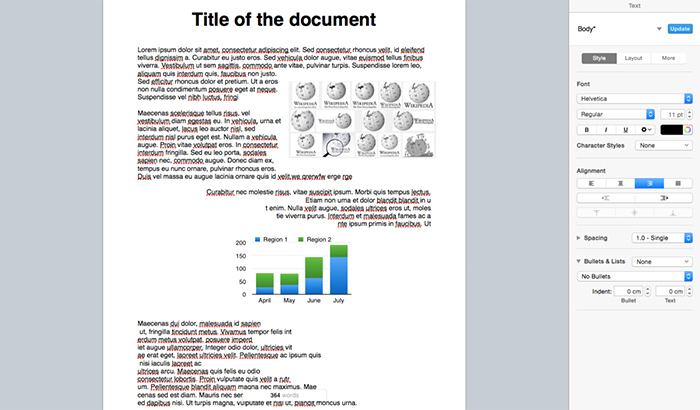
It’s not as simple as just opening a program and typing in words/numbers. Basic office skills now require that you know how to format a document decently, have a passing understanding of how spreadsheets work, and probably that you’re familiar with how to share and collaborate on files using cloud software like Dropbox or GSuite.
The one crazy trick that always works
As important as hard skills are, the most important 21st-century skill of all isn’t something you can do with a few clicks: it’s the ability to constantly learn and adapt. By the time the next century rolls around, most of the above advice will seem absurdly outdated. You don’t have to learn the details of every new technology that comes around, but at the very least you should make an effort to know what’s changing and what skills you need to be up to date on.
Image Credits: BagoGames, Gnome Preferences Desktop Keyboard Shortcuts, Pages Word Processor