

Often these days, we’re collaborating on a project with someone, or more than one person, who isn’t even in the same building as us, let alone the same office, thanks to the wonders of the Internet. Sometimes that makes it hard to exchange ideas when you need a visual. marqueed.com changes that, making it easy for everyone, whether you’re using Mac, PC, or an iOS device.
Marqueed offers a way to upload pictures online privately or publicly, and allows you to invite others to see your pictures. It also allows you to make annotations on the pictures, and have your collaborators make annotations as well. It’s going to make things much easier.

Marqueed does what they can to make you feel comfortable about trying out the service from the very beginning. Opening up the site, they offer you choices to try it out, sign up for free, log in, or watch a video showing what Marqueed can be used for. I watched the video, then tried it out before signing up. With all the things we sign up for online, why add to that until we know for sure that we want to?
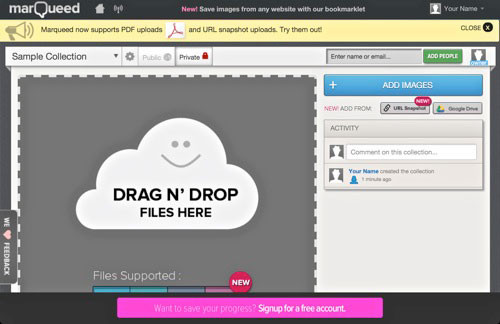
The first step is to begin a collection and add an image or images. I just used the existing Sample Collection and decided to add a screencap of the site. From the way it was explaining to add images, either a drag and drop or directly from a website, I was afraid it wouldn’t work with iOS. I was wrong. I clicked on “Add Images” and feared that I’d get held up on my iPad, but instead, it took me directly to my Camera Roll. You can also add images through Google Drive.
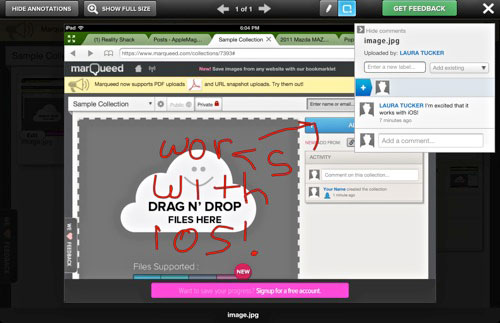
Once you add an image, you can call it up and begin making annotations. I used the freehand tool and marked up that it worked with iOS. I also added that remark into the conversation view. The only thing I wished for was that the annotations would be possible in additional colors to red. Sometimes a lot of annotations can get confusing, and putting them in different colors can help sort that out.
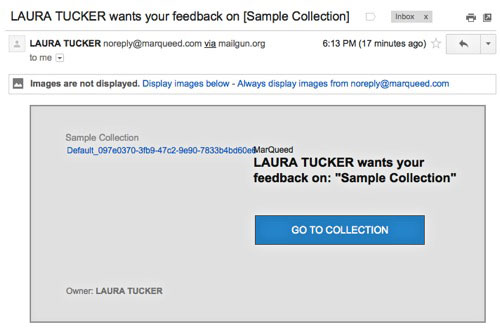
At this point you can invite others to view and annotate your collection as well, by adding their emails. This sends them a notification to their email, letting them know that you have shared something with them. They can go directly to the marqueed site and sign up before they view your collection. I was just trying this out with myself, so just used a separate email for the additional signup, and put my name in all caps in one, and upper and lower case in the other to shows the difference. I also tried it this time on my MacBook instead of the iPad. Additionally, you can add a picture to your profile to help other collaborators determine who’s making the comments.
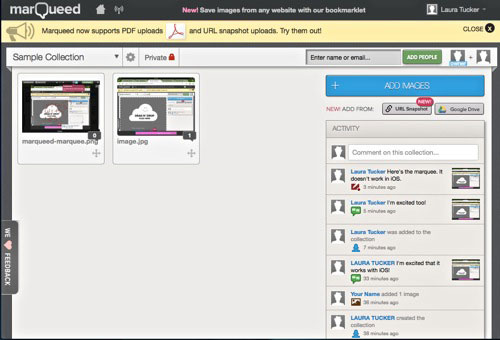
Once I opened up the shared collection, I was able to make more annotations, albeit in the same red color. I was also able to create a marquee around an area, something I wasn’t able to do when accessing it on my iPad in the browser. That’s the only shortcoming I could find, other than the annotations only being in red. I was also able to comment back to myself regarding this collection. From this point, I was also able to add another image to the collection. When I accessed it again on my iPad, I saw my original annotations, the additional comments, and the additional image.
I can see so many uses for Marqueed. I’m collaborating on a new logo and sales idea for my martial arts school, and think it will be much easier if we all sign on and comment on Marqueed. Recently I was in on the design and setup of a new website, and it would have been so much easier had we used something like Marqueed to exchange our ideas. It makes visual collaborating so much easier.
Marqueed.com