

Facebook has recently released a new commenting system that aims to take the web by storm. This comment system can replace your existing commenting functionality and allows your reader to post comments with their Facebook account. The comments will also be posted to their Facebook’s wall, which could potentially increase more traffic for you.
Now if you are keen to implement the Facebook comment system in your site, here’s how you can do so:
Static site
If you are running a static website, adding the Facebook comment system is easy.
- Go to Facebook comments social plugin page.
- Enter the URL of your site, number of comments to show and the width of the comments. Click the “Get Code” button.
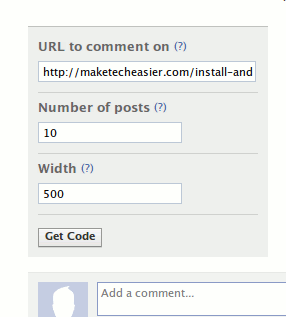
- Copy the code and paste it to your site where you want the comment to appear.
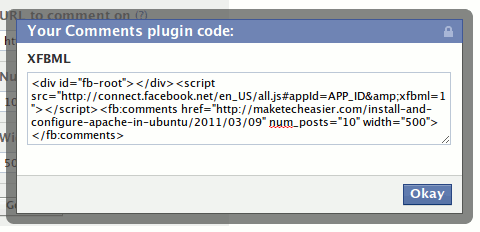
- Next, still in your site, paste the following code to anywhere between the
andtag
Replace the “{YOUR_FACEBOOK_USER_ID}” with your own Facebook ID. This will allow you to moderate the comments.
- Lastly, paste the following code to just before the
tag.
That’s it for implementing Facebook comment on static website.
WordPress
The easiest way to implement Facebook Comment in your WordPress site is via plugin. One of the more promising plugin is Facebook Comments for WordPress.
- Download, install and active Facebook Comments For WordPress.
- Before you can use it, you need to register a Facebook application and obtain the app id. Go to Facebook and register a new app. Once you have registered the app, copy the Application ID and Application Secret.

- Back to your WordPress dashboard, go to the Facebook Comments settings page and paste the Application ID and Application Secret into the first two fields.
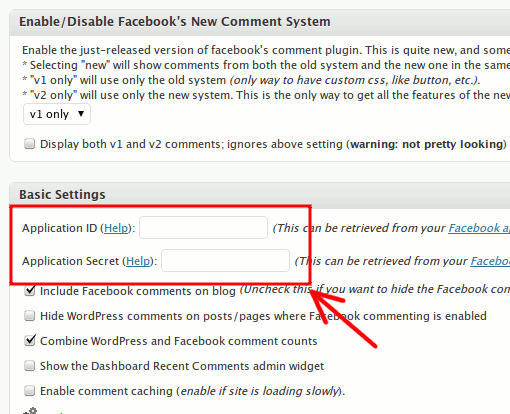
- From here on, you can configure the plugin to your liking. The default language for comments is set to “Afrikaan”, so make sure you change that in the settings before you make it live. Once done, click the “Update Option” button.
Go to your blog and you should see the commenting system in action. If you are using other commenting system like Disqus or IntenseDebate, remember to deactivate them, else you will see two comment system in your blog.