

Many people don’t know how to track statistics for their website and feel overwhelmed when they first log into Google Analytics. There’s a lot of information to see so if you’re not familiar with it, you’ll probably not know what’s important to look at or track regularly. This can vary depending on what type of website you have but there are some common points that everyone should be tracking to see if their website is growing or if improvements need to be made. If you’re not tracking it, you’re not going to know if it’s successful!
1. Traffic Pattern
Viewing your overall traffic pattern will help you determine if your efforts are paying off. If your traffic is steady or increasing, you’re on the right track. If it’s not, you can then dig deeper into your analytics to see the weak spots and make adjustments to improve the traffic to your website.
To see the overall trend, log into your Google Analytics dashboard and click on the “Overview” tab. Then click on the “Date Box” in the upper right corner and change the dates to cover the last two years and click “Apply”. If you haven’t had Google Analytics enabled for tracking your website that long, just use the start date and current date to see your growth pattern. Check the “Week” view to see a broader pattern over time.
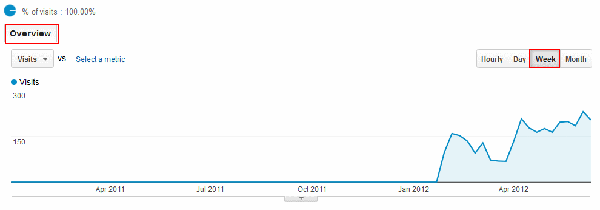
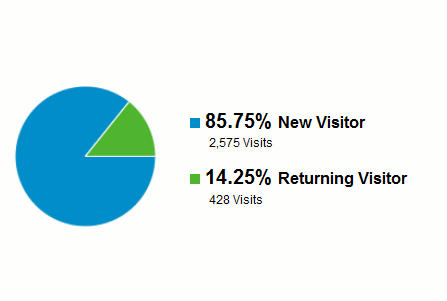
Under that graph, you’ll see a pie chart showing you the breakdown of your traffic by the number of “New Visitors” and “Returning Visitors”. This helps you to see if your marketing efforts are bringing in new traffic as well as engaging returning visitors.
2. Bounce Rate
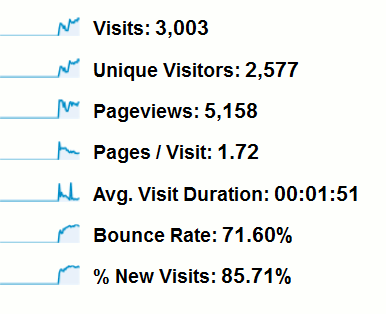
Your bounce rate is the percentage of people who view only one page of your website before leaving. The goal is to have a low bounce rate- around 50% or lower by creating content that keeps visitors engaged. If your bounce rate is high, you’ll want to examine some reasons why. It could be a lack of proper solicitation to the site, content, or the layout of the landing page. Websites that have a variety of content may also have a higher bounce rate since some viewers are coming to the site for a specific topic.
The stats chart (next to the pie chart I mentioned above) has the “Bounce Rate”, “Pageviews”, “number of Page Views”, “number of Pages Per Visit”, and the” Average Time on Site”. Those numbers will help you determine if the traffic coming to your site matches the reader’s expectations. Be sure to promote and link your site properly so you get quality traffic. Below you’ll see the bounce rate for my blog is pretty high. That is a direct reflection of not adding content regularly and letting the site sit stagnant. In doing some digging for this article, I also see a link bringing traffic to my site is causing a lot of this bounce. It will need to be removed from the website by the user. It’s a good idea to scan for these things routinely so you can be sure your analytics reflect accurately to your content.
3.Traffic
Your traffic should come from a variety of referral, direct, and search sites and be fairly evenly distributed. You don’t want to have all your eggs in one basket in case that site was to suddenly drop traffic to yours. If your direct traffic is too high, then you may not be getting enough new visitors which would indicate that you’re getting repeat visitors that aren’t spending as much time on your site since they are just viewing what’s new.
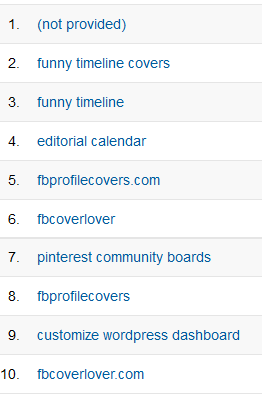
If your Search Engine traffic is too high, check the bounce rate as well. Make sure whatever search term brought them to your site, matches the content being searched. To rectify a high bounce rate based on search term, you’ll need to tag your content better and make sure the content is relevant to the top search terms sending people to your site. You can see what those search terms are by going to “Traffic Sources” then “Sources”, “Search”, and “Organic”.
4. Content
Knowing what content your visitors are reading will help you determine what topics are popular so you can write more on that subject. The “Content Report” will give you a list of what visitors are reading most. Go to “Content, Site Content,” and then “Pages” to see your content list.
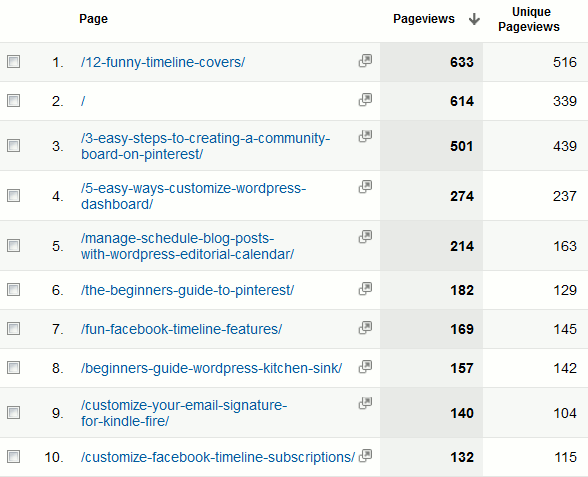
You’ll want to look for pages with a high view count and low bounce rate to determine a quality article. Those are good quality articles that should be promoted more through permalinks or as featured articles.

5. Social Media
A newer feature to Google Analytics is “Social Sources”. It’s a handy tool to measure referral traffic from various social networks. Of course you can dig through your “Referral Traffic” tab to find those counts but it’s much more convenient to see them all in one place!
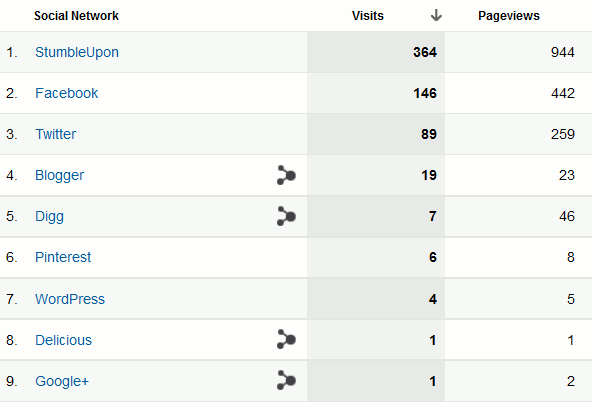
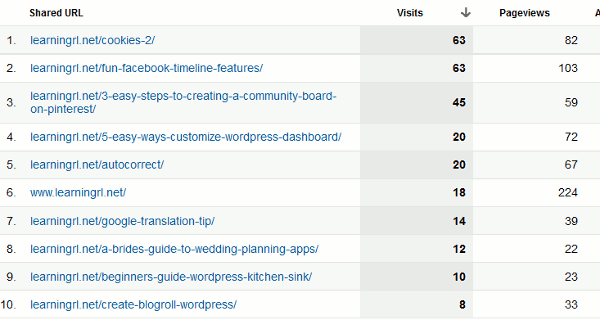
You can go a step further and see what links those social sites are referring by clicking on the name of the site. You’ll be shown a list of links that are bringing in visitors from that social site. This helps you to focus your time and energy on what works and take steps to increase the traffic referrals from others that are lower. If it’s a blog or review that mentions you, use the opportunity to stop and say thanks to those who are spreading the word!
I hope you found these tips for using Google Analytics helpful. Let us know what metrics you like to keep track of or any useful tips that weren’t covered here!