

You might already have used WordPress for a long time and get the hang of it. Well, here are 4 hidden WordPress features for you to maximize your WordPress blog and get the most out of it.
1. Turn off post revision
One of the new feature in WordPress 2.6 is the post revision. This is a great feature that does a version control for all your posts. At any point of time, you can see what was changed in the post, by whom and when and revert back to the previous post if necessary. For a multi-authors blog, this is a splendid feature, but for single user, this could possibly lead to many duplicate of the same post that junk up your database.
By default, the post revisioning feature is turned ON by default and there is no options to turn it off in the Admin menu. To disable it, you have to download your wp-config.php file from the server (using any FTP program), add the following line:
define('WP_POST_REVISIONS', false);
after the line define ('WPLANG', '');
Now if you want to keep the post revisioning feature, but limit the number of revision copy, you can paste this line instead
define('WP_POST_REVISIONS', no_of_revision);
and replace the no_of_revision by the no of revision copy you want to keep.
Now, don’t forget to save the file and upload it back to your server.
2) Configuring secret keys
WordPress 2.6 includes three secret keys AUTH_KEY, SECURE_AUTH_KEY, and LOGGED_IN_KEY to make your login session more secure and more difficult for hacker to crack.
Similarly, there is no way to add this in the Admin menu. You have to configure it via the wp-config.php file.
Open up your wp-config.php (Assuming you are using WordPress 2.6 and have downloaded the file from your server), you should see the following three lines:
define('AUTH_KEY', 'put your unique phrase here'); // Change this to a unique phrase.
define('SECURE_AUTH_KEY', 'put your unique phrase here'); // Change this to a unique phrase.
define('LOGGED_IN_KEY', 'put your unique phrase here'); // Change this to a unique phrase.
Now, go to http://api.wordpress.org/secret-key/1.1/. You should see the same three lines of code with a random weird string in the place of ‘put your unique phrase here‘.

Copy the three lines from the site and replace the same three lines of code on the wp-config.php.
Save and upload the wp-config.php to your server.
(If you are using WP2.5, you will only see one line define(‘SECRET_KEY’, ‘put your unique phrase here’);. You can get the unique SECRET_KEY from http://api.wordpress.org/secret-key/1.0/)
3) Split long post into two or more pages
Sometimes you have written a long post and it become very lengthy and uncomfortable for your reader to read. What you can do is to split it into several short posts. To do it, simply add a
to the part of the post that you want to split.
To show the pagination at the bottom of the post, insert the line
to your theme single.php after the line
4) Add a thumbnail for each post
Have you ever wondered how others manage to embed a thumbnail for every single post? Well, you can simply do it by adding a custom field into your post.
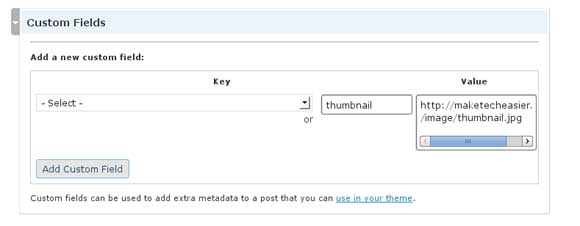 In your WordPress Write section, scroll down to find ‘Custom Fields‘. Click on it to reveal the input fields. Under the Key, type ‘thumbnail‘. Under the value, type the URL of the thumbnail image that you want to embed. Click ‘Add Custom Field‘.
To display the thumbnail on your blog, you can query it by inserting the following line to your wp theme.