Save 40% on a Matein Travel Laptop Backpack

We may earn a commission from links on this page.
Deal pricing and availability subject to change after time of publication.
Deal Matein Travel Backpack Featured

With travel restrictions easing up in some areas and some businesses and schools reopening, you may be in the market for a new bag to carry your laptop and all your other electronics. Consider the Matein Travel Laptop Backpack that has a USB charging port and an antitheft feature. You can get it now at 40 percent off.

The backpack is made of durable, water-resistant polyester, has metal zippers, and is designed with secure, long-lasting usage in mind for everyday use or as a weekender bag. It will fit in perfectly in an office environment, at school, or while traveling. The airflow back design has thick, soft multi-panel ventilated padding to provide the maximum of back support. Adjustable shoulder straps relieve the stress on your shoulders, and the padded top handle offers comfort as well.
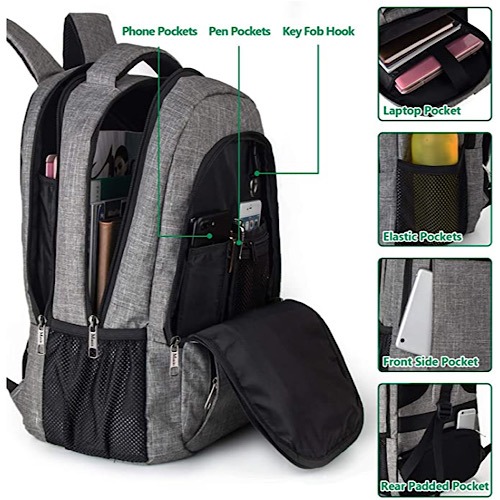
Deal Matein Travel Backpack Backside

One separate compartment holds up to a 15.6-inch laptop. A large packing compartment allows for your other daily electronic necessities, including chargers, cords, etc. A front compartment with many pockets holds pens and the like and even has a key fob hook. A luggage strap will allow you to fit it on top of your luggage by sliding it over an upright handle. A hidden antitheft pocket will protect your valuables.

The Matein Travel Laptop Backpack has a built-in USB charger outside and a built-in charging cable on the inside. This offers you a more convenient way of charging your phone while you walk. Note that it doesn’t power itself and only offers easy access.

Take $20 off this 15.6″ backpack in Austere Grey and pay just $29.99. Other colors are available with variable discounts. There is also a 17″ backpack available in multiple color options with a much less discount.

Matein Travel Laptop Backpack

Make Tech Easier may earn commission on products purchased through our links, which supports the work we do for our readers.

Subscribe to our newsletter!

Our latest tutorials delivered straight to your inbox

Laura Tucker Avatar

Read next

When Cingular chief Stan Sigman backed the original iPhone before its 2007 unveiling, he accepted terms American carriers usually refused: no logo on the device, no control over its software, no preloaded apps, and a share of monthly subscriber revenue flowing back to Apple, after signing on without seeing a prototype
In 2016, archaeologists dated two rings of snapped stalagmites in France’s Bruniquel Cave to 176,500 years ago, evidence that Neanderthals had walked 336 metres into darkness with fire and built architecture deep underground long before modern humans reached Europe
Otto von Bismarck was 74 when Germany adopted the world’s first national old-age social insurance program in 1889, setting the pension age at 70 after years of fighting socialists with bans, laws, and a promise few workers would live long enough to use
When cosmonaut Valeri Polyakov stepped out of his Soyuz capsule in March 1995 after 437 consecutive days aboard Mir, doctors recorded him at several centimetres above his pre-flight height, and his spine had become so unaccustomed to gravity that the recovery team carried him to a chair rather than risk the compression of letting him walk.
When Harvard astronomer Cecilia Payne submitted her 1925 doctoral thesis arguing that the Sun was made almost entirely of hydrogen, the field’s senior figure Henry Norris Russell talked her into adding a line calling the result ‘almost certainly not real,’ and then published the same conclusion himself four years later to widespread acclaim.
When Edme Mariotte stared at marks on a wall in the 1660s, one mark vanished inside a six-degree hole where the optic nerve leaves the eye and the brain has been filling in wallpaper, sky, and faces ever since
When seismic waves from the Chicxulub impact reached what is now North Dakota roughly ten minutes after the asteroid struck, they appear to have triggered a ten-metre standing wave in an inland river that flung fish onto the bank and buried them under glass beads still falling from the sky.
When survivors near Lake Nyos woke on the morning of 22 August 1986, the cattle were dead in the fields, the birds had fallen out of the trees, and 1,746 of their neighbours were lying where they had stood the night before, with no fire, no flood, and no wound to explain it.